































Table of Contents
- Key Points
- Understanding Coding Agents
- AI Coding Agents
- Using AI Agents with Git & Python
- Benefits and Challenges of AI-Powered Pull Requests
- FAQ
- Related Questions


Understanding Coding Agents
Working with Coding Agents: An Overview
Coding agents have revolutionized software development, offering a new way to automate and streamline various processes. Before we dive into the specifics of GitHub pull requests, let's discuss how we want to work with these coding agents.
Most developers today use Large Language Models (LLMs) to write code, automate repetitive tasks, and perform code reviews. Now, you might have already created an agent that was developed to solve a specific task with access to tools that could pull data from some API or maybe pull data from a SQL database.
Coding agents typically follow a workflow where they are prompted to generate code, the code is executed, and the results are fed back to the agent for further refinement. The code, once deemed satisfactory and working as needed, can be deployed. However, this workflow has limitations. It is an improvement but still needs enhancement to replace the human developers.
The Need for a More Human-Like Workflow
Current workflows involving coding agents often require extensive human intervention to ensure code quality and integration. In real-world development teams, developers don't simply submit code without review. Code reviews, feedback loops, and CI/CD pipelines are essential parts of the process. In the current AI agent model, the prompting is done by humans and there are constant reviews of the generated code. The AI agent does not make decisions, but rather needs to be enhanced. The goal is to empower the AI agents to substitute for human developers and work with greater independence. A more streamlined process is necessary to make AI agents truly useful. We need AI agents that can substitute human developers, not simply assist them.
Emulating Human Developer Workflows for AI Agents
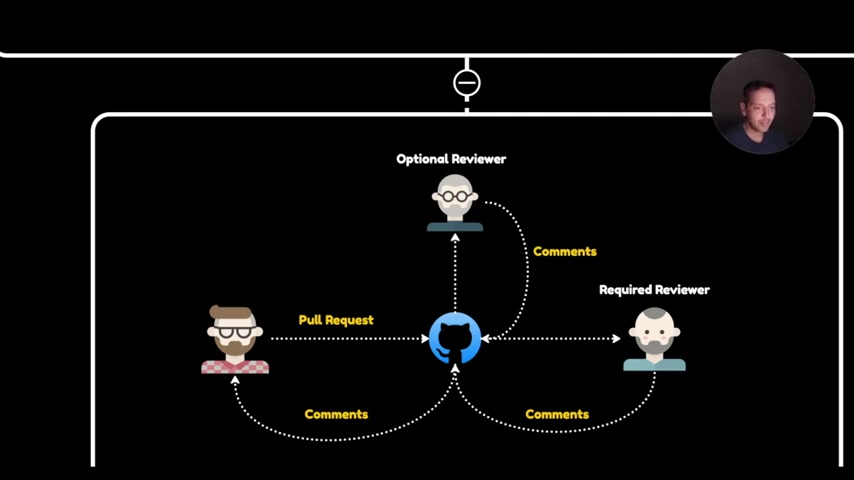
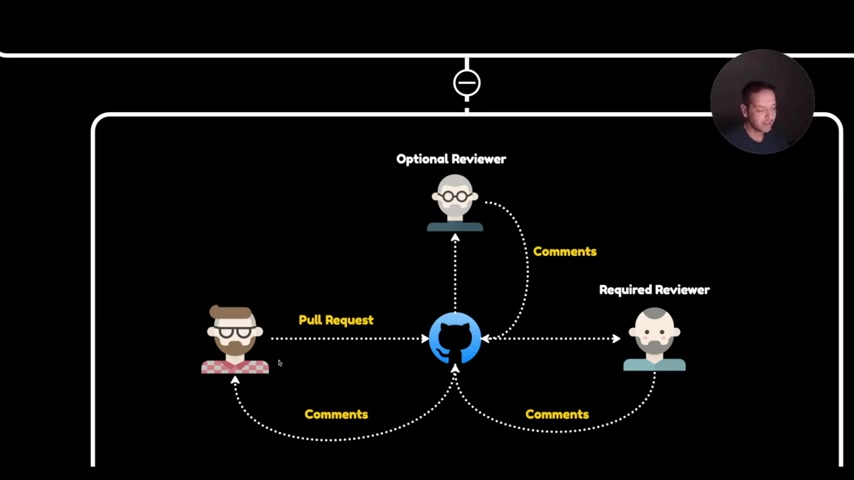
AI agents need to integrate seamlessly with existing development workflows, mimicking the interactions and processes of human developers. What does a typical workflow between developers in a team actually look like? If we start off with the guy in the red shirt to the left, imagine that he has written some code, and he wants to merge that code into the main branch in the codebase. What is he going to do? He's going to create a new branch, then he's going to push the code to GitHub, and he's going to make a pull request. That pull request will trigger a CI pipeline, and once the pipeline succeeds, this will trigger a message to the reviewers, and the reviewers are then going to have a look at the code and then put comments in the codebase, which is going to go back to the main developer, and he's going to improve the code, and that's going to continue until the code is in a state where it can be merged into the main branch. This is a Simplified version of a common Git workflow, but we can emulate this in our AI systems.
Why Mimicking Developer Workflows Is Crucial
Mimicking the way developers interact prevents time wastage among team members and ensures the code pushed is functional and reviewed before integration. A key point to note is that the developers are not wasting each other's time, they're not pushing code that's not working, and the reviewers are only going to get notified when the build succeeds. A new workflow can ensure AI agents operate efficiently without overburdening human resources. We need AI builds that integrate smoothly into existing workflows.
AI Coding Agents
Working in Parallel: A New Paradigm for AI Agents
This is very different from the way that we are working with AI agents today, but there is no reason that we can't have a workflow with the AI agents that mimics this workflow and we might even do something that's better because we can replicate the AI agents. It also becomes possible to establish groups of agents tasked with specific responsibilities. This model assigns separate tasks to distinct teams, improving overall efficiency and code quality. One team is responsible for writing the code, you have another team responsible for testing the code and the agents can make pull requests against the repo and then we can get notified whenever there is a change or whenever the build succeeds.
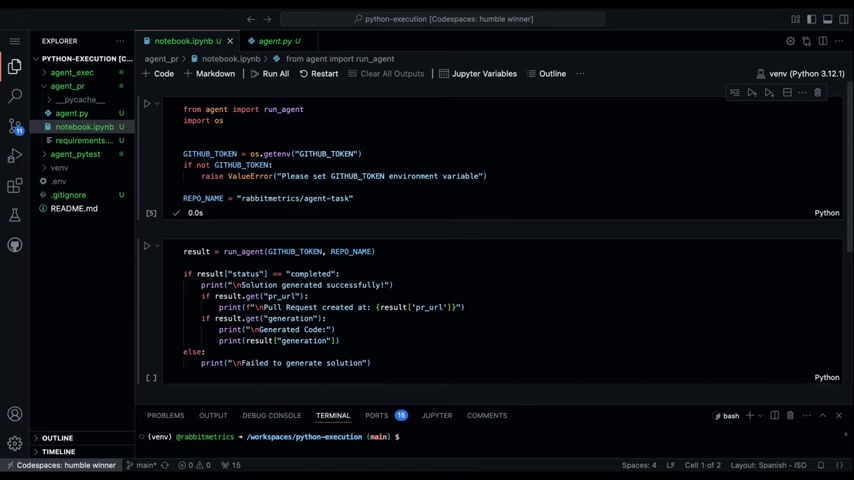
It is also possible to have AI agents take up the role of a reviewer, and use AI Tools to inspect the generated code before the pull request reaches a human.
Using AI Agents with Git & Python
Leveraging GitPython for Local Git Operations
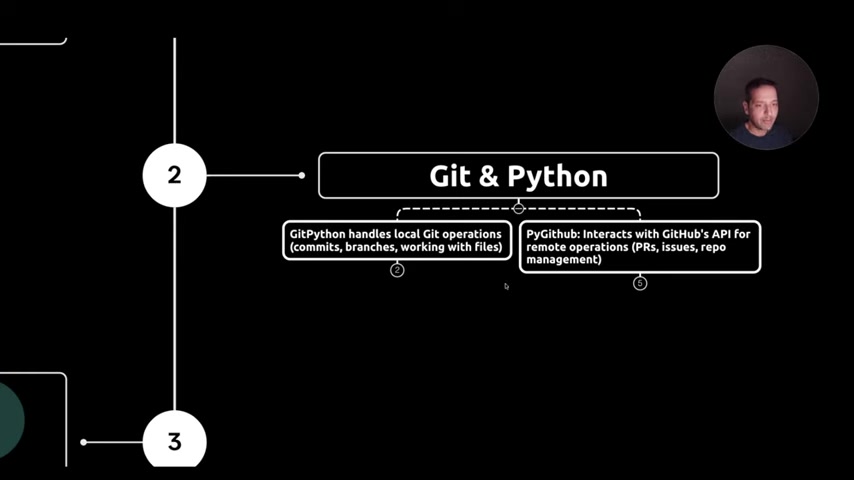
GitPython handles local Git operations (commits, branches, working with files). The first step is using GitPython which allows you to make local Git operations, such as commits. You can branch, you can work with files. The syntax is pretty simple, and we can use that to create tools for AI agents that allows us to basically do almost anything with Git. This makes managing Git operations programmatically easier for AI agents.
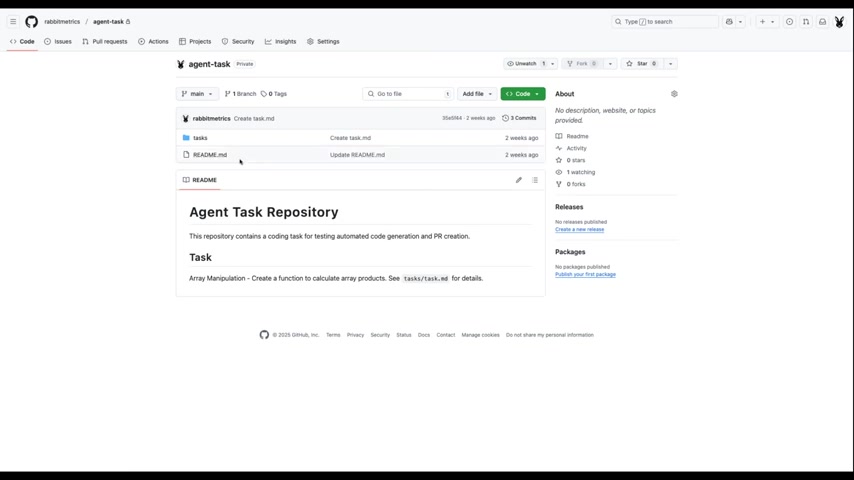
Interacting with GitHub's API Using PyGithub
The next step to allow AI agents to seamlessly work with Git is to use the PyGithub library. Once the Git is implemented, then we have PyGithub, which is specifically for interacting with GitHub's API. If we want to push code to GitHub, for instance, PyGithub will allow us to do that.


Most people like



































Report
Please select a reason for reporting
- 13 Reasons to Switch from Snapchat to Text Messaging
- 7 Powerful Speech to Text Apps to Boost Productivity
- 10 Best Speech to Text Tools for Effortless Transcription
- 13 Free Tools to Easily Transcribe Audio to Text
- 15 Surprising Ways Google's Speech-to-Text Boosts Productivity
- 7 Best Free Online Audio to Text Transcription Tools
- 9 Tips to Transcribe Speech to Text Faster and Better
- 13 Best Speech to Text Software for Windows 10 in 2023
- 7 Tips for Choosing the Best Transcriber for Audio to Text
- 11 Reasons Why Dragon Speech-to-Text Apps are Game-Changers
- 6 Secrets to Enhance Your Speech to Text Transcription
- 6 Brilliant Ways to Boost Productivity with Talk-to-Text on Your MacBook
- 6 Ways Transcription Software Converts Audio to Text
- 8 Tips to Transcribe Speech to Text Like a Pro
- 6 Reasons IBM Watson Speech to Text is a Game-Changer
- 14 Powerful Ways Talk-to-Text Improves Your Workflow
- 12 Top Windows Speech-to-Text Software for Efficient Transcription
- 12 Game-Changing Benefits of Apple's Speech to Text Technology
- 9 Powerful Use Cases for AWS Speech to Text Technology
- 10 Easy Steps to Transcribe YouTube Videos to Text
- transcription audio en texte
- online audio transcription
- free audio file transcription
- free ai audio transcription
- audio transcription service
- audio transcription online free
- audio transcription free online
- audio to transcription software
- audio and transcript
- ai audio transcription free
- voice recording to text converter
- translate voice recording to text
- record voice to text
- audio recording to text converter
- voice recording and transcription
- chatgpt voice to text
- gmail voice to text
- speech to text reader
- speech to text ai free
- speech to talk
- Create Engaging Animated Explainer Videos with a Free AI Tool
- Stop Multi-Subscribing: Benchmark Top AI Visual Models in One Canvas
- Best Seedance 2.5 API Provider: Every Price on the Market, Checked at Source
- AI OnlyFans: How to Generate $30,000/Month (Legally)
- Transform Your Script into an Engaging Video with AI Video Maker!
- AI Marketing Automation: A Comprehensive Guide for Small Businesses
- Midjourney Alternative for Anime Art Creators: Why PixAI May Be Better for Character Workflows
- 10 Things Most People Get Wrong About AI Image Search
- AI Girlfriend Apps: Top Choices Redefining Relationships 2025
- How to Reduce Quoting Errors in Salesforce with AI-Assisted Quote Creation
- AI Resume Builders: EnhanceCV, ResumeNerd AI, & Teal Compared
- ResumeAI: Crafting ATS-Optimized Resumes with AI
- AI in Resume Writing: A New Era for Job Seekers
- AI Resume Tools: Streamline Your Job Search and Land Your Dream Role
- AI Resume Optimization: The Right Way to Land Interviews
- Crafting a Killer Resume with AI: A Step-by-Step Guide
- Crafting a Winning Resume: AI Tools and Expert Tips
- AI Job Search: Level Up Your Career with AI Automation
- Empower Your Career Journey: Dynamic Resumes with AI
- AI Resume Builder: Create Professional Resumes Effortlessly

Copyright ©2026 toolify