































Table of Contents
- Key Points
- Unlocking Image Text with GPT-4o API and Python
- Handling Local Image Files
- Step-by-Step Guide: Extracting Data from an Invoice Image
- GPT-4o API Pricing
- Advantages and Disadvantages of GPT-4o API
- Core Features of the GPT-4o API
- Use Cases for the GPT-4o API in Image Text Extraction
- Frequently Asked Questions
- Related Questions



Unlocking Image Text with GPT-4o API and Python
Introduction to the GPT-4o API for Image Text Extraction
OpenAI's release of the GPT-4o API marks a significant advancement in the realm of AI-driven text extraction from images . This new API is being touted for its speed and cost-effectiveness, promising to be twice as fast as its predecessor, GPT-4 Turbo, while being available at half the cost. This combination makes it an attractive option for developers looking to enhance their applications with robust OCR capabilities. Beyond speed and cost, the GPT-4o API boasts improved vision capabilities, which makes it easier and better at extacting text from images. With the GPT-4o API, developers can handle the invoices, contracts and other documents with improved text extraction ability, in faster and cheaper manner.
It's critical to harness the GPT-4o API with Python to leverage the benefits of cost efficiency, speed of text extraction from images and improved vision capabilities. This article shows how to unlock image text with GPT-4o API. Before this update, different models were needed to perform text extraction from images and text only tasks, which makes the process less efficient. Now this has changed, single models can be applied for multiple task at cheaper prices, and with faster speed.
Setting Up Your Python Environment for GPT-4o API Integration
To begin, setting up your Python environment is a fundamental initial step. This ensures that you have all the necessary libraries and dependencies to interact with the GPT-4o API seamlessly.
- Install the OpenAI Library:
- Import Necessary Libraries:
- In your Python script, import the required libraries:
from openai import OpenAI
import json
import os
from urllib.parse import urlparse
import base64
- In your Python script, import the required libraries:
- Set Up Your OpenAI API Key:
- To authenticate your requests to the OpenAI API, you need to set up your API key as an environment variable. This involves storing your API key in a way that your Python script can access it without hardcoding it directly into the script for security reasons. The best practice is to use environment variables.
- You will need to set an environment variable named
OPENAI_API_KEYwith your API key as its value.
With these setup steps, your environment is fully prepared for interacting with the GPT-4o API.
Crafting Consistent Data Formats Using JSON Schemas
One of the key techniques for effective text extraction is ensuring that the extracted data adheres to a consistent format
. This is achieved through the use of JSON schemas, which define the structure and data types of the expected output. JSON schemas provide a contract, ensuring that regardless of the input image, the output will always conform to the specified structure.
Key Benefits of Using JSON Schemas:
- Data Validation: Ensures that the extracted data conforms to a predefined structure.
- Consistency: Standardizes data output across different images, making data processing easier.
- Automation: Simplifies automated data handling and integration with other systems.
Here’s a simple example of a JSON schema for an invoice:
{
    "type": "object",
    "properties": {
        "invoiceNumber": {
            "type": "string",
            "description": "The unique identifier for the invoice."
        },
        "dateIssued": {
            "type": "string",
            "format": "date",
            "description": "The date when the invoice was issued."
        },
        "dueDate": {
            "type": "string",
            "format": "date",
            "description": "The date by which the invoice should be paid."
        },
        "from": {
            "type": "object",
            "properties": {
                "name": {
                    "type": "string",
                    "description": "Name of the issuer."
                },
                "address": {
                    "type": "string",
                    "description": "Address of the issuer."
                }
            },
            "required": [
                "name",
                "address"
            ]
        },
        "to": {
            "type": "object",
            "properties": {
                "name": {
                    "type": "string",
                    "description": "Name of the recipient."
                },
                "address": {
                    "type": "string",
                    "description": "Address of the recipient."
                }
            },
            "required": [
                "name",
                "address"
            ]
        },
        "items": {
            "type": "array",
            "description": "List of items included in the invoice.",
            "items": {
                "type": "object",
                "properties": {
                    "description": {
                        "type": "string",
                        "description": "Description of the item."
                    },
                    "quantity": {
                        "type": "number",
                        "description": "Quantity of the item."
                    },
                    "price": {
                        "type": "number",
                        "description": "Price of the item."
                    }
                },
                "required": [
                    "description",
                    "quantity",
                    "price"
                ]
            }
        },
        "total": {
            "type": "number",
            "description": "Total amount of the invoice."
        }
    },
    "required": [
        "invoiceNumber",
        "dateIssued",
        "from",
        "to",
        "items",
        "total"
    ]
}
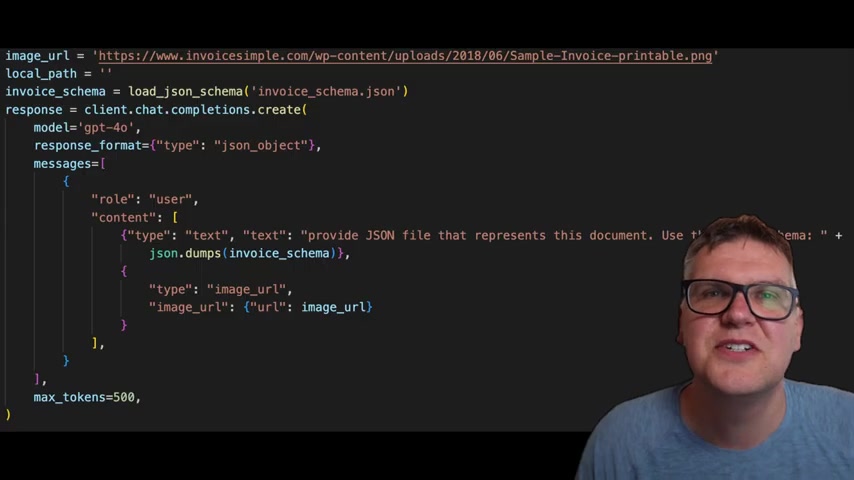
By loading and utilizing this schema in your Python script, you ensure that the GPT-4o API returns data in a predictable and usable format.
Extracting Text from Images with GPT-4o and Python
With your environment and schema set up, you can now use Python to extract text from images using the GPT-4o API. This involves creating a client, loading the image, and sending a request to the API.
Here’s a step-by-step guide:
- Initialize the OpenAI Client
client = OpenAI() - Load the JSON Schema
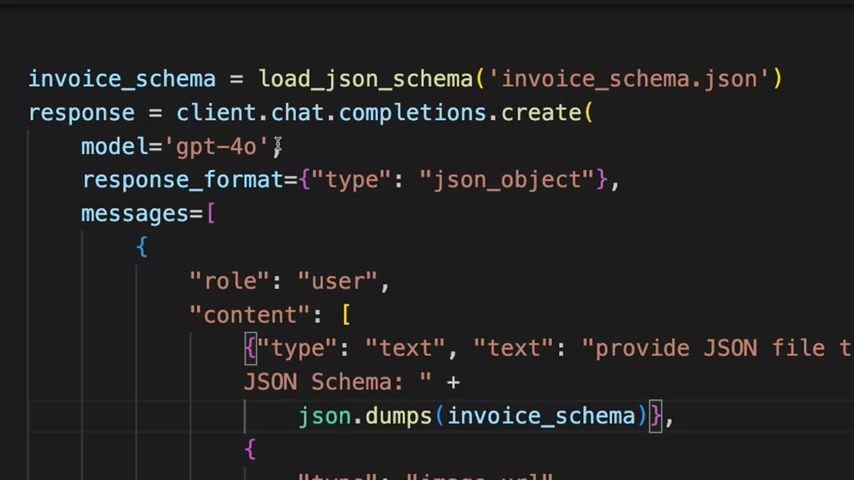
def load_json_schema(schema_file: str) -> dict:
with open(schema_file, 'r') as file:
    return json.load(file)
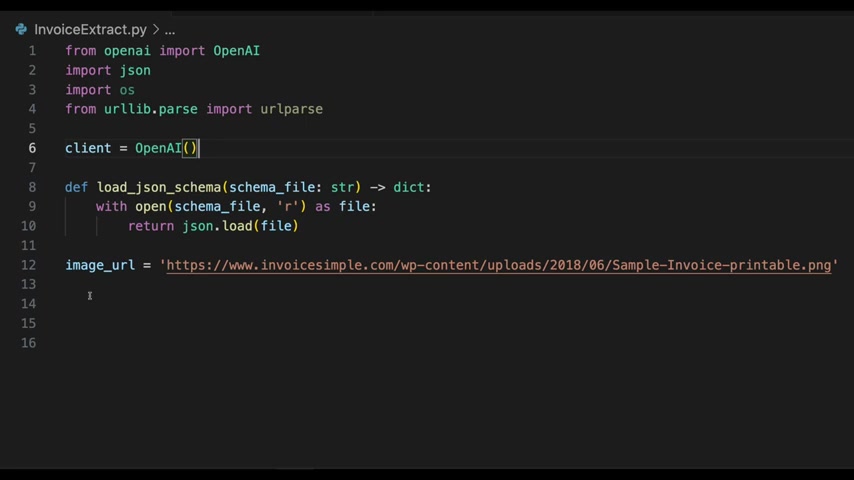
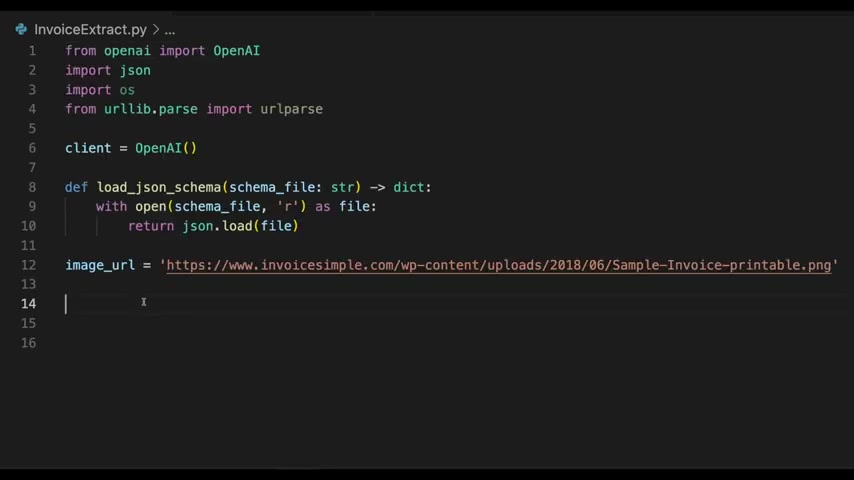
invoice_schema = load_json_schema('invoice_schema.json')
3.  **Construct the API Request**
```python
image_url = 'https://www.invoicesimple.com/wp-content/uploads/2018/06/Sample-Invoice-printable.png'
response = client.chat.completions.create(
    model='gpt-4o',
    response_format={'type': 'json_object'},
    messages=[
        {
            'role': 'user',
            'content': [
                {
                    'type': 'text',
                    'text': 'Provide JSON file that represents this document. Use this JSON Schema: ' + json.dumps(invoice_schema)
                },
                {
                    'type': 'image_url',
                    'image_url': {
                        'url': image_url
                    }
                }
            ]
        }
    ],
    max_tokens=500,
)- Extract and Parse the JSON Data
json_data = json.loads(response.choices[0].message.content)
This code initializes the OpenAI client, loads a JSON schema for invoices, constructs an API request with the image URL, and extracts the parsed JSON data from the API response. By setting the response_format to 'json_object', you ensure that the API returns a well-formatted JSON response.
By following these steps, you can effectively extract text from images using the GPT-4o API and Python, leveraging the benefits of structured data through JSON schemas.
Handling Local Image Files
Uploading and Processing Local Images
While using image URLs is convenient, there are scenarios where you need to process local image files
. The GPT-4o API supports this, but it requires a slightly different approach, specifically base64 encoding the image.
Here’s how to handle local image files:
- Import Base64 Library:
- Ensure you have the
base64library imported.import base64
- Ensure you have the
- Encode the Image to Base64:
- Open the image file in binary mode, read its contents, and encode it to base64. This encoding converts the binary data of the image into a text format that can be included in the API request.
with open('handwritten_sample.png', 'rb') as image_file:
image_base64 = base64.b64encode(image_file.read()).decode('utf-8')
- Open the image file in binary mode, read its contents, and encode it to base64. This encoding converts the binary data of the image into a text format that can be included in the API request.
- Construct the API Request with Base64 Encoded Image
- Modify the API request to include the base64 encoded image in the
image_urlfield. You also need to specify the data type asimage/jpeg;base64.
- Modify the API request to include the base64 encoded image in the
response = client.chat.completions.create(
    model='gpt-4o',
    response_format={'type': 'json_object'},
    messages=[
        {
            'role': 'user',
            'content': [
                {
                    'type': 'text',
                    'text': 'Provide JSON file that represents this document. Use this JSON Schema: ' + json.dumps(invoice_schema)
                },
                {
                    'type': 'image_url',
                    'image_url': {
                        'url': f'data:image/jpeg;base64,{image_base64}'
                    }
                }
            ]
        }
    ],
    max_tokens=500,
)- Extract and Parse the JSON Data
json_data = json.loads(response.choices[0].message.content)By following these steps, you can process local image files using the GPT-4o API, converting them into base64 encoded strings and including them in your API requests. This method allows you to handle images directly from your local file system, providing flexibility and control over your data processing pipeline.
Step-by-Step Guide: Extracting Data from an Invoice Image
Step 1: Prepare Your Environment
Before diving into the code, ensure your environment is set up correctly.
- Install the OpenAI Library
:
pip install openai - Set Your API Key: Save your API key as an environment variable.
- Install Other Packages: Install
json,os,base64, andurlparse. - Import Libraries
from openai import OpenAI
import json
import os
from urllib.parse import urlparse
import base64
Step 2: Load the JSON Schema
Define the function to load the JSON schema
, create your invoice_schema.json file, and define the invoice schema as below:
def load_json_schema(schema_file: str) -> Dict:
    with open(schema_file, 'r') as file:
        return json.load(file)

invoice_schema = load_json_schema('invoice_schema.json')
Step 3: Configure the GPT-4o API Request
Configure the GPT-4o API request. Load the image either from URL or local path.
# load from URL
image_url = 'https://www.invoicesimple.com/wp-content/uploads/2018/06/Sample-Invoice-printable.png'
# load from local file
image_path = 'handwritten_sample.png'
If load from local file, you will need to load it as base64 .
with open(image_path, 'rb') as image_file:
    image_base64 = base64.b64encode(image_file.read()).decode('utf-8')
Next, construct the API request with the content and image_url or the base64 encoded image.
if image_path:
    content= [
        {
            'type': 'text',
            'text': 'Provide JSON file that represents this document. Use this JSON Schema: ' + json.dumps(invoice_schema)
        },
        {
            'type': 'image_url',
            'image_url': {
                'url': f'data:image/jpeg;base64,{image_base64}'
            }
        }
    ]
else:
    content= [
        {
            'type': 'text',
            'text': 'Provide JSON file that represents this document. Use this JSON Schema: ' + json.dumps(invoice_schema)
        },
        {
            'type': 'image_url',
            'image_url': {
                'url': image_url
            }
        }
    ]

response = client.chat.completions.create(
    model='gpt-4o',
    response_format={'type': 'json_object'},
    messages=[
        {
            'role': 'user',
            'content': content
        }
    ],
    max_tokens=500,
)
Step 4: Extract and Save the JSON Data
Extract the JSON data from the API response
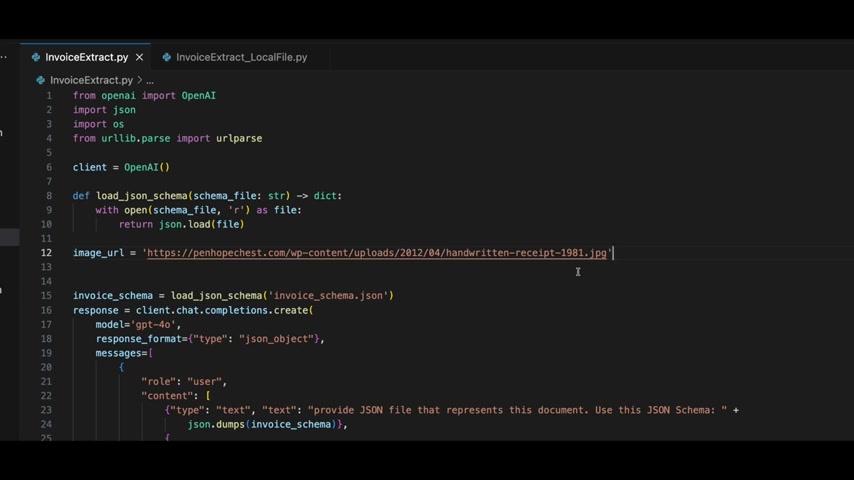
and save it to a JSON file:
json_data = json.loads(response.choices[0].message.content)

# Extract JSON data from the response and remove Markdown formatting
filename_without_extension = os.path.splitext(os.path.basename(urlparse(image_url).path))[0]
json_filename = f'{filename_without_extension}.json'

with open(json_filename, 'w') as file:
    json.dump(json_data, file, indent=4)

print(f'JSON data saved to {json_filename}')
GPT-4o API Pricing
Cost Efficiency of GPT-4o
The GPT-4o API is advertised as being significantly more cost-effective than its predecessors

, particularly GPT-4 Turbo. Specifically, GPT-4o is positioned as being 50% cheaper than GPT-4 Turbo, which can lead to substantial savings, especially for high-volume applications. This pricing model makes it more accessible for developers and businesses looking to integrate advanced AI capabilities without incurring excessive costs.
Here is a breakdown of the cost comparison for GPT-4o:
| Feature | GPT-4o Pricing |
|---|---|
| Input Tokens | $5 per million tokens |
| Output Tokens | $15 per million tokens |







Most people like
































Report
Please select a reason for reporting
- 13 Reasons to Switch from Snapchat to Text Messaging
- 7 Powerful Speech to Text Apps to Boost Productivity
- 10 Best Speech to Text Tools for Effortless Transcription
- 13 Free Tools to Easily Transcribe Audio to Text
- 15 Surprising Ways Google's Speech-to-Text Boosts Productivity
- 7 Best Free Online Audio to Text Transcription Tools
- 9 Tips to Transcribe Speech to Text Faster and Better
- 13 Best Speech to Text Software for Windows 10 in 2023
- 7 Tips for Choosing the Best Transcriber for Audio to Text
- 11 Reasons Why Dragon Speech-to-Text Apps are Game-Changers
- 6 Secrets to Enhance Your Speech to Text Transcription
- 6 Brilliant Ways to Boost Productivity with Talk-to-Text on Your MacBook
- 6 Ways Transcription Software Converts Audio to Text
- 8 Tips to Transcribe Speech to Text Like a Pro
- 6 Reasons IBM Watson Speech to Text is a Game-Changer
- 14 Powerful Ways Talk-to-Text Improves Your Workflow
- 12 Top Windows Speech-to-Text Software for Efficient Transcription
- 12 Game-Changing Benefits of Apple's Speech to Text Technology
- 9 Powerful Use Cases for AWS Speech to Text Technology
- 10 Easy Steps to Transcribe YouTube Videos to Text
- transcription audio en texte
- online audio transcription
- free audio file transcription
- free ai audio transcription
- audio transcription service
- audio transcription online free
- audio transcription free online
- audio to transcription software
- audio and transcript
- ai audio transcription free
- voice recording to text converter
- translate voice recording to text
- record voice to text
- audio recording to text converter
- voice recording and transcription
- chatgpt voice to text
- gmail voice to text
- speech to text reader
- speech to text ai free
- speech to talk
- Meshy AI: How to Create 3D Models from Text and Images
- How SEO and Marketing Dashboards Empower Agencies to Drive Results
- How to Use AI Tools to Find Internal Linking Opportunities Across a Business Website
- Discover Your Perfect Haircut with AI Hairstyle Apps
- Free Reputation Calculator Tools: How They're Adapting to Score AI Visibility, Not Just Rankings
- Design Professional Flyers for Free on Your Phone
- Best Free Flyer Maker Apps for Android: Design Like a Pro
- How to Know If Your Business Is Ready for an AI Customer Service Agent
- Revolutionizing Storytelling: From Novels to Screenplays with AI
- Create Engaging Animated Explainer Videos with a Free AI Tool
- Meshy AI: How to Create 3D Models from Text and Images
- ASOMobile Helps Teams Benchmark App Store Screenshots Against Competitors
- How to Match LMS Software With Your Organization's Training Plan
- Revolutionizing Email Marketing Agency with AI
- How to Convert BTC to HNT
- Unleashing the Power of AI: Cognizant's Roadmap for Transformation
- Frame to Video Review: A Practical Look at Turning Two Still Frames Into Motion
- NVIDIA NIM: Revolutionizing Supply Chain Data Analysis with AI
- Top AI Tools That Help Brands Stand Out Offline (Not Just Online)
- Top 5 Cold Email Software: Maximize Your Outreach in 2025

Copyright ©2026 toolify