































Table of Contents
- Key Points
- Image Classification: A Practical Guide
- Troubleshooting and Optimization
- Advantages and Disadvantages
- FAQ
- Related Questions



Image Classification: A Practical Guide
What is Image Classification?
Image classification is a type of machine learning that involves training a computer to automatically categorize images based on their content. This technology finds applications in numerous fields, from medical image analysis to self-driving cars. The ability to accurately identify and categorize images is crucial for automating tasks, improving decision-making, and enhancing user experiences.
The Importance of Data Quality:
Before diving into the code, it's critical to understand the importance of data quality. A machine learning model is only as good as the data it's trained on. Clean, well-labeled, and diverse data sets are essential for achieving high accuracy. For image classification, this means ensuring that your images are properly formatted, appropriately sized, and accurately labelled.
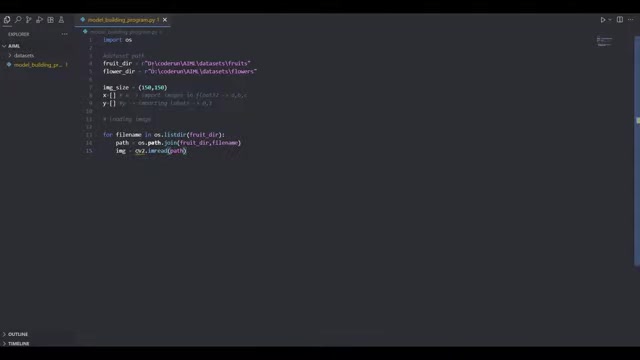
Having a clean dataset greatly improoves the overall efficiency and output of any ML model. There are a number of steps we need to take to prepare data for the ML models.
- Data cleaning: This involves identifying and correcting errors, inconsistencies, and missing values in your dataset. It is particularly vital in removing and cleaning up redundant data which increases both the efficiency and effectiveness of the model.
- Data annotation/labelling: This is labeling data and catagorizing data that will be used by the model to perform its function. Depending on your project this is usually done manually but with the increasing use of LLMs this is becoming an automated process.
- Consistent Formatting: Image files must have consistent data formats or there will be errors performing Image Recognition. The process of reformatting ensures consistency in training the Machine Learning Models.
- Balancing Data Sets: Bias occurs in ML models when there is disproportionately large amounts of data for certain features that can throw off the entire model.
Preparing Your Image Data
Creating a robust machine learning model begins long before the actual model building, at the data preparation stage. Here's what it takes:
1. Data Acquisition:
- Gathering your image data can involve several methods. Whether the data comes from open source databases like Kaggle and Hugging Face, or it's collected using your own organization’s or project’s resources, make sure the images are relevant to your model's classification goals.
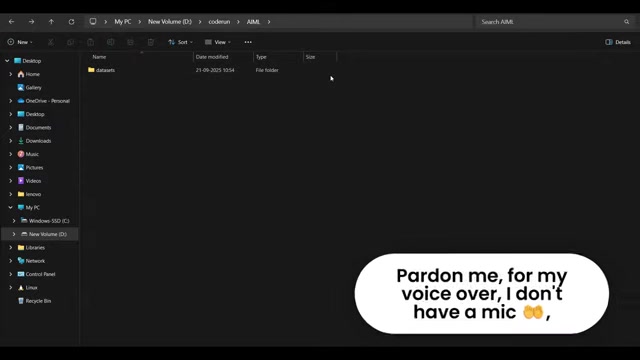
Remember that if you use multiple image databases, you must conform images to the same types for the model to work.
2. Structuring Your Dataset:
- Organize all image files into distinct folders. This organizational structure will allow for a more streamlined process that is also easier for the ML Models to train with. In a case where your objective is to make a model classify images based on the label in a certain dataset, each of those sub-folders must be a class in the data-set.
- Ensure both your training data is separate from validation data so as to avoid overtraining your models. It can also help to store test data away from training data to maintain image integrity.
3. Resizing and Normalizing Images:
- It’s important to ensure all images must have the same image format, and you need to also ensure images in the dataset all have the same aspect ratio and size. Doing this ensures that no errors occur during the actual image import into the dataset. You also don’t want one data subset being larger than the others.
4. Data Augmentation:
- Applying image manipulation techniques such as rotating and resizing images can help to increase the image data available without having to acquire entirely new datasets. Image augmentation is also extremely vital for removing biases that might be present in datasets.
Here are additional steps that can enhance your dataset
| Step | Description |
|---|---|
| Cleaning | Involves addressing incorrect data, inconsistencies, redundancies, and incomplete information. |
| Normalizing | Ensures all data is scaled similarly. It makes training less skewed and faster. |
| Labeling/Annotation | This stage involves accurately naming image types. Incorrect annotations can cause your data to not be recognized by the ML model and skew results. |
Building the Machine Learning Model
Constructing the image classification model involves defining the network architecture, choosing appropriate layers, and configuring optimization algorithms. Here's a code walkthrough that addresses the steps needed.
1. Importing Libraries:
The first thing to is to make sure that Tensorflow, Keras, and Numpy are all imported as part of the development environment or the ML project you are building the model with. ML libraries are often extremely versatile and can be used for a number of different AI/ML data analysis programs.
import os
import cv2
import numpy as np
from tensorflow.keras.models import Sequential
from tensorflow.keras.layers import Conv2D, MaxPooling2D, Flatten, Dense, Dropout
from tensorflow.keras.optimizers import Adam
2. Defining data paths and formats:
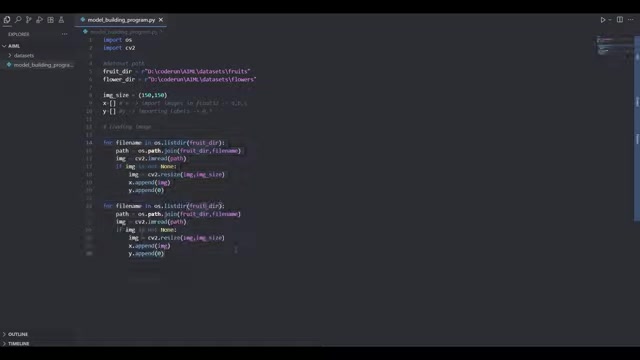
Next you need to give explicit data paths that the ML will be using to train models. Once you make variables for these data paths, declare image types and sizes for the formatting to occur later.
#Dataset path
fruit_dir = r"D:\coderun\AIML\datasets\fruits"
flower_dir = r"D:\coderun\AIML\datasets\flowers"

img_size = (150,150)

x = [] #import images in float32 -> a,b,c
y = [] #importing labels -> 0,1
3. Loading and Resizing Images for training: Next, you will make a for loop to process the images. You will also define the image size and then resize the image itself to the correct image output dimensions. The images will also be converted to binary for machine reading.
#loading image
for filename in os.listdir(fruit_dir):
    path = os.path.join(fruit_dir,filename)
    img = cv2.imread(path)
    if img is not None:
        img = cv2.resize(img,img_size)
        x.append(img)
        y.append(0)

for filename in os.listdir(flower_dir):
    path = os.path.join(flower_dir,filename)
    img = cv2.imread(path)
    if img is not None:
        img = cv2.resize(img,img_size)
        x.append(img)
        y.append(1)
4. Numpy Arrays: You will have to set your images to a Numpy data type in order to have the ability to run a number of common data analysis algorithms that will be important to generating accurate models. This process makes sure that both images and labels are added into a single data-type that can be easily analyzed.
#convert to numpy arrays
x = np.array(x,dtype='float32')
y = np.array(y)
print("dataset loaded", x.shape,y.shape)
Once the image import is all done, the training section for building your machine learning model can be achieved as the data is now prepped to be put through some of these algorithms.
Training the machine learning model for high accuracy
It is important that the correct parameters for the AI model itself is also used for training. Here we will utilize some popular modules for sequential model building that are highly popular.
#model training

model = Sequential([
    Conv2D(32,(3,3),activation='relu',input_shape=(150,150,3)),
    MaxPooling2D((2,2)),
    Conv2D(64,(3,3),activation='relu'),
    MaxPooling2D((2,2)),
    Conv2D(128,(3,3),activation='relu'),
    MaxPooling2D((2,2)),
    Flatten(),
    Dense(128,activation='relu'),
    Dropout(0.5),
    Dense(1,activation='sigmoid') #binary outputs

])

model.compile(optimizer='Adam',learning_rate=0.0001,loss='binary_crossentropy',metrics=['accuracy'])
history = model.fit(x,y,epochs=15,batch_size=32,shuffle=True)

model.save(r"D:\coderun\AIML\model\classification_model.h5")
- Step 1: Add activation layers: These layers ensure that nonlinearity occurs to improve learning with the model.
- Step 2: Adding the Dropout layer: These allow the neural network to better interpret and train by improving textures and other attributes of the images used. By improving specific attributes, the AI model will recognize each of the different components involved. This is further enhanced by also improving edge quality.
- Step 3: Compile to ensure it works on your hardware: By declaring the optimization algorithms, you can tell your model to configure itself for use on your hardware specifications and make adjustments based on learning rate and other metrics.
Once the process of building and training your model is done, it has to be saved to local storage so that you can use the model elsewhere. This is vital in the next video which we will show how to connect this to a front end so you can classify images easily.








Most people like































Report
Please select a reason for reporting
- 13 Reasons to Switch from Snapchat to Text Messaging
- 7 Powerful Speech to Text Apps to Boost Productivity
- 10 Best Speech to Text Tools for Effortless Transcription
- 13 Free Tools to Easily Transcribe Audio to Text
- 15 Surprising Ways Google's Speech-to-Text Boosts Productivity
- 7 Best Free Online Audio to Text Transcription Tools
- 9 Tips to Transcribe Speech to Text Faster and Better
- 13 Best Speech to Text Software for Windows 10 in 2023
- 7 Tips for Choosing the Best Transcriber for Audio to Text
- 11 Reasons Why Dragon Speech-to-Text Apps are Game-Changers
- 6 Secrets to Enhance Your Speech to Text Transcription
- 6 Brilliant Ways to Boost Productivity with Talk-to-Text on Your MacBook
- 6 Ways Transcription Software Converts Audio to Text
- 8 Tips to Transcribe Speech to Text Like a Pro
- 6 Reasons IBM Watson Speech to Text is a Game-Changer
- 14 Powerful Ways Talk-to-Text Improves Your Workflow
- 12 Top Windows Speech-to-Text Software for Efficient Transcription
- 12 Game-Changing Benefits of Apple's Speech to Text Technology
- 9 Powerful Use Cases for AWS Speech to Text Technology
- 10 Easy Steps to Transcribe YouTube Videos to Text
- transcription audio en texte
- online audio transcription
- free audio file transcription
- free ai audio transcription
- audio transcription service
- audio transcription online free
- audio transcription free online
- audio to transcription software
- audio and transcript
- ai audio transcription free
- voice recording to text converter
- translate voice recording to text
- record voice to text
- audio recording to text converter
- voice recording and transcription
- chatgpt voice to text
- gmail voice to text
- speech to text reader
- speech to text ai free
- speech to talk
- How SEO and Marketing Dashboards Empower Agencies to Drive Results
- How to Use AI Tools to Find Internal Linking Opportunities Across a Business Website
- Discover Your Perfect Haircut with AI Hairstyle Apps
- Free Reputation Calculator Tools: How They're Adapting to Score AI Visibility, Not Just Rankings
- Design Professional Flyers for Free on Your Phone
- Best Free Flyer Maker Apps for Android: Design Like a Pro
- How to Know If Your Business Is Ready for an AI Customer Service Agent
- Revolutionizing Storytelling: From Novels to Screenplays with AI
- Create Engaging Animated Explainer Videos with a Free AI Tool
- Stop Multi-Subscribing: Benchmark Top AI Visual Models in One Canvas
- ASOMobile Helps Teams Benchmark App Store Screenshots Against Competitors
- How to Match LMS Software With Your Organization's Training Plan
- Revolutionizing Email Marketing Agency with AI
- How to Convert BTC to HNT
- Unleashing the Power of AI: Cognizant's Roadmap for Transformation
- Frame to Video Review: A Practical Look at Turning Two Still Frames Into Motion
- NVIDIA NIM: Revolutionizing Supply Chain Data Analysis with AI
- Top AI Tools That Help Brands Stand Out Offline (Not Just Online)
- Top 5 Cold Email Software: Maximize Your Outreach in 2025
- Magic School AI: Revolutionizing Quiz & Assessment Generation

Copyright ©2026 toolify