































Table of Contents
- Key Points
- Crafting the Perfect Composition with Stable Diffusion
- Using Community-Driven Enhancements
- Step-by-Step Guide: From Idea to AI Masterpiece
- Stable Diffusion with Custom Composition: Pros and Cons
- Frequently Asked Questions
- Related Questions



Crafting the Perfect Composition with Stable Diffusion
The Importance of Composition in AI Art
In the realm of AI art, composition is key. While algorithms can generate incredible details, the overall structure and arrangement of elements determine whether an image truly captivates. A well-composed image guides the viewer's eye, creates a sense of balance, and effectively conveys the artist's intended message. Mastering composition techniques allows you to transform raw AI output into polished, professional-looking artwork. You want to create that first perfect impression. With good composition, you'll be on your way to producing some stunning results.
To create the best content, it is important to plan out your images. Consider the topic of your images, including the placement and characteristics. By thinking about the goal of the work, you can tailor your project to meet the needs of your viewing audience. This is the best way to increase engagement and overall, help your pictures perform well.
Lesson 1: Conceptualizing Your Image
The first step in creating controllable AI art is to have a clear vision. Before you even touch Stable Diffusion, take the time to conceptualize your image. What is the story you want to tell? What mood do you want to evoke? What are the key elements you want to include? A well-defined concept serves as a blueprint for your entire workflow.
Consider a few ways you could tailor the project:
- Gathering some reference images to help guide the AI's generations
- Creating some sketches
- Taking detailed notes describing how all the elements should come together
For example, the end result of this process could look something like a beautiful woman in a red Chinese dress sitting with a red umbrella. This gives a starting point for the whole workflow.
Finding Source Material: The Ethical Approach
Once you have a concept, gather source materials. One method involves searching for real-world photographs or artworks that embody the style, pose, or elements you desire. Websites like Baidu can be useful in this gathering process.
It's best to avoid any legal issues, so it is worth considering more advanced methods.
To avoid any possible copyright infringements when producing commercial content, it's prudent to generate your own source material through Stable Diffusion, then utilizing that result in the future projects. Using source images created in this way can give you the ability to create commercial work confidently.
Using Photoshop for Initial Image Preparation
Photoshop becomes your digital canvas for refining and manipulating your source material. Import your chosen image and use the selection tools to isolate the key elements, such as the subject or specific details you want to incorporate. You can then adjust the resolution, remove backgrounds, and prepare the image for further processing in Stable Diffusion.
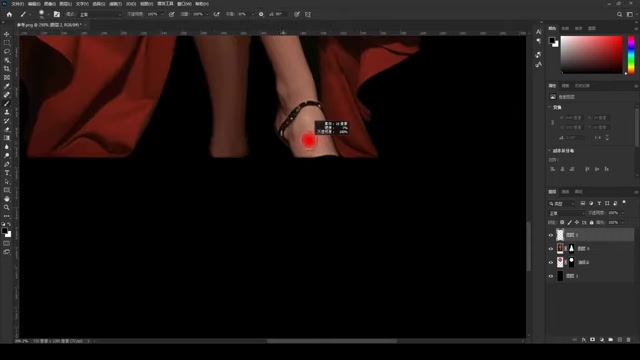
These images are great for creating an AI art piece that you can truly control.
Next, some changes that can be made in Photoshop are:
- Adjusting the Resolution
- Removing and Changing Backgrounds
- Erasing unwanted details or other distractions
Compositing Elements and Redrawing Details
After preparing the initial image, you can begin compositing additional elements. Import your gathered assets into the Photoshop document and arrange them according to your desired composition. Use masking and blending techniques to seamlessly integrate the elements. Then, redraw any missing sections or features to complete the overall structure.
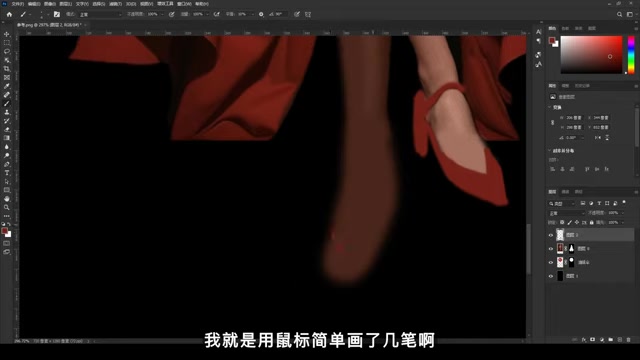
Remember that you are making broad strokes as an outline for the AI to complete later on, so don't get bogged down in minor details.
The following tools can be useful:
- Drawing tools to redefine the lines and shape of the original image.
- Layer manipulation to set background and foreground elements.
- Masking to have more control over drawing and placement
Preparing for Stable Diffusion
With your composition finalized in Photoshop, it's time to transition to Stable Diffusion. This is where the AI takes over, transforming your vision into reality. You will need to prepare your prompts. These prompts can be used to have the AI make key decisions about the style and details of your picture.
Two main components make up a good Prompt:
- A definition of the topic.
- The AI style requests.
This process may require some tweaking to really dial in the prompt to the specific art project.
Leveraging ControlNet for Image Control
ControlNet is a Game-changer in the Stable Diffusion workflow. It allows you to exert precise control over the generated image, ensuring it adheres to your desired composition and structure. By feeding your prepared Photoshop image into ControlNet, you guide the AI's creative process, resulting in a more predictable and controllable outcome. This will help prevent unwanted randomness in the generations.
The primary benefit from using ControlNet is the AI's focus to adhere to your artistic goals.
Stable Diffusion Image Generation
After loading the ControlNet setup, generate the images and evaluate. This will give an overview of the final picture. Make notes about the images and what to change to meet your artistic goals. Then modify the steps above before generating again.
This is a process of refinement and iteration to have the AI get closer to your vision.
Addressing Problems and Issues in Generated Pictures
There are a few things that need to be considered before the final image generation. One thing to consider would be the level of color used, or color bleed. Color bleed can be addressed by reducing the level of "feathering" applied to the image. Black coloring can also be an issue when the AI doesn't generate the proper design.
Consider these factors to prevent problems in the final generation. This will help save on time and energy in your image creations. Using these tactics will also help to create unique, personalized work!







Most people like





























Report
Please select a reason for reporting
- 13 Reasons to Switch from Snapchat to Text Messaging
- 7 Powerful Speech to Text Apps to Boost Productivity
- 10 Best Speech to Text Tools for Effortless Transcription
- 13 Free Tools to Easily Transcribe Audio to Text
- 15 Surprising Ways Google's Speech-to-Text Boosts Productivity
- 7 Best Free Online Audio to Text Transcription Tools
- 9 Tips to Transcribe Speech to Text Faster and Better
- 13 Best Speech to Text Software for Windows 10 in 2023
- 7 Tips for Choosing the Best Transcriber for Audio to Text
- 11 Reasons Why Dragon Speech-to-Text Apps are Game-Changers
- 6 Secrets to Enhance Your Speech to Text Transcription
- 6 Brilliant Ways to Boost Productivity with Talk-to-Text on Your MacBook
- 6 Ways Transcription Software Converts Audio to Text
- 8 Tips to Transcribe Speech to Text Like a Pro
- 6 Reasons IBM Watson Speech to Text is a Game-Changer
- 14 Powerful Ways Talk-to-Text Improves Your Workflow
- 12 Top Windows Speech-to-Text Software for Efficient Transcription
- 12 Game-Changing Benefits of Apple's Speech to Text Technology
- 9 Powerful Use Cases for AWS Speech to Text Technology
- 10 Easy Steps to Transcribe YouTube Videos to Text
- transcription audio en texte
- online audio transcription
- free audio file transcription
- free ai audio transcription
- audio transcription service
- audio transcription online free
- audio transcription free online
- audio to transcription software
- audio and transcript
- ai audio transcription free
- voice recording to text converter
- translate voice recording to text
- record voice to text
- audio recording to text converter
- voice recording and transcription
- chatgpt voice to text
- gmail voice to text
- speech to text reader
- speech to text ai free
- speech to talk
- Meshy AI: How to Create 3D Models from Text and Images
- How SEO and Marketing Dashboards Empower Agencies to Drive Results
- How to Use AI Tools to Find Internal Linking Opportunities Across a Business Website
- Discover Your Perfect Haircut with AI Hairstyle Apps
- Free Reputation Calculator Tools: How They're Adapting to Score AI Visibility, Not Just Rankings
- Design Professional Flyers for Free on Your Phone
- Best Free Flyer Maker Apps for Android: Design Like a Pro
- How to Know If Your Business Is Ready for an AI Customer Service Agent
- Revolutionizing Storytelling: From Novels to Screenplays with AI
- Create Engaging Animated Explainer Videos with a Free AI Tool
- Meshy AI: How to Create 3D Models from Text and Images
- ASOMobile Helps Teams Benchmark App Store Screenshots Against Competitors
- How to Match LMS Software With Your Organization's Training Plan
- Revolutionizing Email Marketing Agency with AI
- How to Convert BTC to HNT
- Unleashing the Power of AI: Cognizant's Roadmap for Transformation
- Frame to Video Review: A Practical Look at Turning Two Still Frames Into Motion
- NVIDIA NIM: Revolutionizing Supply Chain Data Analysis with AI
- Top AI Tools That Help Brands Stand Out Offline (Not Just Online)
- Top 5 Cold Email Software: Maximize Your Outreach in 2025

Copyright ©2026 toolify