































Table of Contents
- Key Points
- Understanding AI Dungeon and Its Potential
- The Power of /remember in AI Dungeon
- Step-by-Step Guide to Using the /remember Command
- The Advantages and Disadvantages of Using /remember
- Frequently Asked Questions about the /remember Command
- Related Questions



Understanding AI Dungeon and Its Potential
What is AI Dungeon?
AI Dungeon, developed by Latitude, is a first-of-its-kind AI-generated text adventure Game. It uses a massive natural language AI model (GPT-3 or Dragon) to generate the story and results of your actions as you play. Unlike most other games, you are not limited by the imagination of the developer in what you can do. Anything you can express in language can be your action, and the AI Dungeon master will decide how the world responds.
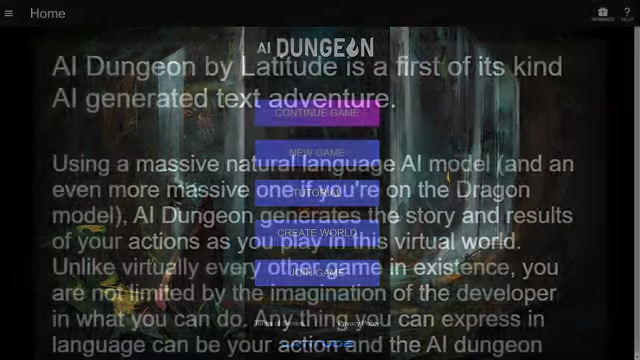
It simulates all kinds of games in a text format. From epic fantasy quests to refined self-introspection or random jokes, AI Dungeon offers a unique and surprisingly contrasting gaming experience. AI Dungeon leverages the power of advanced AI to generate dynamic and interactive stories based on player input. This offers a level of freedom and creativity unmatched by traditional video games. Players can craft their own adventures and determine how the story unfolds, making each playthrough unique.
The Power of /remember in AI Dungeon
Unlocking Deeper Memory and Story Control
While AI Dungeon's engine is powerful, its inherent memory limitations can sometimes lead to inconsistencies or forgotten details within a story.

The AI typically only reads the last few dozen player inputs. This is where the /remember command becomes invaluable. Think of it as a short-term memory boost for the AI, allowing you to explicitly define and reinforce key aspects of the story that you want it to consistently recognize and incorporate. Effectively used, the /remember function is the key to give the AI context which is included before the actual story writing. It is used to tell the AI things over the long term which it would otherwise forget. Without a feature like /remember, plot points can be dropped, and character backstories may be ignored, resulting in a less satisfying and coherent experience. By strategically employing /remember, you can act as a co-author, guiding the AI and ensuring the story aligns with your creative vision. It allows you to give the AI the context which is included before the actual Story Writing. It is used to tell the AI things over the long term which it would otherwise forget.
Understanding Memory Limitations
Before diving into the specifics of the /remember command, it's crucial to understand the AI's inherent memory constraints. The AI Dungeon engine doesn't possess a perfect long-term memory. It primarily relies on a limited context window, focusing on the recent turns of your story to generate its responses. This can lead to situations where:
- Important character details are forgotten.
- Past events are disregarded.
- The overall narrative coherence suffers. The
/remembercommand acts as a workaround for these limitations, providing a mechanism to reinforce essential details that you want the AI to prioritize.
Where the /remember Tab Comes In
One of the features that makes the AI’s memory much deeper is the remember tab.
This is marked with a pin icon. It is a kind of ‘immediate memory’, providing the ability to store important information such as names, settings, character information, and current context so the AI can have a better and deeper understanding of the context of your story. By using it, you can help the AI to understand your intent better as the player.
Important Facts to Remember
There are some facts that are more important than others for the Remember tab. Here are a few examples:
- Information about your character.
- Your allies.
- Your friends and family.
- Your quest.
- The situation.
- Author's notes.
Also, be sure to remember that the AI can draw information from the World Info area as well.
Strategies for Effective Use of /remember
To maximize the effectiveness of the /remember command, consider these strategies:
- Prioritize essential details: Focus on the most crucial aspects of your story, such as character names, relationships, key locations, and ongoing objectives. Avoid cluttering the
/remembersection with irrelevant information. - Use clear and concise language: The AI is more likely to accurately interpret and utilize information that is presented in a straightforward and unambiguous manner.
- Update frequently: As your story progresses, continuously review and update the
/remembersection to reflect new developments, character arcs, and plot twists. - Combine with other features: The
/remembercommand works best in conjunction with other AI Dungeon features like World Info and Author's Notes. Use World Info to define the broader world setting and lore, and Author's Notes to guide the AI's writing style and tone.
Step-by-Step Guide to Using the /remember Command
Accessing the /remember Tab and Adding Information
-
Initiating a New Game or Continuing an Existing One: Begin your AI Dungeon adventure by starting a new game or continuing a saved one.
-
Locating the Remember Tab: Look for the pin icon located within the game's interface.
-
Adding Information: Click the pin icon to open the
/remembertab. Here, you can type in key information about your character, plot, and world. Use concise and clear language. -
Setting up the Basic Facts of Your Story: Set up your initial parameters for your story by dictating the facts as you want them. That way, there will be no confusion on the AI’s part about these things.
Using the /remember Command During Gameplay
While the /remember tab is useful for overall story context, you can also use the /remember command inline during gameplay to reinforce specific details at key moments.
- Type
/rememberfollowed by your statement: For example,/remember The sword is glowing with blue light. - The AI will acknowledge your statement: This confirms that it has registered the information.
- Use sparingly: Overuse of the inline
/remembercommand can disrupt the flow of the story.







Most people like































Report
Please select a reason for reporting
- 13 Reasons to Switch from Snapchat to Text Messaging
- 7 Powerful Speech to Text Apps to Boost Productivity
- 10 Best Speech to Text Tools for Effortless Transcription
- 13 Free Tools to Easily Transcribe Audio to Text
- 15 Surprising Ways Google's Speech-to-Text Boosts Productivity
- 7 Best Free Online Audio to Text Transcription Tools
- 9 Tips to Transcribe Speech to Text Faster and Better
- 13 Best Speech to Text Software for Windows 10 in 2023
- 7 Tips for Choosing the Best Transcriber for Audio to Text
- 11 Reasons Why Dragon Speech-to-Text Apps are Game-Changers
- 6 Secrets to Enhance Your Speech to Text Transcription
- 6 Brilliant Ways to Boost Productivity with Talk-to-Text on Your MacBook
- 6 Ways Transcription Software Converts Audio to Text
- 8 Tips to Transcribe Speech to Text Like a Pro
- 6 Reasons IBM Watson Speech to Text is a Game-Changer
- 14 Powerful Ways Talk-to-Text Improves Your Workflow
- 12 Top Windows Speech-to-Text Software for Efficient Transcription
- 12 Game-Changing Benefits of Apple's Speech to Text Technology
- 9 Powerful Use Cases for AWS Speech to Text Technology
- 10 Easy Steps to Transcribe YouTube Videos to Text
- transcription audio en texte
- online audio transcription
- free audio file transcription
- free ai audio transcription
- audio transcription service
- audio transcription online free
- audio transcription free online
- audio to transcription software
- audio and transcript
- ai audio transcription free
- voice recording to text converter
- translate voice recording to text
- record voice to text
- audio recording to text converter
- voice recording and transcription
- chatgpt voice to text
- gmail voice to text
- speech to text reader
- speech to text ai free
- speech to talk
- How SEO and Marketing Dashboards Empower Agencies to Drive Results
- How to Use AI Tools to Find Internal Linking Opportunities Across a Business Website
- Discover Your Perfect Haircut with AI Hairstyle Apps
- Free Reputation Calculator Tools: How They're Adapting to Score AI Visibility, Not Just Rankings
- Design Professional Flyers for Free on Your Phone
- Best Free Flyer Maker Apps for Android: Design Like a Pro
- How to Know If Your Business Is Ready for an AI Customer Service Agent
- Revolutionizing Storytelling: From Novels to Screenplays with AI
- Create Engaging Animated Explainer Videos with a Free AI Tool
- Stop Multi-Subscribing: Benchmark Top AI Visual Models in One Canvas
- ASOMobile Helps Teams Benchmark App Store Screenshots Against Competitors
- How to Match LMS Software With Your Organization's Training Plan
- Revolutionizing Email Marketing Agency with AI
- How to Convert BTC to HNT
- Unleashing the Power of AI: Cognizant's Roadmap for Transformation
- Frame to Video Review: A Practical Look at Turning Two Still Frames Into Motion
- NVIDIA NIM: Revolutionizing Supply Chain Data Analysis with AI
- Top AI Tools That Help Brands Stand Out Offline (Not Just Online)
- Top 5 Cold Email Software: Maximize Your Outreach in 2025
- Magic School AI: Revolutionizing Quiz & Assessment Generation

Copyright ©2026 toolify