































Table of Contents
- Key Points
- Getting Started with Azure Document AI and Python
- Supported File Formats
- Setting up Azure Document Intelligence Resource
- FAQ
- Related Questions



Getting Started with Azure Document AI and Python
Introduction to Azure Document Intelligence
Azure Document Intelligence is a powerful AI service that empowers you to build intelligent document processing solutions.
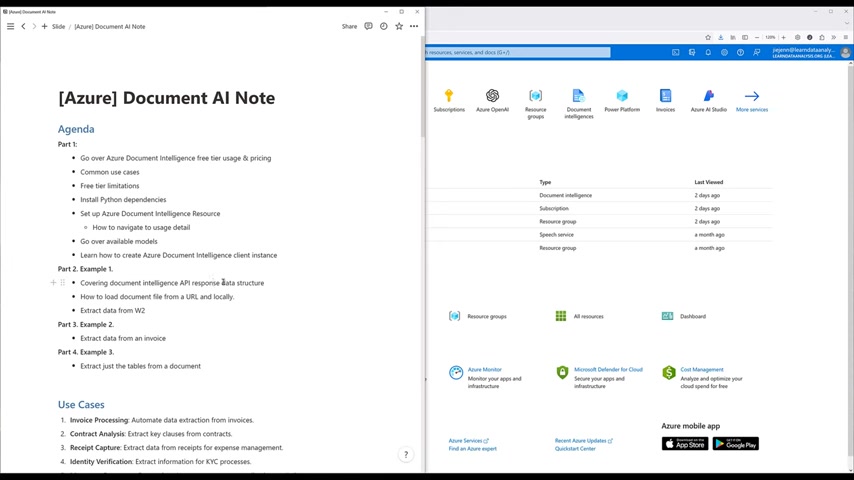
It allows you to automatically analyze and extract information from various documents, saving time and resources. This Tutorial focuses on utilizing the Document Intelligence API with Python, providing a practical, hands-on approach for both beginners and those looking to expand their skills.
This isn't just another tutorial; it's your gateway to mastering one of the most useful and potentially challenging APIs within the Azure ecosystem. A basic understanding of Python and Azure will be beneficial, but the comprehensive nature of this guide will help you navigate even if you're relatively new to these technologies. We'll cover everything from pricing and use cases to scripting and data extraction.
Agenda: A Roadmap for Document AI Mastery
This tutorial is divided into four key parts, designed to provide a structured learning experience:
Part 1: Foundations
-
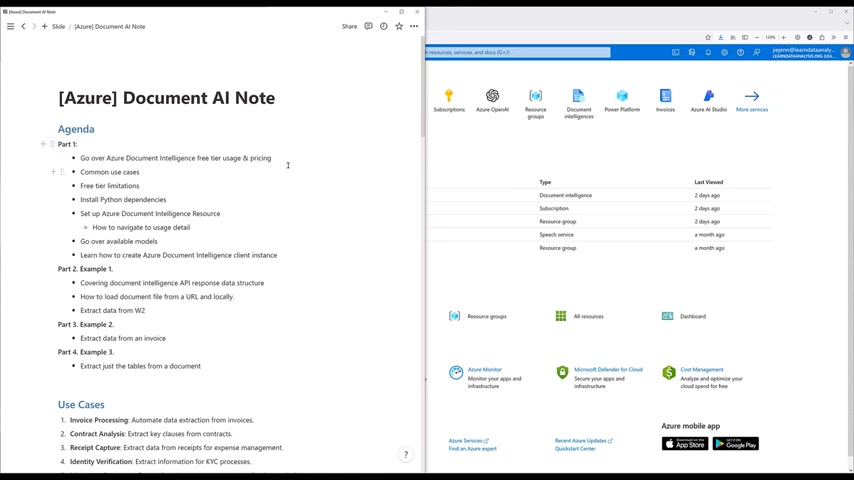
Pricing Overview: Learn about Azure Document Intelligence's free tier usage, pricing structure, and how to optimize costs.
-
Common Use Cases: Explore various applications of Document Intelligence across different industries.
-
Free Tier Limitations: Understand the limitations of the free tier and how to effectively utilize it.
-
Python Dependencies: Install the necessary Python libraries to interact with the Document Intelligence API.
-
Resource Setup: Set up an Azure Document Intelligence resource and learn how to navigate its usage details.
-
Available Models: Discover the pre-built models available for various document types.
-
Client Instance: Learn how to create an Azure Document Intelligence client instance in Python.
Part 2: Example 1: W2 Form Data Extraction
-
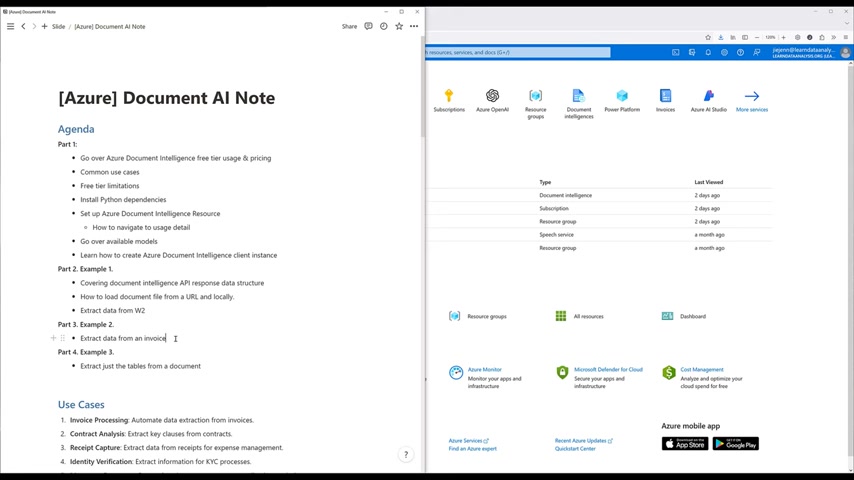
API Response Data Structure: Covering document intelligence API response data structure.
-
Load Document File: Learn how to load document file from a URL and locally.
-
Extract data from W2.
Part 3: Example 2: Invoice Data Extraction
- Extract data from an invoice.
Part 4: Example 3: Table Extraction
- Extract just the tables from a document.
This structured approach ensures that you gain a comprehensive understanding of Azure Document AI, empowering you to tackle real-world document processing challenges.
Common Use Cases in Document AI
Azure Document AI offers a wide range of applications across various industries, automating tasks and improving efficiency. Some common use cases include:
-
Invoice Processing: Automate data extraction from invoices, reducing manual effort and improving accuracy.
-
Contract Analysis: Extract key clauses from contracts, enabling faster review and compliance checks.
-
Receipt Capture: Extract data from receipts for expense management, streamlining expense reporting.
-
Identity Verification: Extract information for KYC processes, improving customer onboarding.
-
Mortgage Document Processing: Automate mortgage application analysis, accelerating loan approvals.
-
Medical Record Digitization: Convert medical records into structured formats, improving data accessibility.
-
Email Processing: Extract information from emails and attachments, automating email-based workflows.
-
Legal Document Review: Summarize key legal document information, assisting in legal research.
-
Customer Onboarding: Streamline gathering and verifying onboarding documents.
-
Tax Form Processing: Extract data from tax forms, automating tax preparation processes.
-
Educational Records Management: Digitize and manage educational documents.
-
Claims Processing: Automate insurance claim data extraction.
-
Bank Statement Analysis: Extract financial information for analysis.
-
Real Estate Automation: Process real estate documents efficiently.
These use cases demonstrate the versatility of Azure Document AI, showcasing its potential to transform document-intensive processes across industries.
Understanding Pricing and Free Tier Limitations
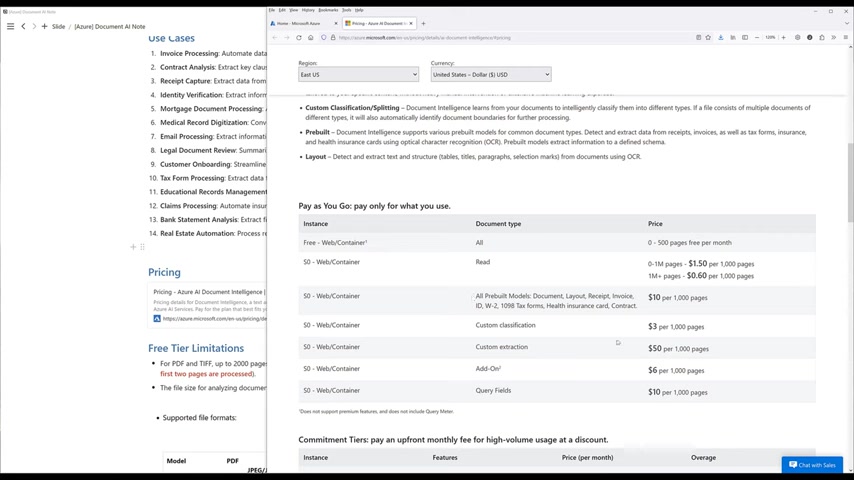
Azure Document Intelligence offers a flexible pricing model with a free tier to allow users to explore the service and its capabilities.
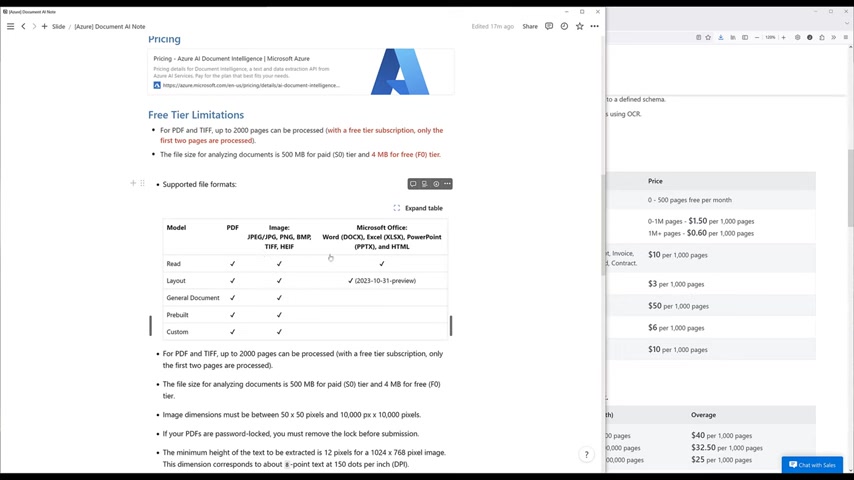
Key aspects of pricing include:
- Free Tier: Process up to 500 pages per month for free, allowing for experimentation and development.
- Free Tier Limitations:
- PDF and TIFF files can be processed with a free tier subscription, up to 2000 pages, but only the first two pages are processed.
- The file size for analyzing documents is 500 MB for the paid (S0) tier and 4 MB for the free (F0) tier.
- Pay-as-you-go: Pay only for what you use, with costs varying depending on the document type and features used.
- Commitment Tiers: For high-volume usage, commitment tiers offer upfront monthly fees for discounted rates.
| Feature | Instance | Price (per month) |
|---|---|---|
| Custom Extraction | Azure | $800 per 20,000 pages |
| Prebuilt | Azure | $190 per 20,000 pages |
Understanding these pricing details ensures you can effectively manage your costs and choose the plan that best suits your needs. Always refer to the official Azure Document Intelligence pricing page for the most up-to-date information.
Supported File Formats
Azure Document AI Compatibility
Azure Document Intelligence boasts compatibility with a diverse range of file formats, ensuring seamless integration with your existing document workflows. These formats include:
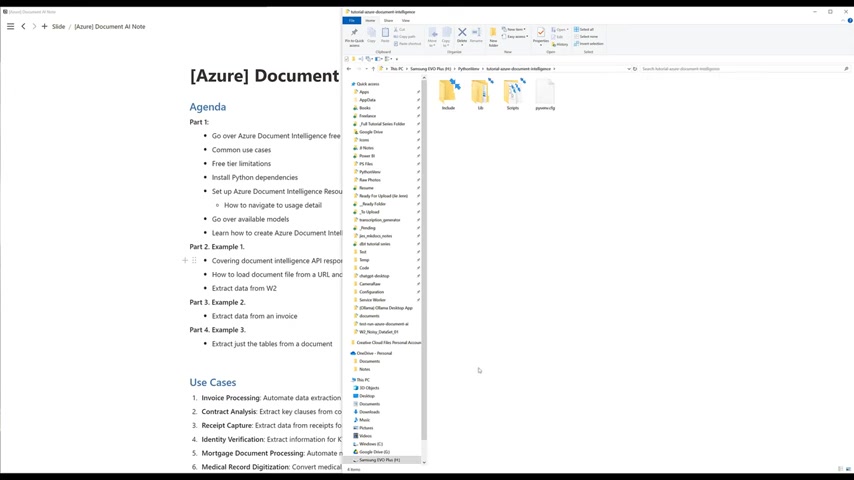
- PDF: Ideal for documents with complex layouts and embedded fonts.
- TIFF: Commonly used for scanned documents and faxed images.
- JPEG/JPG: Versatile for images, supporting various compression levels.
- PNG: Suited for images with transparent backgrounds.
- BMP: A simple raster graphics format.
- HEIF/HEIC: High-efficiency image format for superior compression.
- Microsoft Office Files: Support for WORD (.docx), Excel (.xlsx), and PowerPoint (.pptx) files streamline integration with Office documents.
- HTML.
This broad support ensures that you can leverage Azure Document AI regardless of the format your documents are in.
Setting up Azure Document Intelligence Resource
Creating a Resource Group
A resource group is a container that holds related resources for an Azure solution. It is best to allocate all resources for the solution to that resource group, to simplify billing management.You can create a resource group in the Azure portal:
- Go to the Azure portal: Head to portal.azure.com

.
- Search for Resource Groups: Search “Resource groups” in the search bar.
- Add a new resource group: Click the “Add” button.
- Select a Subscription: Choose an Active subscription. A subscription is basically a way to track your bills on Azure.
- Resource group name: Give your resource group a globally unique name. The name needs to follow a set of requirements: can only contain alphanumeric characters and hyphens, must be 3-64 characters long, and cannot start or end with a hyphen.
- Select a region: Select your region where the resources are going to be located.
- Click Review and Create: Once your resource group is configured correctly, you can review your settings, and then hit “create.”
Installing the Python Dependencies
To interact with Azure Document Intelligence through Python, you'll need to install the following dependencies:
pip install azure-ai-documentintelligence
pip install pandas
These commands will install the Azure Document Intelligence library and the Pandas library, a powerful data analysis and manipulation tool that we’ll use to organize extracted data.
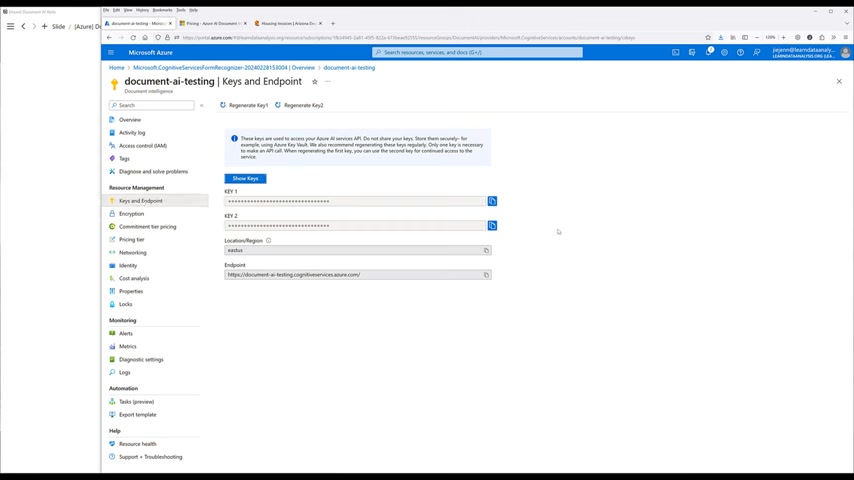
Create Your Own Local config.ini File
It's also a good idea to initialize your own local config.ini file.
[DocumentAI]
api_key = YOUR_API_KEY
endpoint = YOUR_ENDPOINT_URL
Creating the Azure Document Intelligence Client Instance
Now, let's create the Azure Document Intelligence Client Instance. This section goes over the code to set it up, for easy re-use in the future.
import os
import configparser
import base64
from urllib.parse import urlparse
from azure.core.credentials import AzureKeyCredential
from azure.ai.documentintelligence import DocumentIntelligenceClient

def client():
    config = configparser.read('client.ini')
    api_key = config.get('DocumentAI', 'api_key')
    endpoint = config.get('DocumentAI', 'endpoint')

    # An endpoint is a URL at which a web service can be accessed by a client application.
    # (variable) endpoint: str

    client = DocumentIntelligenceClient(endpoint=endpoint, credential=AzureKeyCredential(api_key))

    return client
The above Python code defines a client function that facilitates programmatic access to Azure's Document Intelligence Service. Here's a breakdown:
- Import Necessary Libraries: It starts by importing required modules, including
os,configparserfor configuration handling,base64for encoding, and specific classes from theazure-ai-documentintelligencelibrary for interacting with the service. - Define client() function: This function is the heart of the code, encapsulating the process of authenticating and creating a DocumentIntelligenceClient.
- Credential Type: The
Credentialparameter, needed for the client to connect to Azure, is either anAzureKeyCredentialorTokenCredential. Here,AzureKeyCredentialis used.
The function initializes an instance of the DocumentIntelligenceClient, passing in the endpoint URL and the Azure key credential for authentication.
How to Check the File Path
The process begins with a function named is_file_or_url(input_string), which is crafted to discern the nature of a given input string. Let's go over the code:
def is_file_or_url(input_string: str) -> Literal['file', 'url', 'unknown']:
    # Identify if the input is a local file path
    if os.path.isfile(input_string):
        return 'file'

    # Identify if the input is a URL
    try:
        result = urlparse(input_string)
        return 'url' if all([result.scheme, result.netloc]) and result.scheme in ['http', 'https'] else 'unknown'
    except:
return 'unknown'os.path.isfile(input_string)checks if the path exists.urlparse(input_string)the function checks if the string meets URL requirements.
How to check Pricing Details
You can find the usage for the document intelligence API by going to metrics.
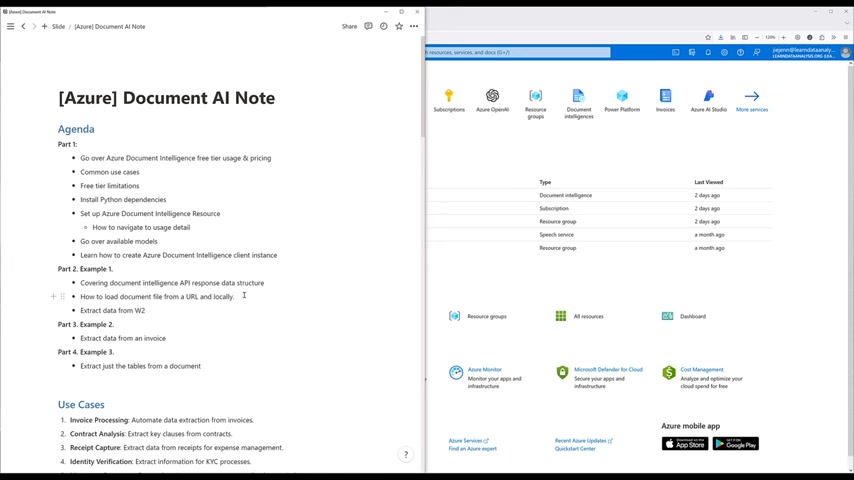
You can access the Azure metrics by looking into cost management.
- Under Monitoring, click Metrics Under Monitoring, click Metrics to see pricing.
This is a useful tool to have to measure against your documents. To see a specific document analysis, remember that metrics are usually not exact.







Most people like


































Report
Please select a reason for reporting
- 13 Reasons to Switch from Snapchat to Text Messaging
- 7 Powerful Speech to Text Apps to Boost Productivity
- 10 Best Speech to Text Tools for Effortless Transcription
- 13 Free Tools to Easily Transcribe Audio to Text
- 15 Surprising Ways Google's Speech-to-Text Boosts Productivity
- 7 Best Free Online Audio to Text Transcription Tools
- 9 Tips to Transcribe Speech to Text Faster and Better
- 13 Best Speech to Text Software for Windows 10 in 2023
- 7 Tips for Choosing the Best Transcriber for Audio to Text
- 11 Reasons Why Dragon Speech-to-Text Apps are Game-Changers
- 6 Secrets to Enhance Your Speech to Text Transcription
- 6 Brilliant Ways to Boost Productivity with Talk-to-Text on Your MacBook
- 6 Ways Transcription Software Converts Audio to Text
- 8 Tips to Transcribe Speech to Text Like a Pro
- 6 Reasons IBM Watson Speech to Text is a Game-Changer
- 14 Powerful Ways Talk-to-Text Improves Your Workflow
- 12 Top Windows Speech-to-Text Software for Efficient Transcription
- 12 Game-Changing Benefits of Apple's Speech to Text Technology
- 9 Powerful Use Cases for AWS Speech to Text Technology
- 10 Easy Steps to Transcribe YouTube Videos to Text
- transcription audio en texte
- online audio transcription
- free audio file transcription
- free ai audio transcription
- audio transcription service
- audio transcription online free
- audio transcription free online
- audio to transcription software
- audio and transcript
- ai audio transcription free
- voice recording to text converter
- translate voice recording to text
- record voice to text
- audio recording to text converter
- voice recording and transcription
- chatgpt voice to text
- gmail voice to text
- speech to text reader
- speech to text ai free
- speech to talk
- How SEO and Marketing Dashboards Empower Agencies to Drive Results
- How to Use AI Tools to Find Internal Linking Opportunities Across a Business Website
- Discover Your Perfect Haircut with AI Hairstyle Apps
- Free Reputation Calculator Tools: How They're Adapting to Score AI Visibility, Not Just Rankings
- Design Professional Flyers for Free on Your Phone
- Best Free Flyer Maker Apps for Android: Design Like a Pro
- How to Know If Your Business Is Ready for an AI Customer Service Agent
- Revolutionizing Storytelling: From Novels to Screenplays with AI
- Create Engaging Animated Explainer Videos with a Free AI Tool
- Stop Multi-Subscribing: Benchmark Top AI Visual Models in One Canvas
- 5 Data Problems That Stall AI Projects in Financial Compliance
- Master Storyboard Drawing: Expert Tips for Non-artists
- The Future of Smart Glasses: Explained & Assembling Guide
- DeepL Translator: The AI-Powered Translation Tool
- AI Video Upscaling: Top Tools Compared for Enhanced Quality
- Bridging the Gap: How One Indie Developer Solved the "Art Asset Nightmare" Using AI Style Transfer
- How I Direct Consistent AI Clips: A Hands-On Guide to Multi-Model Generation
- My Honest Review of VideoAI: The Ultimate Character Voice Generator I've Been Using Lately
- Why do so many AI tools underdeliver for online stores?
- My Brand New Logo: AI-Powered Logo Design for Startups

Copyright ©2026 toolify