































Table of Contents
- Key Points
- Understanding Naive Bayes Text Classification
- Building a Naive Bayes Text Classifier: A Step-by-Step Guide
- Weighing the Options: Pros and Cons of Naive Bayes
- FAQ
- Related Questions


Understanding Naive Bayes Text Classification
What is Naive Bayes?
Naive Bayes is a classification technique based on Bayes' theorem. It's termed 'naive' because of its assumption that the presence of a particular feature in a class is independent of the presence of any other feature. This assumption is rarely true in real-world scenarios, but surprisingly, Naive Bayes performs remarkably well in many cases, particularly in text classification.
Bayes' Theorem in a Nutshell: Bayes' theorem describes the probability of an event, based on prior knowledge of conditions that might be related to the event. Mathematically, it's expressed as:
P(A|B) = [P(B|A) * P(A)] / P(B)
Where:
- P(A|B) is the posterior probability of class (A, target) given predictor (B, attributes).
- P(B|A) is the likelihood which is the probability of predictor given class.
- P(A) is the prior probability of class.
- P(B) is the prior probability of predictor.
Why Naive Bayes for Text? Text data is high-dimensional, with each word potentially representing a feature. Naive Bayes simplifies this by treating each WORD as independent, thus reducing the computational complexity and making it feasible to work with large text datasets.
Types of Naive Bayes Classifiers
There are primarily three types of Naive Bayes classifiers, each suited for different types of data:
- Gaussian Naive Bayes: Assumes that features follow a normal distribution. It's used when features are continuous.
- Multinomial Naive Bayes: Best suited for text classification problems where features represent the counts of words.
It works well with discrete data.
- Bernoulli Naive Bayes: Similar to Multinomial Naive Bayes, but predictors are boolean variables. If a word occurs in the document, the predictor is 1, otherwise 0.
Building a Naive Bayes Text Classifier: A Step-by-Step Guide
Prerequisites
Before diving into the code, ensure you have the following libraries installed:
- NumPy: For numerical computations.
- Pandas: For data manipulation and analysis.
- Scikit-learn (sklearn): For machine learning algorithms and tools.
- Seaborn: For plot visualizations
You can install these using pip:
pip install numpy pandas scikit-learn seabornStep 1: Importing Necessary Libraries
Let's begin by importing the required libraries. This sets the stage for our text classification task.
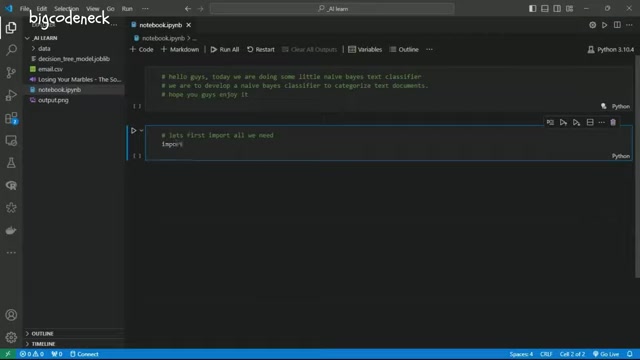
import numpy as np
import pandas as pd
import seaborn as sns
from sklearn.datasets import fetch_20newsgroups  # Dataset
from sklearn.model_selection import train_test_split # Split Data
from sklearn.feature_extraction.text import CountVectorizer, TfidfTransformer # Text to Numeric conversion
from sklearn.naive_bayes import MultinomialNB  # Naive Bayes model
from sklearn.metrics import accuracy_score, confusion_matrix, classification_report # Evaluations
import matplotlib.pyplot as pltfetch_20newsgroups: This function from scikit-learn will help us download and load the 20 Newsgroups dataset. This dataset contains news articles from 20 different topics, perfect for our text classification example.train_test_split: This is a function to split your dataset into training and testing sets, which is crucial for evaluating the performance of our model.CountVectorizerandTfidfTransformer: These are used to convert text data into a numerical format that our machine learning model can understand. CountVectorizer creates a vocabulary of all the words in your dataset and counts the occurrences of each word in each document. TfidfTransformer then adjusts these counts based on how frequently words appear in the entire dataset, giving more weight to the words that are unique to specific documents.MultinomialNB: This is the Naive Bayes classifier we’ll be using, specifically designed for discrete data like word counts for text classification.accuracy_score,confusion_matrix, andclassification_report: These are metrics used to evaluate the performance of your classification model. They help you understand how well your model is classifying the text data.
Step 2: Loading and Preparing the Data
Now, let's load the 20 Newsgroups dataset. We will categorize text documents.
categories = ['alt.atheism', 'talk.Religion.misc','comp.graphics', 'sci.space']
newsgroups_train = fetch_20newsgroups(subset='train',  categories=categories, shuffle=True, random_state=42)
newsgroups_test = fetch_20newsgroups(subset='test', categories=categories, shuffle=True, random_state=42)

X_train = newsgroups_train.data
y_train = newsgroups_train.target

X_test = newsgroups_test.data
y_test = newsgroups_test.target
Here, we fetch the training and testing datasets, specifying the categories we are interested in and also assigning the news article data and their corresponding categories to our X_train, y_train, X_test and y_test variables respectively.
X typically represents your features (the actual text of the news articles), while y represents the target variable (the category each article belongs to).
Step 3: Feature Extraction
To use text data with machine learning algorithms, we need to convert it into a numerical format. This is where CountVectorizer and TfidfTransformer come in.
count_vect = CountVectorizer(stop_words='english')
X_train_counts = count_vect.fit_transform(X_train)

tfidf_transformer = TfidfTransformer()
X_train_tfidf = tfidf_transformer.fit_transform(X_train_counts)CountVectorizer: First, we instantiate CountVectorizer to transform the text documents to a matrix of token counts. We also pass instop_words='english'to remove common English stop words (like 'the', 'is', 'in') which are not helpful for classification.fit_transform(): we use this to fit and transform our training set to a matrix of token counts.TfidfTransformer: We then instantiate theTfidfTransformerto compute the Term Frequency-Inverse Document Frequency (TF-IDF) which measures the importance of each word in the documents.fit_transform(): Finally we use this to transform theX_train_countsinto TF-IDF features.
We first fit and transform the training data (X_train) and then only transform the test data (X_test) using the fitted vectorizer and transformer. This ensures that we don't leak any information from the test data into our training process, maintaining the integrity of our model evaluation.
X_test_counts = count_vect.transform(X_test)
X_test_tfidf = tfidf_transformer.transform(X_test_counts)
Step 4: Training the Naive Bayes Classifier
With our features extracted and transformed, we can now train the Naive Bayes classifier. Given that we're working with word counts, Multinomial Naive Bayes is well-suited.
model = MultinomialNB()
model = model.fit(X_train_tfidf, y_train)
Step 5: Evaluating the Model
Now we evaluate our trained model’s performance on the testing dataset.
y_pred = model.predict(X_test_tfidf)

accuracy = accuracy_score(y_test, y_pred)
print(f'Model Accuracy: {accuracy}')
To further evaluate the model, we can print a classification report and the confusion matrix.
class_repo = classification_report(y_test, y_pred)
print(f'Classification Report:
', class_repo)

conf_matrix = confusion_matrix(y_test, y_pred)

fig = plt.figure(figsize=(10,7))
sns.heatmap(conf_matrix, annot=True, fmt='d', cmap='Blues', xticklabels=newsgroups_train.target_names, yticklabels=newsgroups_train.target_names)
plt.xlabel('Predicted')
plt.ylabel('Actual')
plt.title('Confusion Matrix')
plt.tight_layout()
plt.show()- This gives precision, recall, F1-score for each category.
- This shows true vs. predicted labels.
Step 6: Analyzing Important Words
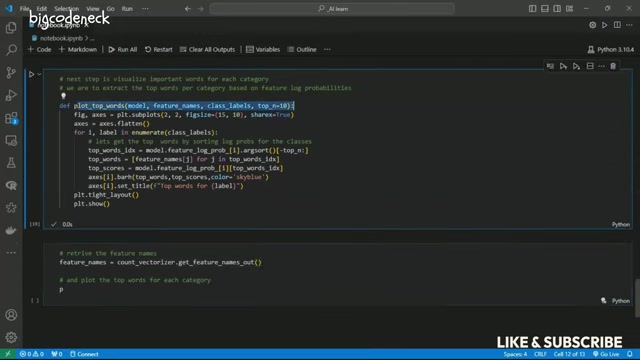
To gain insights into the model's decision-making process, we can extract the top words associated with each category.
def plot_top_words(model, feature_names, class_labels, top_n=10):
    fig, axes = plt.subplots(2, 2, figsize=(15, 10), sharex=True)
    axes = axes.flatten()
    for i, label in enumerate(class_labels):

        top_words_idx = model.feature_log_prob_[i].argsort()[:-top_n - 1:
        top_words = [feature_names[j] for j in top_words_idx]
        top_scores = model.feature_log_prob_[i][top_words_idx]

        axes[i].barh(top_words, top_scores, color='skyblue')
        axes[i].set_title(f'Top words for {label}')
    plt.tight_layout()
    plt.show()

feature_names = count_vect.get_feature_names_out()
plot_top_words(model, feature_names, newsgroups_train.target_names)- This function extracts and plots the top words for each category based on the model's learned feature log probabilities.




Most people like


































Report
Please select a reason for reporting
- 13 Reasons to Switch from Snapchat to Text Messaging
- 7 Powerful Speech to Text Apps to Boost Productivity
- 10 Best Speech to Text Tools for Effortless Transcription
- 13 Free Tools to Easily Transcribe Audio to Text
- 15 Surprising Ways Google's Speech-to-Text Boosts Productivity
- 7 Best Free Online Audio to Text Transcription Tools
- 9 Tips to Transcribe Speech to Text Faster and Better
- 13 Best Speech to Text Software for Windows 10 in 2023
- 7 Tips for Choosing the Best Transcriber for Audio to Text
- 11 Reasons Why Dragon Speech-to-Text Apps are Game-Changers
- 6 Secrets to Enhance Your Speech to Text Transcription
- 6 Brilliant Ways to Boost Productivity with Talk-to-Text on Your MacBook
- 6 Ways Transcription Software Converts Audio to Text
- 8 Tips to Transcribe Speech to Text Like a Pro
- 6 Reasons IBM Watson Speech to Text is a Game-Changer
- 14 Powerful Ways Talk-to-Text Improves Your Workflow
- 12 Top Windows Speech-to-Text Software for Efficient Transcription
- 12 Game-Changing Benefits of Apple's Speech to Text Technology
- 9 Powerful Use Cases for AWS Speech to Text Technology
- 10 Easy Steps to Transcribe YouTube Videos to Text
- transcription audio en texte
- online audio transcription
- free audio file transcription
- free ai audio transcription
- audio transcription service
- audio transcription online free
- audio transcription free online
- audio to transcription software
- audio and transcript
- ai audio transcription free
- voice recording to text converter
- translate voice recording to text
- record voice to text
- audio recording to text converter
- voice recording and transcription
- chatgpt voice to text
- gmail voice to text
- speech to text reader
- speech to text ai free
- speech to talk
- Meshy AI: How to Create 3D Models from Text and Images
- How SEO and Marketing Dashboards Empower Agencies to Drive Results
- How to Use AI Tools to Find Internal Linking Opportunities Across a Business Website
- Discover Your Perfect Haircut with AI Hairstyle Apps
- Free Reputation Calculator Tools: How They're Adapting to Score AI Visibility, Not Just Rankings
- Design Professional Flyers for Free on Your Phone
- Best Free Flyer Maker Apps for Android: Design Like a Pro
- How to Know If Your Business Is Ready for an AI Customer Service Agent
- Revolutionizing Storytelling: From Novels to Screenplays with AI
- Create Engaging Animated Explainer Videos with a Free AI Tool
- Automate Lead Generation: A Comprehensive Guide with AI Agents
- Revideo.io: The Future of Reverse Video Search Technology
- Revolutionizing Email Marketing Agency with AI
- Breaking the Character Drift Dilemma: A Practical Test of Smart Shot
- Meshy AI: How to Create 3D Models from Text and Images
- ASOMobile Helps Teams Benchmark App Store Screenshots Against Competitors
- How to Match LMS Software With Your Organization's Training Plan
- How to Convert BTC to HNT
- Unleashing the Power of AI: Cognizant's Roadmap for Transformation
- Frame to Video Review: A Practical Look at Turning Two Still Frames Into Motion

Copyright ©2026 toolify