































Table of Contents
- Key Points
- The Importance of SEO for Help Documents
- Additional Tools within Document360 for SEO
- How to Optimize Your Help Documents with Document360
- Document360: Weighing the Pros and Cons
- Document360 Core Features for SEO
- Frequently Asked Questions
- Related Questions


How to Optimize Your Help Documents with Document360
Step-by-Step Guide to Improving SEO in Document360
To optimize your help documents using Document360, follow these steps:
-
Write Well-Documented Articles:
- Create comprehensive and informative content that fully addresses the topic at hand.
- Use H2, H3, and H4 headings to structure your article, making it easier for search engines to understand the content.
- Aim for at least 1500 characters to cover the topic in depth
.
-
Access Article Settings:
- In Document360, navigate to the article you want to optimize.
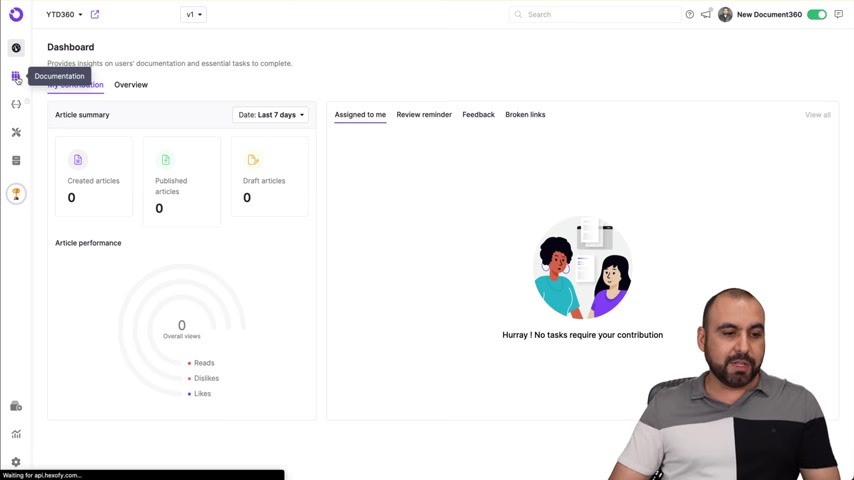
- Click on the gear icon to access the article settings .
-
Optimize SEO Title:
- Write a compelling SEO title that includes relevant keywords.
- Frame the title as a potential question users might search for.
-
Customize the Slug:
- Create a URL-friendly slug using dashes to separate keywords.
- Ensure the slug accurately reflects the article's content.
-
Craft an Effective SEO Description:
- Write a concise and engaging description, ideally between 120-160 characters.
- Highlight the key benefits and information users will find in the article.
-
Add Relevant Tags:
- Include tags that are related to the article's topic to improve discoverability.
-
Upload a Featured Image:
- Add a relevant and visually appealing featured image.
- This image will be displayed when the article is shared on social media or appears in search results.
-
Configure robots.txt:
- Navigate to Knowledge Base Site -> Article settings & SEO -> SEO .
- Ensure that your robots.txt file allows search engines to crawl your content.
- Change settings from dissalow to allow .
-
Manage Sitemap:
- Submit your sitemap URL to Google Webmaster and Bing Webmaster to ensure all pages are indexed .
-
Check Links Status:
- Go to analytics -> Links status .
- Check for broken link, and ensure internal links are updated .
By following these steps, you can significantly improve the SEO of your help documents and attract more organic traffic.
Document360 Core Features for SEO
Essential SEO Capabilities in Document360
Document360 is a comprehensive knowledge base platform that offers a range of features to enhance SEO performance
. It includes:
- SEO Settings: Allows you to optimize article titles, slugs, and descriptions for better search engine rankings.
- Broken Link Checker: Identifies and helps fix broken links, which negatively impact SEO.
- robots.txt Modification: Enables you to customize the robots.txt file to control which pages search engines crawl.
- Sitemap Management: Automatically generates and updates sitemaps to ensure search engines index your content effectively.
These features collectively improve your help document's visibility and search engine ranking, making it easier for users to find the support they need.





Most people like


































Report
Please select a reason for reporting
- 13 Reasons to Switch from Snapchat to Text Messaging
- 7 Powerful Speech to Text Apps to Boost Productivity
- 10 Best Speech to Text Tools for Effortless Transcription
- 13 Free Tools to Easily Transcribe Audio to Text
- 15 Surprising Ways Google's Speech-to-Text Boosts Productivity
- 7 Best Free Online Audio to Text Transcription Tools
- 9 Tips to Transcribe Speech to Text Faster and Better
- 13 Best Speech to Text Software for Windows 10 in 2023
- 7 Tips for Choosing the Best Transcriber for Audio to Text
- 11 Reasons Why Dragon Speech-to-Text Apps are Game-Changers
- 6 Secrets to Enhance Your Speech to Text Transcription
- 6 Brilliant Ways to Boost Productivity with Talk-to-Text on Your MacBook
- 6 Ways Transcription Software Converts Audio to Text
- 8 Tips to Transcribe Speech to Text Like a Pro
- 6 Reasons IBM Watson Speech to Text is a Game-Changer
- 14 Powerful Ways Talk-to-Text Improves Your Workflow
- 12 Top Windows Speech-to-Text Software for Efficient Transcription
- 12 Game-Changing Benefits of Apple's Speech to Text Technology
- 9 Powerful Use Cases for AWS Speech to Text Technology
- 10 Easy Steps to Transcribe YouTube Videos to Text
- transcription audio en texte
- online audio transcription
- free audio file transcription
- free ai audio transcription
- audio transcription service
- audio transcription online free
- audio transcription free online
- audio to transcription software
- audio and transcript
- ai audio transcription free
- voice recording to text converter
- translate voice recording to text
- record voice to text
- audio recording to text converter
- voice recording and transcription
- chatgpt voice to text
- gmail voice to text
- speech to text reader
- speech to text ai free
- speech to talk
- ChatGPT Knows Ford. It Just Doesn't Quote Ford
- Meshy AI: How to Create 3D Models from Text and Images
- How SEO and Marketing Dashboards Empower Agencies to Drive Results
- How to Use AI Tools to Find Internal Linking Opportunities Across a Business Website
- Discover Your Perfect Haircut with AI Hairstyle Apps
- Free Reputation Calculator Tools: How They're Adapting to Score AI Visibility, Not Just Rankings
- Design Professional Flyers for Free on Your Phone
- Best Free Flyer Maker Apps for Android: Design Like a Pro
- How to Know If Your Business Is Ready for an AI Customer Service Agent
- Revolutionizing Storytelling: From Novels to Screenplays with AI
- Your Business Data Could Be Worth Up to $4M. Find Out Without Uploading a Single File.
- Can an eSIM Plan Save You Time During Travel Setup?
- AI Video Editor Review: A Hands-On Look at Prompt-Based Video Editing
- Keep Characters Consistent Across Scenes With Image-to-Video AI
- How to Convert BTC to HNT
- ProxyWing DuckDuckGo Proxy Review: Plans, Setup and Who It Is For
- ChatGPT Knows Ford. It Just Doesn't Quote Ford
- Automate Lead Generation: A Comprehensive Guide with AI Agents
- Revideo.io: The Future of Reverse Video Search Technology
- Revolutionizing Email Marketing Agency with AI

Copyright ©2026 toolify