























Oracle AI Agent Studio: Document Tool Admin Walkthrough

Updated on Nov 18,2025








Table of Contents
- Key Points
- Understanding the Data Tables Agent
- Navigating the Vision Interface for Scheduled Processes
- How to Effectively Use Document Tooling in Oracle AI Agent
- Oracle AI Agent Studio Pricing Details
- Pros and Cons of Using Oracle AI Agent Studio
- Core Features of Oracle AI Agent Studio
- Practical Use Cases for Oracle AI Agent Studio
- FAQ
- Related Questions


Understanding the Data Tables Agent
Data Tables Agent Overview
The Data Tables Agent in Oracle AI Agent Studio is designed to work seamlessly with data. This agent setup
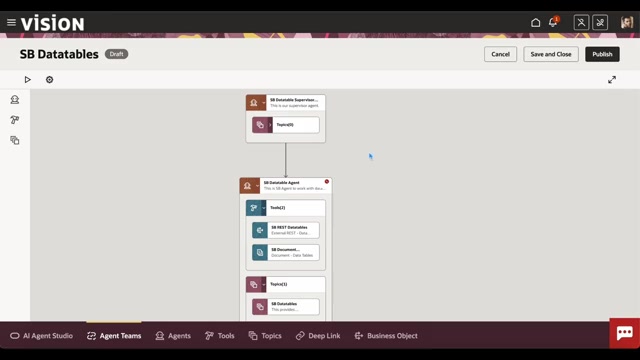
typically includes tools that facilitate data retrieval and manipulation. In this context, the walkthrough examines an agent configured with two primary tools: an External REST tool and a Document Tool. The External REST tool focuses on interacting with external APIs, enabling the agent to pull data from various sources. The Document Tool, on the other hand, is centered around managing and utilizing documents within the agent's workflow. The agent itself is the core component that interacts with these tools based on defined workflows and user inputs. Agents are essential to the performance of the process, so it's important to optimize agent performance.
Role of the Supervisor Agent
Supervisor agents in Oracle AI Agent Studio are optional, but they add a layer of sophistication, especially in summarization. They enable the crafting of specific summarization prompts
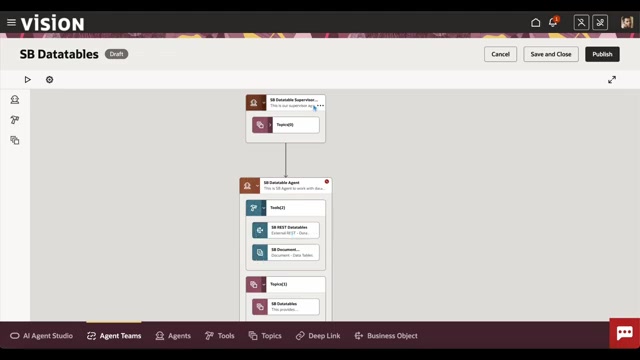
, allowing the agent to provide answers tailored to particular requirements beyond default prompts. Although optional for a single agent, the use of a supervisor demonstrates the platform’s adaptability in handling intricate tasks by structuring and refining interactions. In the 'LLM' tab, you can enable a 'Summarization Mode' that uses a custom prompt. There are even answer and additional requirements already provided. Feel free to expand on this. For example, generating 'properly formatted HTML' can be done by requesting this in the Prompt.
How to Effectively Use Document Tooling in Oracle AI Agent
Ensuring Document Readiness
Prior to engaging the AI with document-based tasks, it's imperative to ascertain the document's 'Published' status. This readiness is paramount for the tool’s proper functioning. To guarantee this state, adhere to a protocol encompassing document uploading, metadata enrichment, and status transition to ‘Ready to Publish’
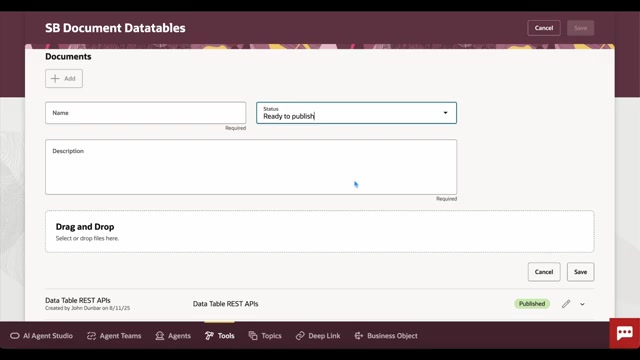
. Post this, trigger the ‘Process Agent Documents’ job. This action sets in motion the conversion of textual content into vectors, subsequently stored within the entity database, priming the documents for AI interaction and efficient processing. It's important that you add useful and accurate metadata to the document, so that the AI agent can use the data effectively. You'll also want to make sure you set a schedule to automatically process documents. These scheduled processes provide a consistent cadence.
Core Features of Oracle AI Agent Studio
Highlighting Key Capabilities
Oracle AI Agent Studio provides a range of features
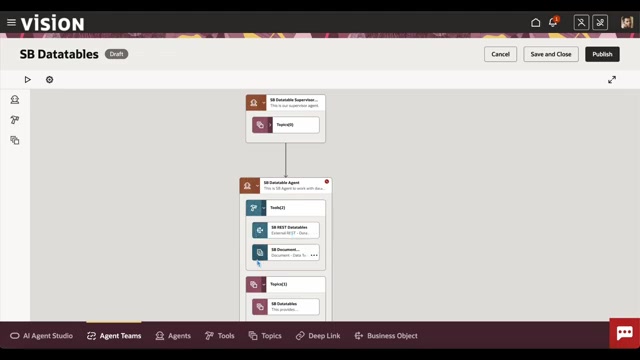
designed to streamline the creation and deployment of AI-powered agents. These core features facilitate data integration, document processing, and workflow automation.
- AI Agent Designer: An easy interface for creating and managing agents. Drag-and-drop is used to create a complex and customized process.
- Document Tool: Enables processing and integration of information contained within PDF, and other document types.
- REST API Integration: Facilitates seamless connection to external data sources and services through REST APIs.
- Scheduled Processes: Automates tasks such as document processing, ensuring timely and consistent updates.
- Summarization Prompts: Provide a summarization mode to generate clear answers.










Most people like































Report
Please select a reason for reporting
- 13 Reasons to Switch from Snapchat to Text Messaging
- 7 Powerful Speech to Text Apps to Boost Productivity
- 10 Best Speech to Text Tools for Effortless Transcription
- 13 Free Tools to Easily Transcribe Audio to Text
- 15 Surprising Ways Google's Speech-to-Text Boosts Productivity
- 7 Best Free Online Audio to Text Transcription Tools
- 9 Tips to Transcribe Speech to Text Faster and Better
- 13 Best Speech to Text Software for Windows 10 in 2023
- 7 Tips for Choosing the Best Transcriber for Audio to Text
- 11 Reasons Why Dragon Speech-to-Text Apps are Game-Changers
- 6 Secrets to Enhance Your Speech to Text Transcription
- 6 Brilliant Ways to Boost Productivity with Talk-to-Text on Your MacBook
- 6 Ways Transcription Software Converts Audio to Text
- 8 Tips to Transcribe Speech to Text Like a Pro
- 6 Reasons IBM Watson Speech to Text is a Game-Changer
- 14 Powerful Ways Talk-to-Text Improves Your Workflow
- 12 Top Windows Speech-to-Text Software for Efficient Transcription
- 12 Game-Changing Benefits of Apple's Speech to Text Technology
- 9 Powerful Use Cases for AWS Speech to Text Technology
- 10 Easy Steps to Transcribe YouTube Videos to Text
- transcription audio en texte
- online audio transcription
- free audio file transcription
- free ai audio transcription
- audio transcription service
- audio transcription online free
- audio transcription free online
- audio to transcription software
- audio and transcript
- ai audio transcription free
- voice recording to text converter
- translate voice recording to text
- record voice to text
- audio recording to text converter
- voice recording and transcription
- chatgpt voice to text
- gmail voice to text
- speech to text reader
- speech to text ai free
- speech to talk
- Create Engaging Animated Explainer Videos with a Free AI Tool
- Stop Multi-Subscribing: Benchmark Top AI Visual Models in One Canvas
- Best Seedance 2.5 API Provider: Every Price on the Market, Checked at Source
- AI OnlyFans: How to Generate $30,000/Month (Legally)
- Transform Your Script into an Engaging Video with AI Video Maker!
- AI Marketing Automation: A Comprehensive Guide for Small Businesses
- Midjourney Alternative for Anime Art Creators: Why PixAI May Be Better for Character Workflows
- 10 Things Most People Get Wrong About AI Image Search
- AI Girlfriend Apps: Top Choices Redefining Relationships 2025
- How to Reduce Quoting Errors in Salesforce with AI-Assisted Quote Creation
- Revideo.io: The Future of Reverse Video Search Technology
- Mastering Cold Calling: The Buffoon Technique for Client Acquisition
- Top AI Image Generators: Photo-Realistic Results in 2025
- Top 5 AI Image Generators: Create Stunning Visuals Easily
- Mastering Camera Angle Control: Top 4 AI Image & Video Generators for Cinematic Precision
- Top 4 AI Tools to Generate Flawless Digital Personas in 2026
- Why AI Language Tutors Underperform in Low-Resource Languages (And How to Work Around It)
- Top 5 AI Detector Tools: Ensuring Originality in Your Content
- How to Tell If an AI Study Tool Is Actually Helping You Learn (6 Checks for 2026)
- From Auto-Cuts to Generative Clips: Top 4 AI Video Editor Platforms Tested

Copyright ©2026 toolify