































Table of Contents
- Key Points
- Understanding PromeAI Background Diffusion
- Maximizing Background Diffusion: Tips and Tricks
- Step-by-Step Guide to Using PromeAI Background Diffusion
- PromeAI Pricing and Subscription Plans
- PromeAI Background Diffusion: Weighing the Pros and Cons
- Frequently Asked Questions About PromeAI Background Diffusion
- Related Questions About PromeAI and AI Art Generation


Understanding PromeAI Background Diffusion
What is PromeAI Background Diffusion?
PromeAI Background Diffusion is an AI-powered tool designed to simplify the process of removing and replacing image backgrounds. It automatically detects the subject of an image and removes the existing background, allowing you to replace it with a new background based on templates or text prompts. This tool is particularly useful for creating product photos, marketing materials, and social media content.
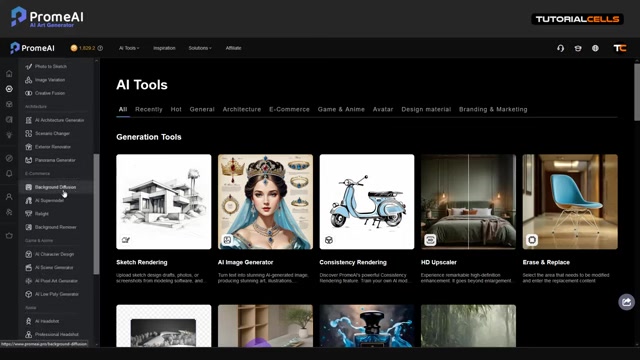
With PromeAI's background diffusion tool, any user can remove and generate background art using AI.
Key Benefits of Using PromeAI for Background Tasks
PromeAI's Background Diffusion offers a range of benefits that can significantly improve your image editing process. It is incredibly fast and efficient, automatically removing the background and generating new ones in seconds. With its AI-driven precision, PromeAI ensures accurate background removal and seamless integration of new backgrounds. Its template library and text Prompt functionality allow for creative exploration and personalization, and PromeAI's user-friendly interface makes it accessible to users of all skill levels.
Here's a breakdown of why it is so easy to use and why you should try it now:
- Ease of Use: PromeAI is designed with a user-friendly interface, making it accessible to both beginners and experienced designers. You don't need extensive technical skills to achieve professional-looking results.
- Time Savings: The automatic background removal and generation features save a significant amount of time compared to manual editing methods.
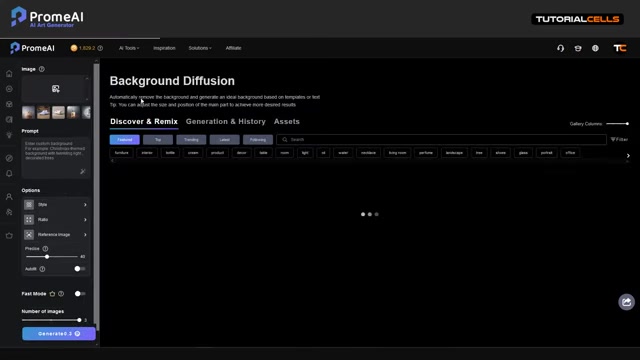
Now, you can create amazing images with an AI that thinks for you.
- Creative Flexibility: With a vast library of templates and the ability to use text prompts, you have endless possibilities for creating unique and engaging backgrounds. You can use these tools with a number of different images and styles.
- High-Quality Results: PromeAI's AI algorithms ensure precise background removal and seamless integration of new backgrounds, resulting in high-quality, professional-looking images. Be sure to analyze the images before and after generation to ensure the quality meets your expectations.
- Cost-Effective Solution: Instead of investing in expensive software and spending hours on manual editing, PromeAI provides a cost-effective solution for achieving professional-grade results.
Maximizing Background Diffusion: Tips and Tricks
Choosing the Right Images
The quality of your source image plays a critical role in the effectiveness of PromeAI's Background Diffusion. Use high-resolution images with clear subjects and well-defined edges. Images with complex backgrounds or low lighting may yield less desirable results. Also, be aware that in some cases, your selected objects may be the product of a poor photo. You may want to select a better photo.
Crafting Effective Text Prompts
When using text prompts for background generation, be specific and descriptive. Instead of simply typing 'garden', try 'a vibrant garden filled with blooming roses and lush greenery'. The more detail you provide, the better PromeAI can understand your vision.
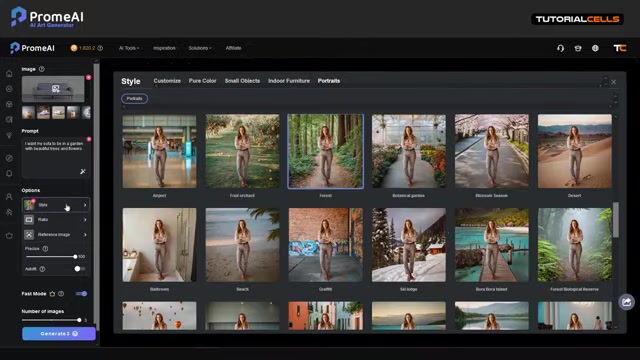
You want to provide lots of prompts to the AI so it can create something special. Also, be sure the language is in the proper and supported format.
Experimenting with Styles
PromeAI offers a variety of styles that can dramatically alter the look and feel of your image. Experiment with different styles to find the one that best complements your subject and desired aesthetic.
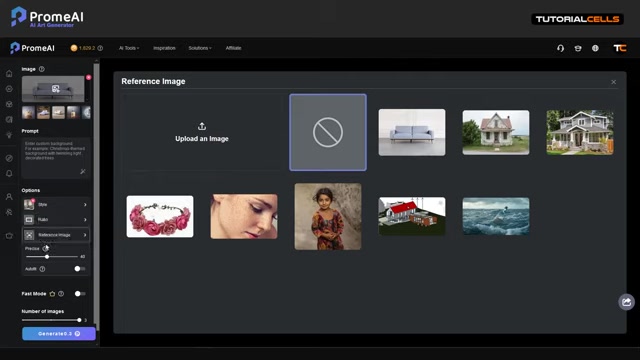
For example, if you want a portrait, it may be better to adjust those settings.
Leveraging Reference Images
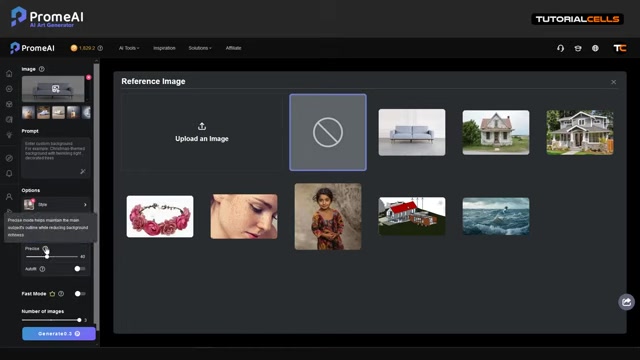
Reference images can be a powerful tool for guiding the background generation process. Use reference images to convey specific elements, such as color palettes, lighting, or composition.
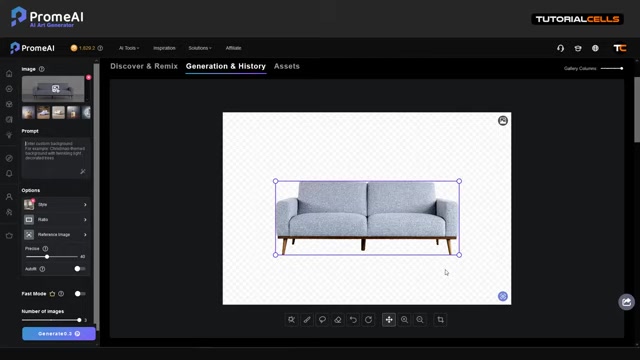
This helps PromeAI align the generated background with your creative direction.
Step-by-Step Guide to Using PromeAI Background Diffusion
Accessing the Background Diffusion Tool
After logging into PromeAI, navigate to the 'AI Tools' section and select 'Background Diffusion'. This will open the tool's interface, where you can begin uploading your image.
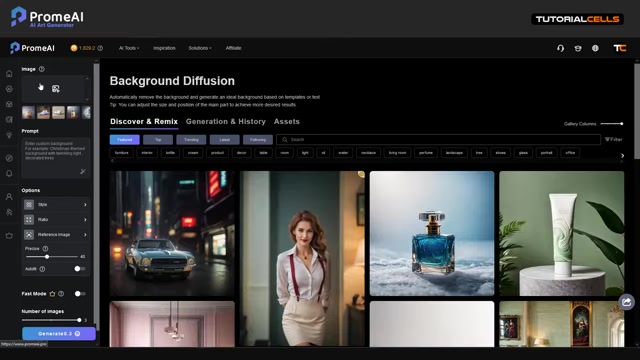
PromeAI's dashboard has all the tools you need, but let's focus on background diffusion.
Uploading Your Image
You can upload your own image from your computer or choose from a selection of preset images. The tool supports various image formats, including JPEG, PNG, and WebP. Simply drag and drop the image into the designated area or click to browse your files.
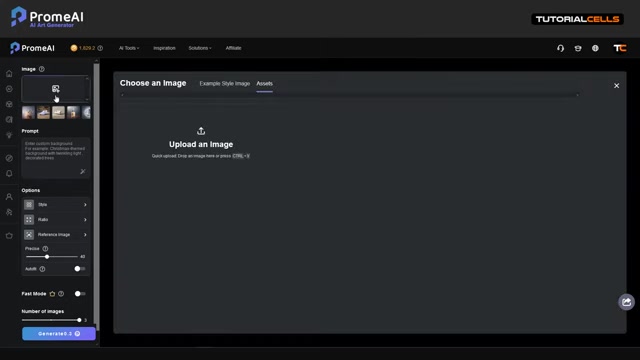
Remember to use images of the right file format for the best results.
Removing the Background Automatically
Once your image is uploaded, PromeAI automatically removes the existing background, leaving only the subject of the image. This process is typically completed within seconds, thanks to the tool's efficient AI algorithms. Watch as PromeAI takes on the task of removing backgrounds for you.
Adding a New Background
After removing the background, you have several options for adding a new one:
-
Using Templates: Choose from PromeAI's extensive library of background templates, categorized by theme and style.
-
Using Text Prompts: Enter a text prompt describing the desired background, and PromeAI will generate a background based on your input. For example, you could type 'Christmas themed background with twinkling lights'
-
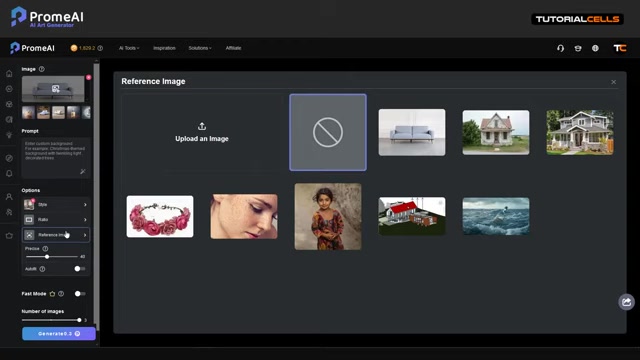
Using Reference Images: Upload a reference image to guide the background generation process. To guide the process, you may want to use additional reference images.
Adjusting Settings for Optimal Results
PromeAI offers several settings to fine-tune the background generation process:
-
Style: Select a style to influence the overall look and feel of the background.
-
Ratio: Adjust the aspect ratio of the image to fit your desired dimensions.
-
Precision: Control the level of detail and accuracy in the background generation.
-
Auto-Fill: Automatically adjust the size and position of the main object for optimal results.
Experiment with these settings to achieve the perfect look for your image.
Generating and Downloading Your Image
Once you're satisfied with the settings, click the 'Generate' button to create your new image. PromeAI will generate several variations based on your specifications, allowing you to choose the best one. Finally, download the image in your preferred format and resolution.
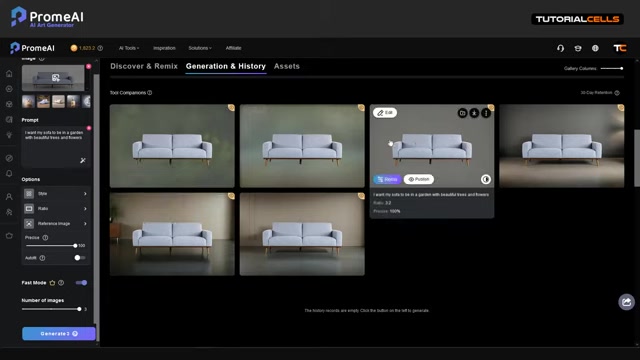
Downloaded images are free of watermarks.








Most people like

































Report
Please select a reason for reporting
- 13 Reasons to Switch from Snapchat to Text Messaging
- 7 Powerful Speech to Text Apps to Boost Productivity
- 10 Best Speech to Text Tools for Effortless Transcription
- 13 Free Tools to Easily Transcribe Audio to Text
- 15 Surprising Ways Google's Speech-to-Text Boosts Productivity
- 7 Best Free Online Audio to Text Transcription Tools
- 9 Tips to Transcribe Speech to Text Faster and Better
- 13 Best Speech to Text Software for Windows 10 in 2023
- 7 Tips for Choosing the Best Transcriber for Audio to Text
- 11 Reasons Why Dragon Speech-to-Text Apps are Game-Changers
- 6 Secrets to Enhance Your Speech to Text Transcription
- 6 Brilliant Ways to Boost Productivity with Talk-to-Text on Your MacBook
- 6 Ways Transcription Software Converts Audio to Text
- 8 Tips to Transcribe Speech to Text Like a Pro
- 6 Reasons IBM Watson Speech to Text is a Game-Changer
- 14 Powerful Ways Talk-to-Text Improves Your Workflow
- 12 Top Windows Speech-to-Text Software for Efficient Transcription
- 12 Game-Changing Benefits of Apple's Speech to Text Technology
- 9 Powerful Use Cases for AWS Speech to Text Technology
- 10 Easy Steps to Transcribe YouTube Videos to Text
- transcription audio en texte
- online audio transcription
- free audio file transcription
- free ai audio transcription
- audio transcription service
- audio transcription online free
- audio transcription free online
- audio to transcription software
- audio and transcript
- ai audio transcription free
- voice recording to text converter
- translate voice recording to text
- record voice to text
- audio recording to text converter
- voice recording and transcription
- chatgpt voice to text
- gmail voice to text
- speech to text reader
- speech to text ai free
- speech to talk
- How SEO and Marketing Dashboards Empower Agencies to Drive Results
- How to Use AI Tools to Find Internal Linking Opportunities Across a Business Website
- Discover Your Perfect Haircut with AI Hairstyle Apps
- Free Reputation Calculator Tools: How They're Adapting to Score AI Visibility, Not Just Rankings
- Design Professional Flyers for Free on Your Phone
- Best Free Flyer Maker Apps for Android: Design Like a Pro
- How to Know If Your Business Is Ready for an AI Customer Service Agent
- Revolutionizing Storytelling: From Novels to Screenplays with AI
- Create Engaging Animated Explainer Videos with a Free AI Tool
- Stop Multi-Subscribing: Benchmark Top AI Visual Models in One Canvas
- AI & Elections: Defending Democracy Against Misinformation
- Navigating Political Discourse: AI, Deepfakes, and Reality Checks
- Detecting Political Bias in News Articles: A Powerful AI Algorithm
- AI Bias Unveiled: Political Leanings in ChatGPT & Beyond
- Revolutionize Learning: Discover Quizzes AI for Engaging Interactive Quizzes
- From AI-Generated to Audience-Ready: How Quillbot Humanize AI Is Changing the Content Editing Process
- Building an AI Writing Stack in 2026: LLMs, Detectors, and Humanizers
- 7 Top AI-Powered Database Assistant Platforms
- An Objective Look at Modern Web-Based Visual Modifications
- My Honest Experience with VideoAI: The Secret Weapon for Creators Who Need Character Voices

Copyright ©2026 toolify