































Table of Contents
- Key Points
- Understanding QueryEd
- Detailed Exploration of QueryEd Features
- A Step-by-Step Guide on Using QueryEd
- QueryEd Pricing
- Pros and Cons of Using QueryEd
- Core Features of QueryEd
- Use Cases for QueryEd
- Frequently Asked Questions (FAQ)
- Related Questions



Understanding QueryEd
What is QueryEd?
QueryEd is an AI-driven platform designed to simplify and enhance the learning process. It allows users to generate question-and-answer pairs, create comprehensive Quizzes, and formulate Essay questions across a wide range of topics. The core objective of QueryEd is to facilitate effective learning and knowledge assessment through customizable and dynamic educational content.

This innovative tool caters to students, educators, and professionals alike, offering a flexible and engaging way to reinforce understanding and evaluate proficiency.
At its heart, QueryEd harnesses the power of artificial intelligence to create Relevant and challenging content. Users can input specific topics, define the number of questions required, and select the question type—whether multiple-choice, essay, or quiz format. The AI then generates content that is both contextually appropriate and aligned with the specified learning objectives.
QueryEd is built to be accessible and user-friendly, ensuring that anyone can easily navigate its features and create personalized learning experiences. By offering customizable educational content, QueryEd helps to improve knowledge retention, facilitate effective assessment, and make learning a more interactive and engaging process. Its adaptability to diverse subjects and educational levels makes it a valuable asset in the modern learning toolkit.
Detailed Exploration of QueryEd Features
Generating Q&A with QueryEd
One of the primary functions of QueryEd is its ability to generate question-and-answer pairs on any topic. This feature is invaluable for students looking to review material, educators aiming to create study guides, and professionals needing to reinforce specific skills. To generate Q&A, users simply input the desired topic and specify the number of questions they need. QueryEd’s AI algorithms then create a set of questions and answers that are both relevant and challenging.
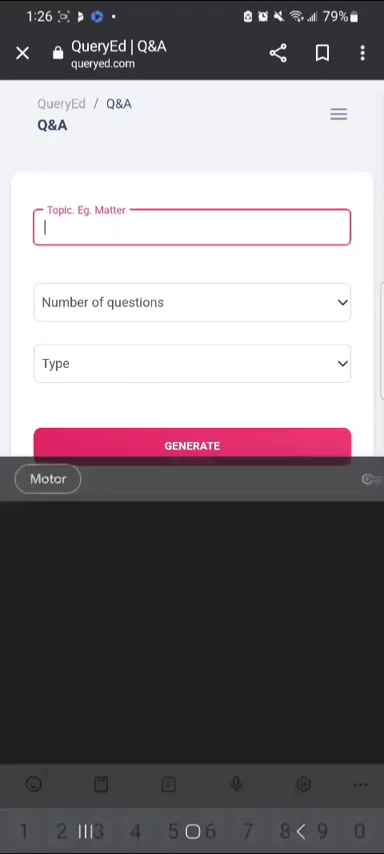
This streamlined process saves time and ensures that learners receive high-quality, targeted content.
Here’s how it works:
- Topic Input: Enter the subject area for which you want to generate questions. This could be anything from biology to history to software engineering.
- Number of Questions: Specify how many questions you want to generate. This allows you to create concise reviews or more comprehensive study Sessions.
- Type Selection: Choose the type of questions you prefer. Options include multiple-choice, essay, or quiz format, allowing you to tailor the content to your specific needs.
- Generation: Let QueryEd’s AI do the rest. The platform generates a set of relevant and challenging questions and answers based on your input.
The generated Q&A can then be used for self-assessment, group study, or creating educational materials. The flexibility of this feature makes QueryEd an essential tool for anyone involved in learning and teaching.
Creating Quizzes with QueryEd
QueryEd excels in its ability to generate quizzes tailored to specific learning needs. Quizzes are a highly effective method for assessing knowledge retention and identifying areas that require further study. The platform allows users to create quizzes with varying difficulty levels and question types, ensuring a comprehensive evaluation of learning outcomes.
To create a quiz, follow these steps:
- Select Quiz Form: Choose the quiz form option from the available question types.
- Enter Topic: Input the subject area for the quiz. For example, you might enter “cells in biology”
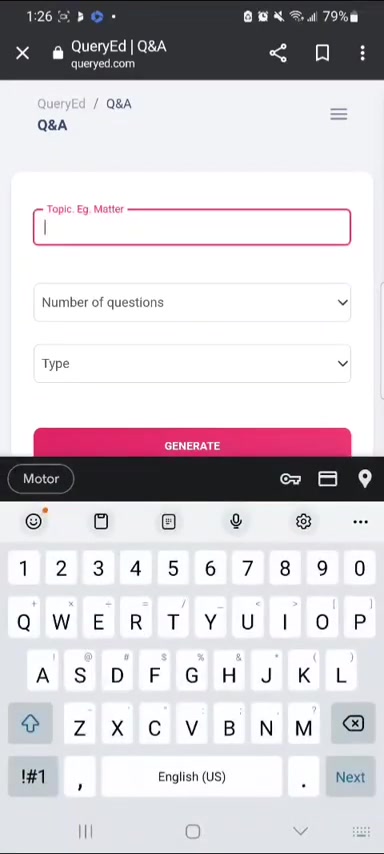
.
- Specify Parameters: Define the number of questions, question type (e.g., multiple-choice), and difficulty level (easy, medium, or hard).
- Generate Quiz: Let QueryEd create the quiz. The platform generates a set of questions based on your defined parameters.
- Take the Quiz: Answer the questions to assess your knowledge. The platform provides immediate feedback, highlighting areas of strength and weakness. You can check all the correct answers and your score after you submit the quiz .
The quizzes generated by QueryEd can be used for self-testing, classroom assessments, or professional development. The platform’s adaptability to different subjects and difficulty levels makes it an invaluable asset for anyone looking to enhance their learning and teaching toolkit.
Essay Question Generation
QueryEd also provides the functionality to generate essay questions, which are particularly useful for promoting critical thinking and in-depth understanding of complex topics. Essay questions require learners to synthesize information, formulate arguments, and articulate their thoughts in a structured manner. This type of question is essential for developing higher-order thinking skills.
Here’s how to generate essay questions using QueryEd:
- Select Essay Type: Choose the essay type option from the available question types.
- Enter Topic: Input the subject area for the essay questions. For example, you might enter “the impact of climate change on global economies”.
- Specify Parameters: Define the number of questions and any specific criteria you want the questions to address.
- Generate Questions: Let QueryEd create the essay questions. The platform generates a set of questions designed to stimulate critical thinking and in-depth analysis.
The generated essay questions can be used for assignments, exams, or personal reflection. The platform’s ability to create nuanced and thought-provoking questions makes it an excellent tool for educators and learners alike.
Export to PDF and Offline Access
QueryEd offers a convenient export to PDF function, enabling users to easily share and access their generated content offline.
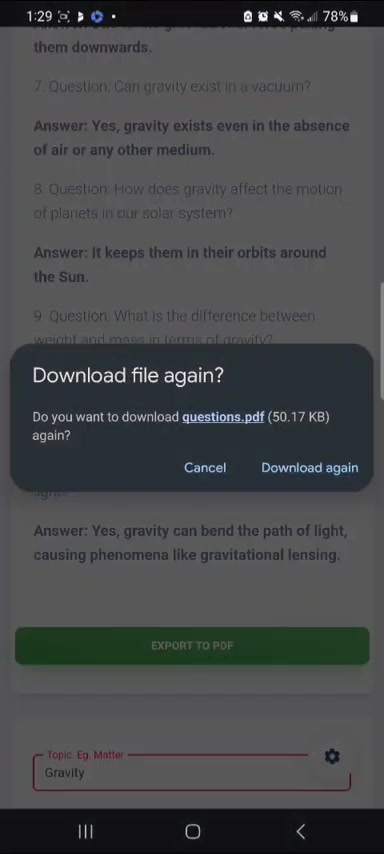
This feature enhances the platform's usability, allowing learners to study and review material without needing an internet connection. The ability to export content to PDF also simplifies the process of sharing educational materials with others, whether it’s distributing study guides to classmates or providing assignments to students.
To export content to PDF, simply click the “Export to PDF” button after generating your Q&A, quiz, or essay questions. The platform will then create a PDF document that you can save, print, or share as needed. This streamlined process ensures that QueryEd’s educational resources are accessible anytime, anywhere.
A Step-by-Step Guide on Using QueryEd
Signing Up and Creating an Account
Before diving into the features of QueryEd, the first step is to create an account. Here’s how to do it:
- Navigate to the QueryEd Website: Open your web browser and go to the QueryEd website.
- Click on “Sign Up”: Locate the “Sign Up” button, usually found in the upper right corner of the homepage

.
- Fill in the Registration Form: Provide the necessary information, including your first name, last name, email address, and password.
- Verify Your Email: After submitting the registration form, you will receive a verification email. Click on the link in the email to verify your account.
- Sign In: Once your account is verified, you can sign in using your email address and password.You can use google account to log in.
Generating Multiple Choice Questions
QueryEd simplifies the creation of multiple choice questions, making it easier than ever to prepare for exams and tests. Here is a straightforward guide:
- Access the Q&A Section: After logging in, navigate to the “Q&A” section of QueryEd.
- Enter Your Topic: In the designated field, type the subject or topic for which you want to create multiple choice questions. For instance, you could enter "Cells in Biology" or "UK GCSE Physics" .
- Specify the Number of Questions: Choose how many questions you want to generate. You can select from a range of options like 10, 15, or 20 questions to fit your study needs.
- Select Multiple Choice Questions Type: From the "Type" dropdown menu, select "Multiple Choice Questions." This tells QueryEd to generate questions in this specific format.
- Choose the Form: Select the form which can be Q&A Form or Quiz Form
- Generate Questions: Click the "Generate" button to start the question creation process. QueryEd will use AI to create multiple choice questions based on your topic and specifications.
- Review and Customize: After generation, review the questions to ensure they meet your standards. You can edit any question to improve Clarity, accuracy, or relevance.
- Export to PDF: If you need to share or review the questions offline, use the "Export to PDF" feature to create a document you can easily distribute and access anywhere.
Additional Features and Customizations
QueryEd goes beyond basic question generation by offering several customization options that enhance the learning experience. Here are some key features you should know:
- Adjust Question Difficulty: Tailor the difficulty level of the questions to match your current understanding. Select from easy, medium, or hard to challenge yourself appropriately
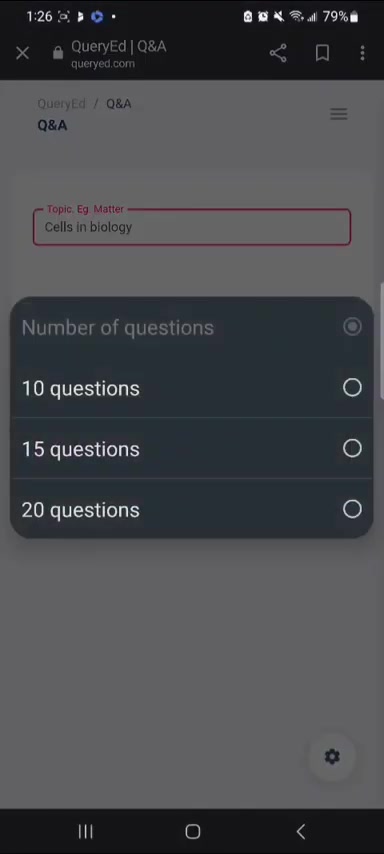
.
- Mix Question Types: Combine different question formats, such as multiple choice and essay questions, in your quizzes to provide a comprehensive review of the material.
- Save and Organize Content: Keep your generated questions and quizzes organized within QueryEd for future access. This is great for tracking progress and revisiting previous topics.
- Print Your Materials: Besides exporting to PDF, you can also print your questions directly from the platform for hands-on studying .
- Use Quiz Mode: When preparing for an exam, switch to quiz mode for a timed test experience. This helps you practice under pressure and improve your test-taking skills.
- Essay question creation: Select Essay Type from the Q&A section then the AI will generate a series of essay questions.
By leveraging these features, QueryEd becomes a personalized learning tool that adapts to your unique educational journey.





Most people like







































Report
Please select a reason for reporting
- 13 Reasons to Switch from Snapchat to Text Messaging
- 7 Powerful Speech to Text Apps to Boost Productivity
- 10 Best Speech to Text Tools for Effortless Transcription
- 13 Free Tools to Easily Transcribe Audio to Text
- 15 Surprising Ways Google's Speech-to-Text Boosts Productivity
- 7 Best Free Online Audio to Text Transcription Tools
- 9 Tips to Transcribe Speech to Text Faster and Better
- 13 Best Speech to Text Software for Windows 10 in 2023
- 7 Tips for Choosing the Best Transcriber for Audio to Text
- 11 Reasons Why Dragon Speech-to-Text Apps are Game-Changers
- 6 Secrets to Enhance Your Speech to Text Transcription
- 6 Brilliant Ways to Boost Productivity with Talk-to-Text on Your MacBook
- 6 Ways Transcription Software Converts Audio to Text
- 8 Tips to Transcribe Speech to Text Like a Pro
- 6 Reasons IBM Watson Speech to Text is a Game-Changer
- 14 Powerful Ways Talk-to-Text Improves Your Workflow
- 12 Top Windows Speech-to-Text Software for Efficient Transcription
- 12 Game-Changing Benefits of Apple's Speech to Text Technology
- 9 Powerful Use Cases for AWS Speech to Text Technology
- 10 Easy Steps to Transcribe YouTube Videos to Text
- transcription audio en texte
- online audio transcription
- free audio file transcription
- free ai audio transcription
- audio transcription service
- audio transcription online free
- audio transcription free online
- audio to transcription software
- audio and transcript
- ai audio transcription free
- voice recording to text converter
- translate voice recording to text
- record voice to text
- audio recording to text converter
- voice recording and transcription
- chatgpt voice to text
- gmail voice to text
- speech to text reader
- speech to text ai free
- speech to talk
- How SEO and Marketing Dashboards Empower Agencies to Drive Results
- How to Use AI Tools to Find Internal Linking Opportunities Across a Business Website
- Discover Your Perfect Haircut with AI Hairstyle Apps
- Free Reputation Calculator Tools: How They're Adapting to Score AI Visibility, Not Just Rankings
- Design Professional Flyers for Free on Your Phone
- Best Free Flyer Maker Apps for Android: Design Like a Pro
- How to Know If Your Business Is Ready for an AI Customer Service Agent
- Revolutionizing Storytelling: From Novels to Screenplays with AI
- Create Engaging Animated Explainer Videos with a Free AI Tool
- Stop Multi-Subscribing: Benchmark Top AI Visual Models in One Canvas
- Revolutionize Learning: Discover Quizzes AI for Engaging Interactive Quizzes
- From AI-Generated to Audience-Ready: How Quillbot Humanize AI Is Changing the Content Editing Process
- Building an AI Writing Stack in 2026: LLMs, Detectors, and Humanizers
- 7 Top AI-Powered Database Assistant Platforms
- An Objective Look at Modern Web-Based Visual Modifications
- My Honest Experience with VideoAI: The Secret Weapon for Creators Who Need Character Voices
- 5 Data Problems That Stall AI Projects in Financial Compliance
- The Future of Smart Glasses: Explained & Assembling Guide
- DeepL Translator: The AI-Powered Translation Tool
- AI Video Upscaling: Top Tools Compared for Enhanced Quality

Copyright ©2026 toolify