































Table of Contents
- Key Points
- Understanding DeepSeek-R1
- Essential Prerequisites for Local Installation
- Step-by-Step Installation and Usage Guide
- Understanding Costs and Access
- Weighing the Advantages and Disadvantages of DeepSeek-R1
- Frequently Asked Questions
- Related Questions


Essential Prerequisites for Local Installation
Hardware and Software Requirements
Before embarking on the installation process, verifying your system's compatibility with the requirements of DeepSeek-R1 is important.
- Operating System: This guide focuses on Linux Ubuntu.
- Processor: An Intel i9 processor is recommended for optimal performance.
- RAM: At least 64 GB of RAM is recommended for decent usage.
- GPU: NVIDIA 3090 GPU with 24GB VRAM will allow you to run this software.
- Disk Space: A significant amount of disk space (1 to 40 GB for distilled models) is required. 400 GB - 1TB may be required for other models.
Open the Required Port for proper functioning
Opening the right port is critical for the smooth operation of DeepSeek-R1.
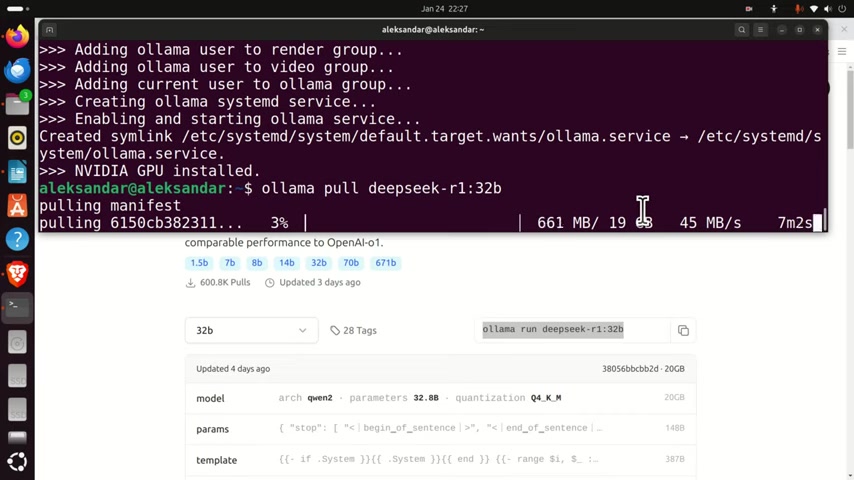
The port referenced (11434) allows the Ollama server to be executed. This is a really vital step, the port must be open for local and outside connections.
Step-by-Step Installation and Usage Guide
Step 1: Installing Curl & Ubuntu Updates
The first thing you need to do is install Curl and Ubuntu updates to use DeepSeek R1.
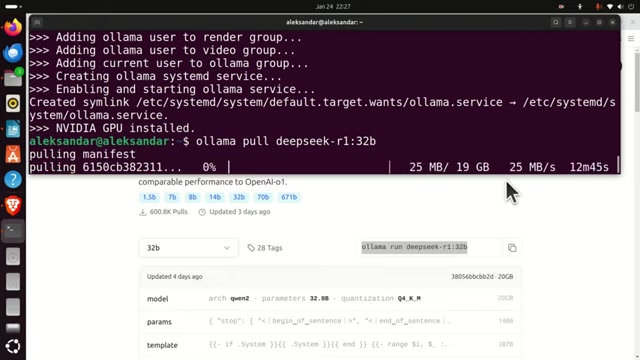
Curl is a command-line tool used for transferring data with URLs, which is required for downloading necessary components. Before installing Curl, update your Ubuntu repositories to ensure you have the latest package information.
sudo apt update && sudo apt upgradeAfter updating, install Curl:
sudo apt install curlVerify the installation by checking the Curl version:
curl --versionStep 2: Installing Ollama
Ollama simplifies the process of running LLMs locally. Install Ollama by navigating to the official website (ollama.com) and downloading the Linux version. Once downloaded, open your terminal and use the provided command to install Ollama:
curl -fsSL https://ollama.com/install.sh | shThis command downloads and executes the Ollama installation script.
Step 3: Downloading DeepSeek-R1 Model with Ollama
Next, download the DeepSeek-R1 model using Ollama. First, search for DeepSeek-R1 on the Ollama website. Then, select the appropriate model version (e.g., a distilled model with 32B parameters to keep your hardware compatible) and click the 'Run' command on the screen to obtain the specific pull command.
Important Note: Do not execute this command directly. To ensure proper downloading, modify the command.
Use the ollama pull command followed by the model name, as shown below:
ollama pull deepseek-r1:14bThis command downloads the DeepSeek-R1 14b parameter model to your local system. This may take some time, depending on your internet connection speed.
Step 4: Creating a Python Virtual Environment
A virtual environment helps isolate project dependencies. Create a new directory for your project, navigate into it, and then create a virtual environment:
mkdir testModel
cd testModel
Install the virtual environment package:
sudo apt install python3.12-venv #Ensure your python version is compatible with this command, replace 3.12 with your versionCreate the python virutal environment:
python3 -m venv env1 #env1 is the environment name, name as you desireActivate the virtual environment:
source env1/bin/activateYour terminal Prompt should now show the virtual environment name (env1).
Step 5: Installing the Ollama Python Library
With the virtual environment activated, install the Ollama Python library:
pip install ollamaThis command installs the necessary Python bindings to interact with the Ollama server and run the DeepSeek-R1 model from Python scripts.
Step 6: Creating and Running the Python Script
Create a Python script (e.g., test.py) using Nano or any other text editor:
sudo nano test.pyAdd the following code to the script. Remember to modify the desiredModel variable to match the DeepSeek-R1 model version you downloaded. This code snippet prompts the model to give a solution to a quadratic equation, saves the output to a text file, and then prints it to the terminal.
import ollama

desiredModel='deepseek-r1:14b'
questionToAsk='How to solve a quadratic equation x^2+5*x+6=0'

response = ollama.chat(model=desiredModel, messages=[
    {
        'role': 'user',
        'content': questionToAsk,
    },
])

OllamaResponse=response['message']['content']

print(OllamaResponse)

with open("OutputOllama.txt", "w", encoding="utf-8") as text_file:
    text_file.write(OllamaResponse)
Run the Python script:
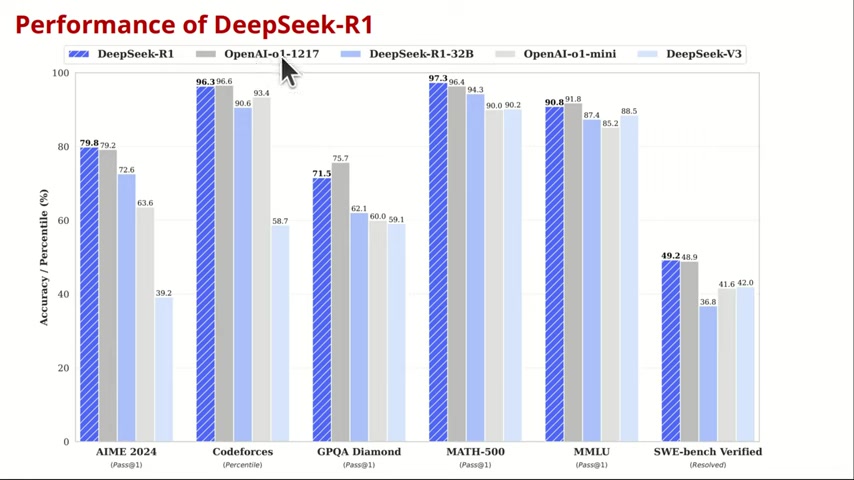
sudo python3 test.py








Most people like































Report
Please select a reason for reporting
- 13 Reasons to Switch from Snapchat to Text Messaging
- 7 Powerful Speech to Text Apps to Boost Productivity
- 10 Best Speech to Text Tools for Effortless Transcription
- 13 Free Tools to Easily Transcribe Audio to Text
- 15 Surprising Ways Google's Speech-to-Text Boosts Productivity
- 7 Best Free Online Audio to Text Transcription Tools
- 9 Tips to Transcribe Speech to Text Faster and Better
- 13 Best Speech to Text Software for Windows 10 in 2023
- 7 Tips for Choosing the Best Transcriber for Audio to Text
- 11 Reasons Why Dragon Speech-to-Text Apps are Game-Changers
- 6 Secrets to Enhance Your Speech to Text Transcription
- 6 Brilliant Ways to Boost Productivity with Talk-to-Text on Your MacBook
- 6 Ways Transcription Software Converts Audio to Text
- 8 Tips to Transcribe Speech to Text Like a Pro
- 6 Reasons IBM Watson Speech to Text is a Game-Changer
- 14 Powerful Ways Talk-to-Text Improves Your Workflow
- 12 Top Windows Speech-to-Text Software for Efficient Transcription
- 12 Game-Changing Benefits of Apple's Speech to Text Technology
- 9 Powerful Use Cases for AWS Speech to Text Technology
- 10 Easy Steps to Transcribe YouTube Videos to Text
- transcription audio en texte
- online audio transcription
- free audio file transcription
- free ai audio transcription
- audio transcription service
- audio transcription online free
- audio transcription free online
- audio to transcription software
- audio and transcript
- ai audio transcription free
- voice recording to text converter
- translate voice recording to text
- record voice to text
- audio recording to text converter
- voice recording and transcription
- chatgpt voice to text
- gmail voice to text
- speech to text reader
- speech to text ai free
- speech to talk
- How SEO and Marketing Dashboards Empower Agencies to Drive Results
- How to Use AI Tools to Find Internal Linking Opportunities Across a Business Website
- Discover Your Perfect Haircut with AI Hairstyle Apps
- Free Reputation Calculator Tools: How They're Adapting to Score AI Visibility, Not Just Rankings
- Design Professional Flyers for Free on Your Phone
- Best Free Flyer Maker Apps for Android: Design Like a Pro
- How to Know If Your Business Is Ready for an AI Customer Service Agent
- Revolutionizing Storytelling: From Novels to Screenplays with AI
- Create Engaging Animated Explainer Videos with a Free AI Tool
- Stop Multi-Subscribing: Benchmark Top AI Visual Models in One Canvas
- ASOMobile Helps Teams Benchmark App Store Screenshots Against Competitors
- How to Match LMS Software With Your Organization's Training Plan
- Revolutionizing Email Marketing Agency with AI
- How to Convert BTC to HNT
- Unleashing the Power of AI: Cognizant's Roadmap for Transformation
- Frame to Video Review: A Practical Look at Turning Two Still Frames Into Motion
- NVIDIA NIM: Revolutionizing Supply Chain Data Analysis with AI
- Top AI Tools That Help Brands Stand Out Offline (Not Just Online)
- Top 5 Cold Email Software: Maximize Your Outreach in 2025
- Magic School AI: Revolutionizing Quiz & Assessment Generation

Copyright ©2026 toolify