































Table of Contents
- Key Points
- Unleashing the Power of AI in Content Creation
- A Practical Guide to Using Shopia AI Writer
- How to Use Shopia's Key Features
- Shopia AI Writer Pricing
- Pros and Cons of Using Shopia AI Writer
- Frequently Asked Questions about Shopia AI Writer
- Related Questions



Unleashing the Power of AI in Content Creation
What is Shopia AI Writer?
Shopia AI Writer is a cutting-edge platform designed to assist users in generating high-quality content using artificial intelligence. It leverages advanced algorithms to produce articles, blog posts, Amazon listings, and other content formats with remarkable speed and efficiency. Whether you're a seasoned marketer or a novice blogger, Shopia aims to streamline your content creation process and boost your online presence.

One of Shopia's standout features is its SEO optimization capability. The platform helps users create content that is not only engaging but also optimized for search engines. By incorporating relevant keywords, meta descriptions, and other SEO elements, Shopia can help your content rank higher in search results, driving more organic traffic to your website. This feature alone makes it an invaluable tool for businesses looking to improve their online visibility and attract new customers.
Shopia also offers a variety of content templates and customization options, allowing users to tailor their content to specific audiences and purposes. From product descriptions to social media posts, the platform provides the tools you need to create compelling content that resonates with your target market. And with its intuitive interface and user-friendly design, Shopia makes content creation accessible to everyone, regardless of their technical expertise.
Keywords are a critical component of successful content creation and SEO strategy. Shopia understands this and offers robust keyword research and integration tools. Users can easily identify relevant keywords for their content and seamlessly incorporate them into the text, meta descriptions, and other SEO elements. This ensures that your content is not only well-written but also optimized for search engines, helping you attract the right audience and drive more conversions.
Key Features and Benefits of Shopia AI Writer
Shopia AI Writer is packed with features designed to simplify and enhance the content creation process. Here's a closer look at some of its key functionalities and benefits:
- Content Automation: Shopia automates the creation of various content formats, such as blog posts, articles, and Amazon listings, saving users significant time and resources.
- SEO Optimization: The platform helps users create SEO-optimized content that ranks higher in Search Engine results, driving more organic traffic to their websites. By incorporating relevant keywords and optimizing meta descriptions, Shopia ensures your content gets the visibility it deserves.
- Versatile Content Formats: From long-form articles to short social media posts, Shopia supports a wide range of content formats, catering to diverse marketing needs. It's a one-stop-shop for all your content creation requirements.
- Plagiarism Checker: Shopia includes a Plagiarism Checker to ensure the originality of your content, protecting your brand reputation and avoiding copyright issues. This feature is invaluable for maintaining credibility and building trust with your audience.
- AI-Powered Suggestions: The platform provides AI-driven suggestions for titles, outlines, and keywords, helping users generate engaging and effective content. These suggestions streamline the creative process and ensure your content is well-structured and optimized for search engines.
- User-Friendly Interface: Offers an intuitive design making content creation accessible to everyone, regardless of their technical expertise.
- Bulk Content Actions: Perform bulk actions for multiple documents or article to assign users, change statuses and more.
Shopia AI Writer is designed to make content creation more efficient, effective, and accessible. By automating key tasks and providing AI-powered assistance, Shopia empowers users to create high-quality content that drives results.
A Practical Guide to Using Shopia AI Writer
Step-by-Step Tutorial: Creating a Blog Article with Shopia AI Writer
Let's walk through the process of creating a blog article using Shopia AI Writer. This step-by-step Tutorial will guide you through the platform's features and functionalities, ensuring you get the most out of this powerful tool:
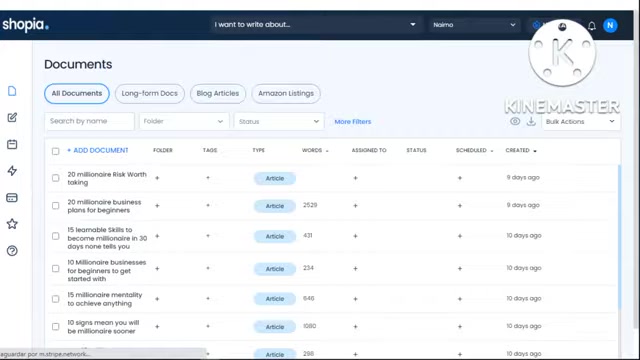
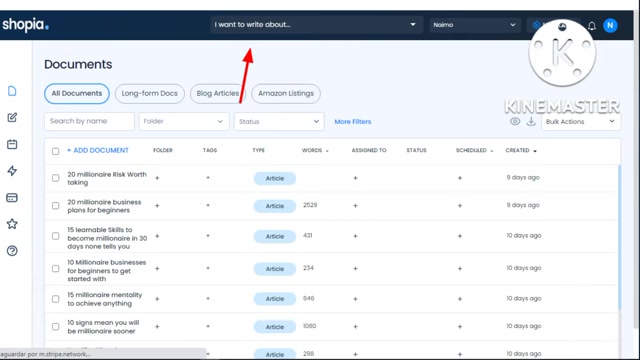
- Access Shopia AI Writer: Begin by navigating to the Shopia website (shopia1.blogspot.com) and logging into your account. If you're a new user, you may need to sign up for a free trial or subscription plan.
- Select 'Blog Articles': Once logged in, navigate to the 'Blog Articles' section, where you can begin creating your content.
- Define Your Article: Provide a detailed description of your desired blog article. Include keywords, tone preferences, and any specific requirements you have. This information will help Shopia generate content that aligns with your vision and target audience.
- Generate Title Suggestions: Shopia will generate a list of title suggestions based on your article description and keywords. Select the title that best captures the essence of your article and resonates with your target audience.
- Review and Refine the Outline: Shopia will create a detailed outline for your blog article, including titles, subheadings, and key points. Review this outline carefully, making any necessary adjustments to ensure it aligns with your content goals.
- Adding Content for Each subheadings: You need to click the black button below, this is a black button, where the content will be automatically created from the key points you have included in step 5.
- Customize Your Article: Take advantage of Shopia's customization options to add your personal touch to the generated content. You can rewrite sections, add images, and incorporate your unique voice and style to create a truly engaging and authentic article.
- Generate Article & Plagiarism Check: Once you're satisfied with the outline and content, click the 'Generate Article' button. Shopia will create the full article, including images if selected. Use the platform's plagiarism checker to ensure your content is original and free from any copyright issues. This is a crucial step in maintaining your brand's credibility and building trust with your audience.
- Edit Article & Plagiarism check: You can edit the article to ensure everything is inline with what you have or change the content to match your tone, style and grammar. You can also check for Plagiarism inbuild tool and make sure everything is unique and error-free before publishing or sending to your article to platforms.
- Send the Article to platforms: Add your article directly to you to blog host by connecting to Zapier, Zapier will allow you to instantly share your article and post to host such as Facebook, Twitter and Instagram.
By following these steps, you can leverage Shopia AI Writer to create compelling blog articles with ease, saving time and effort while maintaining high-quality content.
Crafting Amazon Listings with Shopia: A Streamlined Approach
Creating compelling Amazon listings can be a Game-changer for businesses looking to boost their product visibility and drive sales. Shopia AI Writer simplifies the process with a dedicated Amazon listings feature, ensuring your products stand out in the crowded marketplace.
- Start by choosing Amazon Listings: Access Shopia AI Writer to start on making your Amazon Listings, begin by providing key details about the product you want to list. The description should include essential features, benefits, and target audience information to guide Shopia's AI in generating relevant and effective content.
- Keywords are key!: Identifying and integrating relevant keywords is crucial for maximizing your Amazon listing's visibility. Shopia's built-in keyword research tools assist you in finding high-impact keywords that drive organic traffic and improve your product's ranking in search results.
- Generate Title Suggestions: Shopia will generate a range of potential titles based on your product details and keywords. Choose the title that best captures the essence of your product while being both informative and engaging. An effective title is the first step to attracting potential customers.
- Send to Amazon: With a compelling Product Description and optimized title, you can now get higher product visibility and can potentially increases sales!.
With Shopia's Amazon listings feature, businesses can streamline their product listing creation process, ensuring their products are effectively showcased and optimized for Amazon's search algorithm.
Maximizing Your SEO with Shopia AI Writer
SEO is the backbone of any successful online presence. Shopia AI Writer incorporates several features that help users create content optimized for search engines, ensuring their websites and articles rank higher in search results.
- Keyword Integration: Shopia seamlessly incorporates relevant keywords into your content, meta descriptions, and other SEO elements, ensuring your articles align with search engine algorithms. The platform helps users create SEO-optimized content that ranks higher in search engine results. By incorporating relevant keywords and optimizing meta descriptions, Shopia ensures your content gets the visibility it deserves.
- Keyword Research: Use Shopia's research tools to find high impact keywords for your niche to gain traction quickly.
- Meta Descriptions: With meta descriptions optimized by AI, your website or your article will definitely rank high in search results.








Most people like































Report
Please select a reason for reporting
- 13 Reasons to Switch from Snapchat to Text Messaging
- 7 Powerful Speech to Text Apps to Boost Productivity
- 10 Best Speech to Text Tools for Effortless Transcription
- 13 Free Tools to Easily Transcribe Audio to Text
- 15 Surprising Ways Google's Speech-to-Text Boosts Productivity
- 7 Best Free Online Audio to Text Transcription Tools
- 9 Tips to Transcribe Speech to Text Faster and Better
- 13 Best Speech to Text Software for Windows 10 in 2023
- 7 Tips for Choosing the Best Transcriber for Audio to Text
- 11 Reasons Why Dragon Speech-to-Text Apps are Game-Changers
- 6 Secrets to Enhance Your Speech to Text Transcription
- 6 Brilliant Ways to Boost Productivity with Talk-to-Text on Your MacBook
- 6 Ways Transcription Software Converts Audio to Text
- 8 Tips to Transcribe Speech to Text Like a Pro
- 6 Reasons IBM Watson Speech to Text is a Game-Changer
- 14 Powerful Ways Talk-to-Text Improves Your Workflow
- 12 Top Windows Speech-to-Text Software for Efficient Transcription
- 12 Game-Changing Benefits of Apple's Speech to Text Technology
- 9 Powerful Use Cases for AWS Speech to Text Technology
- 10 Easy Steps to Transcribe YouTube Videos to Text
- transcription audio en texte
- online audio transcription
- free audio file transcription
- free ai audio transcription
- audio transcription service
- audio transcription online free
- audio transcription free online
- audio to transcription software
- audio and transcript
- ai audio transcription free
- voice recording to text converter
- translate voice recording to text
- record voice to text
- audio recording to text converter
- voice recording and transcription
- chatgpt voice to text
- gmail voice to text
- speech to text reader
- speech to text ai free
- speech to talk
- How SEO and Marketing Dashboards Empower Agencies to Drive Results
- How to Use AI Tools to Find Internal Linking Opportunities Across a Business Website
- Discover Your Perfect Haircut with AI Hairstyle Apps
- Free Reputation Calculator Tools: How They're Adapting to Score AI Visibility, Not Just Rankings
- Design Professional Flyers for Free on Your Phone
- Best Free Flyer Maker Apps for Android: Design Like a Pro
- How to Know If Your Business Is Ready for an AI Customer Service Agent
- Revolutionizing Storytelling: From Novels to Screenplays with AI
- Create Engaging Animated Explainer Videos with a Free AI Tool
- Stop Multi-Subscribing: Benchmark Top AI Visual Models in One Canvas
- ASOMobile Helps Teams Benchmark App Store Screenshots Against Competitors
- How to Match LMS Software With Your Organization's Training Plan
- Revolutionizing Email Marketing Agency with AI
- How to Convert BTC to HNT
- Unleashing the Power of AI: Cognizant's Roadmap for Transformation
- Frame to Video Review: A Practical Look at Turning Two Still Frames Into Motion
- NVIDIA NIM: Revolutionizing Supply Chain Data Analysis with AI
- Top AI Tools That Help Brands Stand Out Offline (Not Just Online)
- Top 5 Cold Email Software: Maximize Your Outreach in 2025
- Magic School AI: Revolutionizing Quiz & Assessment Generation

Copyright ©2026 toolify