































Table of Contents
- Key Points
- Accessing Sora 2 via API
- Understanding the KIE.ai API for Sora 2
- Benefits and Limitations
- FAQ
- Related Questions


Accessing Sora 2 via API
The Challenge of Sora 2 Access
For many, direct access to cutting-edge AI video generation tools like Sora 2 remains limited.
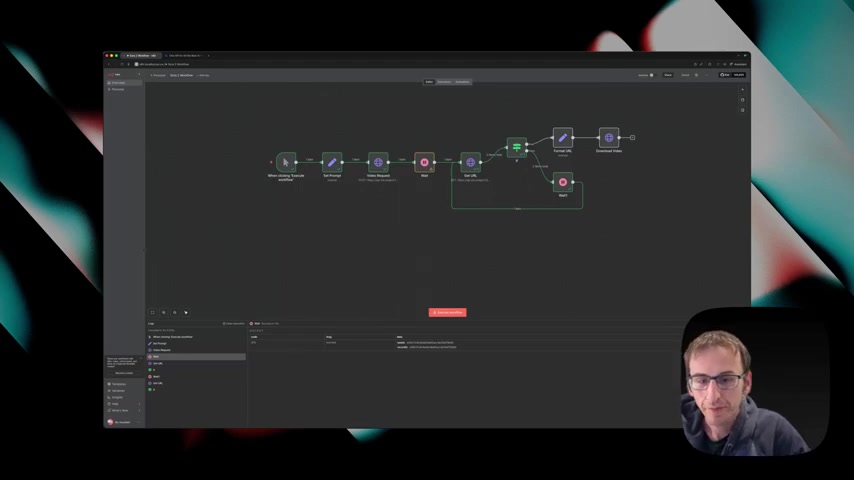
Access through the official website or application often requires invitation codes, creating a barrier for those eager to experiment with AI video creation. This limitation underscores the importance of alternative access methods, such as utilizing APIs, which can provide a programmatic gateway to these powerful tools. This opens up opportunities for automated workflows and integrations.
Fortunately, you can circumvent this by accessing Sora 2 via its Application Programming Interface (API), giving you the power to programmatically request videos and download the results. This eliminates the need for constant manual interaction through the official platform. This accessibility opens a world of possibilities for integrating AI video generation into existing workflows. The use of KIE.ai provides a streamlined, cost-effective pathway to harnessing the capabilities of advanced video models like Sora 2. KIE.ai offers a unified API for accessing various AI models, simplifying the development process.
Introducing KIE.ai
KIE.ai offers an accessible pathway to use cutting-edge AI tech even without direct access to platforms like Sora 2. For a fraction of the cost compared to alternatives like Fail.ai, this versatile platform provides access through their Sora 2 API. If you need just a video or two, KIE.ai Sora 2 API offers a straightforward path to video creation. You can directly upload your files, define your prompts, and run the video to create high-quality videos programmatically. You can also get the best Video, Image & Music Models in One API!
Sora 2 API Pricing on KIE.ai
The KIE.ai platform, which provides access to Sora 2 API, works based on a credit system. Each 10-second video costs 20 credits or 10 cents, this affordable pricing enables users to efficiently use AI video generation in the KIE.ai playground.
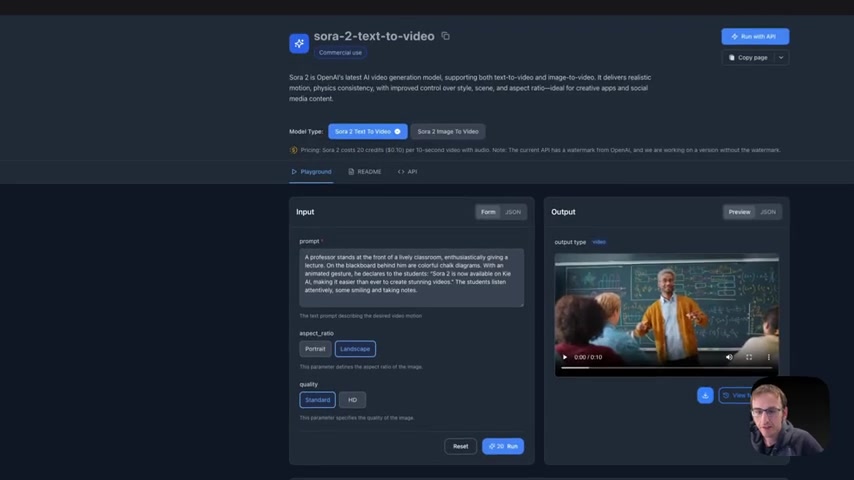
This flexible pricing makes it accessible for various projects.






Most people like





























Report
Please select a reason for reporting
- 13 Reasons to Switch from Snapchat to Text Messaging
- 7 Powerful Speech to Text Apps to Boost Productivity
- 10 Best Speech to Text Tools for Effortless Transcription
- 13 Free Tools to Easily Transcribe Audio to Text
- 15 Surprising Ways Google's Speech-to-Text Boosts Productivity
- 7 Best Free Online Audio to Text Transcription Tools
- 9 Tips to Transcribe Speech to Text Faster and Better
- 13 Best Speech to Text Software for Windows 10 in 2023
- 7 Tips for Choosing the Best Transcriber for Audio to Text
- 11 Reasons Why Dragon Speech-to-Text Apps are Game-Changers
- 6 Secrets to Enhance Your Speech to Text Transcription
- 6 Brilliant Ways to Boost Productivity with Talk-to-Text on Your MacBook
- 6 Ways Transcription Software Converts Audio to Text
- 8 Tips to Transcribe Speech to Text Like a Pro
- 6 Reasons IBM Watson Speech to Text is a Game-Changer
- 14 Powerful Ways Talk-to-Text Improves Your Workflow
- 12 Top Windows Speech-to-Text Software for Efficient Transcription
- 12 Game-Changing Benefits of Apple's Speech to Text Technology
- 9 Powerful Use Cases for AWS Speech to Text Technology
- 10 Easy Steps to Transcribe YouTube Videos to Text
- transcription audio en texte
- online audio transcription
- free audio file transcription
- free ai audio transcription
- audio transcription service
- audio transcription online free
- audio transcription free online
- audio to transcription software
- audio and transcript
- ai audio transcription free
- voice recording to text converter
- translate voice recording to text
- record voice to text
- audio recording to text converter
- voice recording and transcription
- chatgpt voice to text
- gmail voice to text
- speech to text reader
- speech to text ai free
- speech to talk
- Create Engaging Animated Explainer Videos with a Free AI Tool
- Stop Multi-Subscribing: Benchmark Top AI Visual Models in One Canvas
- Best Seedance 2.5 API Provider: Every Price on the Market, Checked at Source
- AI OnlyFans: How to Generate $30,000/Month (Legally)
- Transform Your Script into an Engaging Video with AI Video Maker!
- AI Marketing Automation: A Comprehensive Guide for Small Businesses
- Midjourney Alternative for Anime Art Creators: Why PixAI May Be Better for Character Workflows
- 10 Things Most People Get Wrong About AI Image Search
- AI Girlfriend Apps: Top Choices Redefining Relationships 2025
- How to Reduce Quoting Errors in Salesforce with AI-Assisted Quote Creation
- AI Resume Builders: EnhanceCV, ResumeNerd AI, & Teal Compared
- ResumeAI: Crafting ATS-Optimized Resumes with AI
- AI in Resume Writing: A New Era for Job Seekers
- AI Resume Tools: Streamline Your Job Search and Land Your Dream Role
- AI Resume Optimization: The Right Way to Land Interviews
- Crafting a Killer Resume with AI: A Step-by-Step Guide
- Crafting a Winning Resume: AI Tools and Expert Tips
- AI Job Search: Level Up Your Career with AI Automation
- Empower Your Career Journey: Dynamic Resumes with AI
- AI Resume Builder: Create Professional Resumes Effortlessly

Copyright ©2026 toolify