































Table of Contents
- Key Points
- Understanding Data Conversion in SSIS
- Common Data Conversion Scenarios
- Using the Data Conversion Component in Detail
- Microsoft SQL Server Integration Services (SSIS) Pricing
- Data Conversion Component
- Core Features of SSIS and Data Conversion Capabilities
- Practical Use Cases for Data Conversion
- Frequently Asked Questions
- Related Questions


Understanding Data Conversion in SSIS
Why Data Conversion Matters
Data conversion is essential in SSIS because data originates from diverse sources, each with its own data type conventions. Without proper conversion, integration processes may fail due to incompatible data types between the data source and destination.
Let's consider an analogy: If you were traveling to the United States from India, you'd need to convert your Indian Rupees (INR) into US Dollars (USD) to use your money. The same principle applies to data:
- Different Systems, Different Data: Just as currencies differ across countries, data types differ across systems.
- Seamless Integration: Converting data makes it understandable and usable by the destination system, just like converting currency allows you to make purchases in a foreign country.
- Preventing Errors: Data conversion minimizes the risks of failed integration. This is because not all data is of the same type, this leads us to use the data conversion transformation.
Source and Destination: The SSIS Perspective
In SSIS, we extract data from a source, transform it as needed, and load it into a destination.
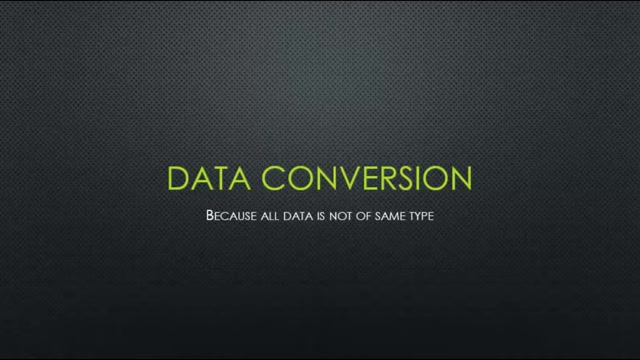
The source can be a variety of locations, and the destination is usually a database. Data Conversion in SSIS serves the purpose of transferring data from the source to the destination. Common sources include CSV files, Excel files, and databases. Common destinations are SQL Server databases and other data warehouses.
- Data Source: The origin of the data, like our CSV file.
- Data Destination: Where we want to load the data, such as Microsoft SQL Server.
- Compatibility: The data types at the source may not be compatible with the types available at the destination. A CSV file may have all of the data with a data type of string but in our destination, Microsoft SQL Server, the data type may be int.
Common Data Conversion Scenarios
Identifying Data Type Mismatches
Identifying data type mismatches is the first crucial step in the SSIS data conversion process. This often manifests as errors during package execution or unexpected behavior when loading data. There are usually signs of mismatch before a pipeline is even run.
- Review Package Properties: In the design phase, carefully review data source and destination properties.
- Error Messages: Examine error messages in SSIS logs and execution results.
- Data Profiling: Before the process begins, it's important to examine all of the data you're expecting to be transfered. This will prevent unexpected errors. This is essential if you are writing a report that's going to be run daily. One single error can cause a data error downstream for all processes. It is ideal to fix those types of issues as early as possible.
Example: Converting Date Formats
Let's imagine your source data contains dates in the format 'MM/DD/YYYY', but your destination SQL Server database uses 'YYYY-MM-DD'. To handle this, you'd use the Data Conversion component to transform the date format.
-
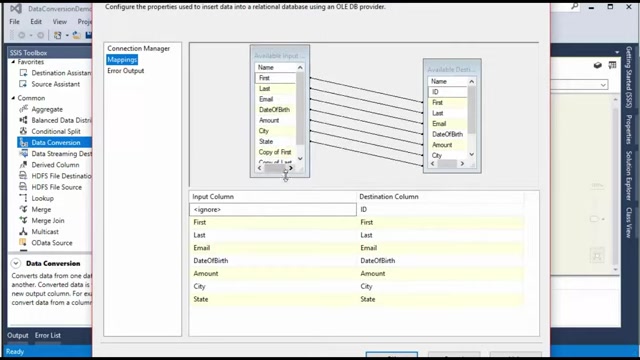
Add the Data Conversion Component: Drag and drop the component into your data flow.
-
Configure the Component: Specify the source column (the date column) and the desired output data type (date with the correct format).
-
Mapping: You have to do mapping in this stage to allow all of the data points to be included in the new format.
Using the Data Conversion Component in Detail
Step-by-Step Configuration
The Data Conversion component in SSIS is designed to transform data from one data type to another. This is how to use the Data Conversion component in detail.
- Add the Data Conversion Component: From the SSIS Toolbox, drag and drop the Data Conversion transformation into your data flow between the source and destination components.
- Connect the Data Flow: Connect the output of your source component to the input of the Data Conversion component, and then connect the Data Conversion component's output to your destination component.
- Open the Data Conversion Transformation Editor: Double-click the Data Conversion component to open the Data Conversion Transformation Editor.
- Select Columns for Conversion:In the editor, you will see a list of available input columns from your source data. Select the columns you want to convert.
- Specify Output Data Type: For each selected column, specify the desired output data type in the Data Type dropdown. The dropdown offers a variety of data types to match SQL Server standards, such as: Unicode string, integer, date.
- Configure Properties: Depending on the data type, you may need to configure additional properties such as length, precision, and scale.
- Output Alias: By default, converted columns will have the same name as the input column with a "Copy of" prefix. You can specify a custom output alias for each converted column by modifying the Output Alias field.
- Mapping: In the OLE DB Destination, you're going to have to select data types for first name and last name that coincide.
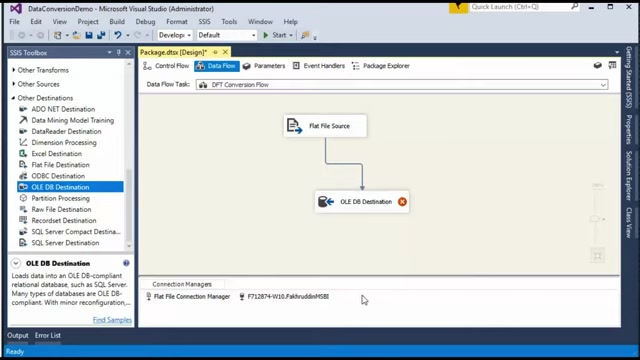
After you select that data connection, you must navigate to the Mapping page. The Data Types that you've extracted need to line up with those data types.
Microsoft SQL Server Integration Services (SSIS) Pricing
Licensing and Cost Considerations
Microsoft SQL Server Integration Services (SSIS) does not have a standalone price. The price is going to depend on what you use for the program.
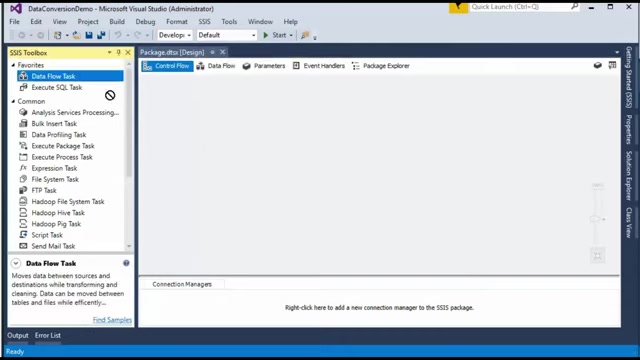
SSIS comes with the purchase of Microsoft SQL Server. The different levels of SQL Server that offer SSIS are listed below.
- SQL Server Developer Edition: Ideal for development and testing environments. It includes all features of the Enterprise Edition but is not licensed for production use. Price typically around $50 USD.
- SQL Server Standard Edition: A good option for small to medium-sized businesses. It offers core data management and business intelligence features. Price can range from $2,000 to $8,000 USD depending on the core.
- SQL Server Enterprise Edition: This edition offers comprehensive, high-end data center capabilities, suitable for mission-critical applications and large-scale data warehousing. Price is typically around $7,000 USD.
In terms of overall cost, you will have to consider server hardware and operation fees, security, storage, and more.
Practical Use Cases for Data Conversion
Standardizing Data from Multiple Sources
When a company acquires or integrates data from multiple sources, data often comes in varying formats and data types. Data conversion can consolidate these into a uniform structure for a unified database.
Data Conversion is essential.
For example, a business may acquire a competitor's customer list. Now, they need to make sure these lists all line up.
Ensuring Compatibility with Data Warehouses
Data warehouses often require data in specific formats for reporting. Data conversion guarantees that data complies with the schema for robust analysis and reporting purposes.
SQL Server destination to get the data loaded correctly.






Most people like






























Report
Please select a reason for reporting
- 13 Reasons to Switch from Snapchat to Text Messaging
- 7 Powerful Speech to Text Apps to Boost Productivity
- 10 Best Speech to Text Tools for Effortless Transcription
- 13 Free Tools to Easily Transcribe Audio to Text
- 15 Surprising Ways Google's Speech-to-Text Boosts Productivity
- 7 Best Free Online Audio to Text Transcription Tools
- 9 Tips to Transcribe Speech to Text Faster and Better
- 13 Best Speech to Text Software for Windows 10 in 2023
- 7 Tips for Choosing the Best Transcriber for Audio to Text
- 11 Reasons Why Dragon Speech-to-Text Apps are Game-Changers
- 6 Secrets to Enhance Your Speech to Text Transcription
- 6 Brilliant Ways to Boost Productivity with Talk-to-Text on Your MacBook
- 6 Ways Transcription Software Converts Audio to Text
- 8 Tips to Transcribe Speech to Text Like a Pro
- 6 Reasons IBM Watson Speech to Text is a Game-Changer
- 14 Powerful Ways Talk-to-Text Improves Your Workflow
- 12 Top Windows Speech-to-Text Software for Efficient Transcription
- 12 Game-Changing Benefits of Apple's Speech to Text Technology
- 9 Powerful Use Cases for AWS Speech to Text Technology
- 10 Easy Steps to Transcribe YouTube Videos to Text
- transcription audio en texte
- online audio transcription
- free audio file transcription
- free ai audio transcription
- audio transcription service
- audio transcription online free
- audio transcription free online
- audio to transcription software
- audio and transcript
- ai audio transcription free
- voice recording to text converter
- translate voice recording to text
- record voice to text
- audio recording to text converter
- voice recording and transcription
- chatgpt voice to text
- gmail voice to text
- speech to text reader
- speech to text ai free
- speech to talk
- Design Professional Flyers for Free on Your Phone
- Best Free Flyer Maker Apps for Android: Design Like a Pro
- How to Know If Your Business Is Ready for an AI Customer Service Agent
- Revolutionizing Storytelling: From Novels to Screenplays with AI
- Create Engaging Animated Explainer Videos with a Free AI Tool
- Stop Multi-Subscribing: Benchmark Top AI Visual Models in One Canvas
- Best Seedance 2.5 API Provider: Every Price on the Market, Checked at Source
- AI OnlyFans: How to Generate $30,000/Month (Legally)
- Transform Your Script into an Engaging Video with AI Video Maker!
- AI Marketing Automation: A Comprehensive Guide for Small Businesses
- Design Professional Flyers for Free on Your Phone
- Best Free Flyer Maker Apps for Android: Design Like a Pro
- Unleash Creativity: AI Coloring Pages with ColoringBook.ai
- Generate Stunning AI Photos with Google Gemini: A Guide
- Boost Your Etsy Sales with Stunning Digital Invitations!
- Revolutionize Your Etsy Listing with AI Text Generator
- Create Coloring Pages with AI: A Bing AI Tutorial
- Photo Lab App: Transform Your Photos with Stunning AI Effects
- Effortless Design: Rewriting Text with Microsoft Designer's AI
- Create & Sell Kids' Coloring Books with AI - KDP Guide

Copyright ©2026 toolify