































Table of Contents
- Key Points
- The Challenge with Traditional QA Testing
- Introducing TestDriver.ai: AI-Powered QA Revolution
- Creating and Running Tests with TestDriver.ai
- TestDriver.ai Pricing Plans
- Pros and Cons of TestDriver.ai
- Core Features of TestDriver.ai
- Real-World Use Cases for TestDriver.ai
- Frequently Asked Questions
- Related Questions



The Challenge with Traditional QA Testing
Flaky Selectors and Brittle Code
Traditional qa testing tools like Selenium, Cypress, and Playwright depend heavily on selectors to identify and interact with elements on a webpage or application. These selectors, whether based on IDs, classes, or XPath expressions, are often fragile. Even minor UI changes can render them obsolete, causing tests to fail and requiring constant maintenance.
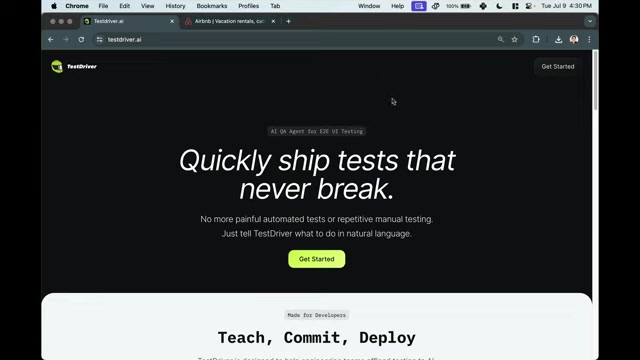
The problem is exacerbated by dynamic content, asynchronous operations, and variations across different browsers and environments. This brittleness leads to test flakiness, where tests pass and fail intermittently, undermining confidence in the testing process and consuming valuable developer time.
This reliance on specific, code-driven selectors introduces significant overhead. Every time an application undergoes a design change, the corresponding test scripts must be updated, creating a continuous cycle of maintenance. This is especially burdensome in agile development environments, where rapid iteration is the norm. The result is often a bottleneck in the development pipeline, where QA struggles to keep pace with the speed of feature releases.
Furthermore, writing and maintaining these tests require specialized skills, creating a barrier to entry for non-technical QA professionals and increasing the reliance on developers. This can lead to communication gaps and misunderstandings between development and QA teams, further slowing down the testing process. Selenium, Cypress, and Playwright are fantastic tools, but they are still code based and can be challenging to maintain.
The Pain of Automated and Manual Testing
Both automated and manual testing methods present distinct challenges. Automated testing, while efficient, can be complex to set up and maintain, often requiring significant coding expertise. The initial investment in creating a robust automated testing suite can be substantial, and the ongoing maintenance costs can quickly add up as applications evolve. As noted, traditional automated tests are brittle and prone to breaking with UI changes, requiring frequent updates and debugging. This can be particularly frustrating for developers who are already under pressure to deliver features quickly.
Manual testing, on the other hand, is time-consuming and repetitive. While it allows for exploratory testing and the identification of nuanced issues, it is not scalable and can be prone to human error. Manually testing every feature and scenario can be a tedious and demoralizing task for QA professionals, leading to burnout and reduced accuracy. Moreover, manual testing is not easily integrated into continuous integration and continuous delivery (CI/CD) pipelines, further slowing down the release process.
The key issue here is scalability. As applications grow in complexity and the pace of development accelerates, traditional QA methods simply cannot keep up. Teams are forced to choose between sacrificing quality and delaying releases, creating a constant tension between speed and reliability. TestDriver.ai enters the scene as a solution to break that tension. By using AI vision, TestDriver.ai avoids the need for brittle selectors and allows anyone to quickly create tests.
Introducing TestDriver.ai: AI-Powered QA Revolution
AI Vision: The Core of TestDriver.ai
TestDriver.ai fundamentally changes the way QA testing is approached by leveraging the power of AI vision. Instead of relying on fragile selectors, TestDriver.ai visually perceives and interacts with applications, mimicking how a human user would.
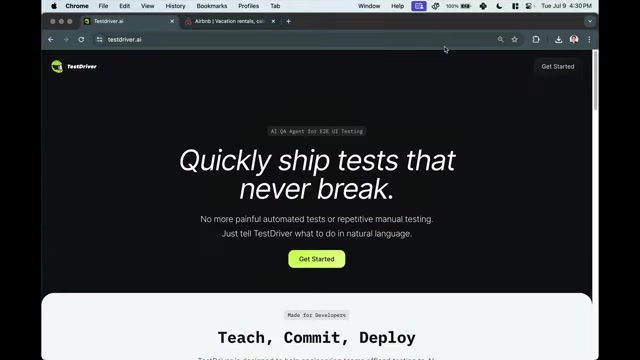
This visual approach makes tests far more resilient to UI changes. The AI can identify elements based on their appearance and context, rather than their specific location or code attributes. This means that even if a button moves or a label changes, the test will still be able to find and interact with it.
This AI vision capability enables TestDriver.ai to adapt dynamically to application changes, reducing the need for manual intervention and maintenance. The AI learns from each test run, continuously improving its ability to recognize and interact with elements. This adaptive learning makes TestDriver.ai a self-improving testing solution that becomes more effective over time. No longer is the team required to rewrite and update the automation every time the product is updated.
Natural Language Prompts: Making Testing Accessible
TestDriver.ai democratizes the testing process by allowing users to create tests using natural language prompts. Instead of writing complex code, users can simply describe what they want the test to do in plain English. For example, a user might say, 'Enter Austin, Texas as a destination' or 'Set the check-in date to July 10th.'
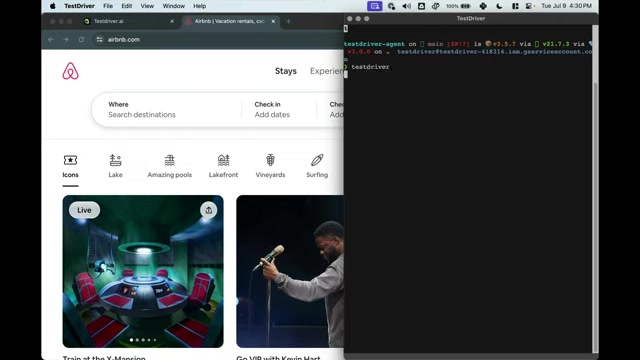
The AI then interprets these prompts and automatically generates the necessary test steps.
This natural language interface makes testing accessible to a wider range of users, including non-technical QA professionals, product managers, and even business analysts. It eliminates the need for specialized coding skills, allowing anyone to contribute to the testing process. This fosters collaboration and empowers teams to create comprehensive test suites that cover all critical aspects of their applications.
Moreover, natural language prompts make it easier to understand and maintain tests. The test steps are described in clear, concise language, making it easy to see what the test is doing and why. This improves transparency and reduces the risk of misunderstandings. The flexibility and easy readability of tests is a powerful benefit.
YAML Code Generation: Integrating with CI/CD Pipelines
TestDriver.ai seamlessly integrates with existing CI/CD pipelines by generating YAML code from natural language prompts. This YAML code defines the test steps and can be easily incorporated into automated build and deployment processes. The result is that the YAML test script grows as the user continues to Prompt the computer.
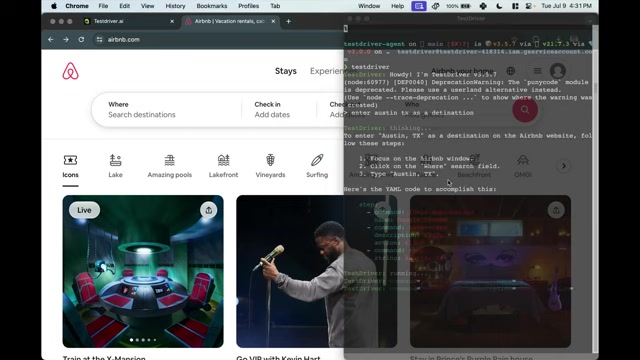
This allows teams to automate their testing efforts and ensure that every code change is thoroughly tested before being released to production. This is especially important in agile development environments, where rapid iteration and frequent releases are the norm.
The YAML code generation feature also makes it easier to share and reuse tests. The YAML files can be stored in version control systems and shared across teams, promoting collaboration and reducing duplication of effort. This standardization of test definitions ensures consistency and improves the overall quality of the testing process.
TestDriver.ai's integration with CI/CD pipelines enables teams to shift left their testing efforts. By incorporating testing earlier in the development lifecycle, teams can identify and fix issues sooner, reducing the cost and risk of defects. This proactive approach to quality assurance improves the overall quality of the application and accelerates the release process.
Resilience to Application Changes: Minimizing Test Breakage
TestDriver.ai's AI vision and natural language interface combine to create tests that are highly resilient to application changes. Because the AI visually perceives and interacts with the application, it is less susceptible to breakage caused by UI changes. Even if elements move, labels change, or the overall design is updated, the AI can still identify and interact with them.
This resilience minimizes the need for manual intervention and maintenance, freeing up developers and QA professionals to focus on more strategic tasks. It also improves the overall reliability of the testing process, providing greater confidence in the quality of the application.
The ability to minimize test breakage is a significant advantage for teams working in agile development environments. It allows them to iterate quickly and release features frequently without being slowed down by constant test maintenance. This accelerates the development process and enables teams to deliver value to their customers faster.
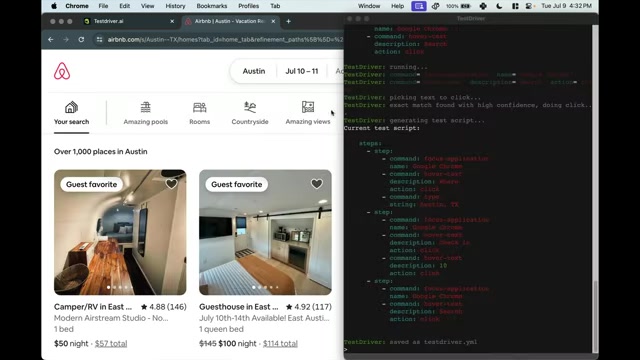
This saves the team time and resources in their build process.
GitHub Action: Simplified Deployment and Execution
TestDriver.ai simplifies the deployment and execution of tests by providing a GitHub Action. This action allows teams to easily integrate TestDriver.ai into their existing GitHub workflows and automate their testing efforts in the cloud. It spawns a Mac VM in the cloud and runs the AI agent with prompts. The agent then reads text and describes images, and determines which actions to take.
With the GitHub Action, teams can automatically run their tests on every code change, ensuring that every new feature is thoroughly tested before being merged into the main branch. The action provides detailed reports and logs, making it easy to identify and fix any issues that arise.
This simplified deployment and execution process makes TestDriver.ai accessible to teams of all sizes and skill levels. It eliminates the need for complex infrastructure setup and configuration, allowing teams to focus on writing and running tests. This makes TestDriver.ai a practical and scalable solution for QA testing in the cloud.
Creating and Running Tests with TestDriver.ai
Step-by-Step Guide to Booking an Airbnb with TestDriver.ai
Let's walk through a practical example of using TestDriver.ai to automate booking an Airbnb. This will illustrate how natural language prompts Translate into actionable test steps and resilient execution.
-
Step 1: Initiate TestDriver.ai
- Open your terminal and run the command 'testdriver' to start the TestDriver.ai CLI.
-
Step 2: Define Destination
- Use a natural language prompt to specify the destination: 'Enter Austin, TX as a destination'.
- TestDriver.ai interprets the prompt and types 'Austin, TX' into the 'Where' search field on the Airbnb website.
-
Step 3: Set Check-In Date
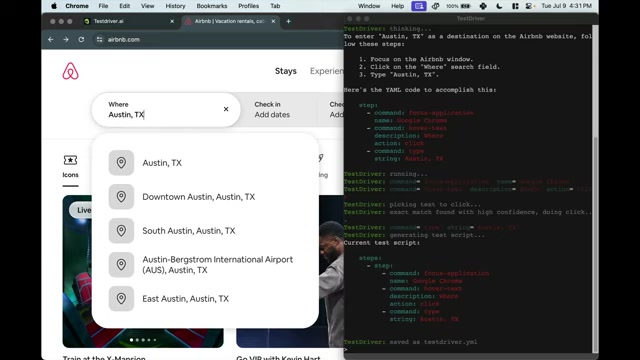
- Use a natural language prompt to set the check-in date: 'Set the check-in date to July 10th'.
- TestDriver.ai identifies the 'Check-in' field, clicks on it, and then selects July 10th from the calendar.
-
Step 4: Click Search
- Use a natural language prompt to initiate the search: 'Click search'.
- TestDriver.ai locates and clicks the 'Search' button on the Airbnb website, displaying available listings in Austin, TX for the specified date.
Each of these steps is translated into YAML code by TestDriver.ai, providing a transparent and reproducible test script. Here's a snippet of what the YAML code might look like:
steps:
  - command: focus-application
    name: Google Chrome
  - command: hover-text
    description: Where
    action: click
  - command: type
    string: Austin, TX
  - command: hover-text
    description: Check in
    action: click
  - command: click
    description: 10
    action: click
  - command: hover-text
    description: Search
action: click-
Step 5: Execute and Validate
- To run the generated test, use the command: 'run testdriver.yaml'
- TestDriver.ai will execute the steps defined in the YAML file, automating the Airbnb booking process.
This example demonstrates the simplicity and power of TestDriver.ai. By using natural language prompts, anyone can create and run complex tests without writing a single line of code. Using the natural language TestDriver and the AI within, anyone can create reliable automated tests.





Most people like






























Report
Please select a reason for reporting
- 13 Reasons to Switch from Snapchat to Text Messaging
- 7 Powerful Speech to Text Apps to Boost Productivity
- 10 Best Speech to Text Tools for Effortless Transcription
- 13 Free Tools to Easily Transcribe Audio to Text
- 15 Surprising Ways Google's Speech-to-Text Boosts Productivity
- 7 Best Free Online Audio to Text Transcription Tools
- 9 Tips to Transcribe Speech to Text Faster and Better
- 13 Best Speech to Text Software for Windows 10 in 2023
- 7 Tips for Choosing the Best Transcriber for Audio to Text
- 11 Reasons Why Dragon Speech-to-Text Apps are Game-Changers
- 6 Secrets to Enhance Your Speech to Text Transcription
- 6 Brilliant Ways to Boost Productivity with Talk-to-Text on Your MacBook
- 6 Ways Transcription Software Converts Audio to Text
- 8 Tips to Transcribe Speech to Text Like a Pro
- 6 Reasons IBM Watson Speech to Text is a Game-Changer
- 14 Powerful Ways Talk-to-Text Improves Your Workflow
- 12 Top Windows Speech-to-Text Software for Efficient Transcription
- 12 Game-Changing Benefits of Apple's Speech to Text Technology
- 9 Powerful Use Cases for AWS Speech to Text Technology
- 10 Easy Steps to Transcribe YouTube Videos to Text
- transcription audio en texte
- online audio transcription
- free audio file transcription
- free ai audio transcription
- audio transcription service
- audio transcription online free
- audio transcription free online
- audio to transcription software
- audio and transcript
- ai audio transcription free
- voice recording to text converter
- translate voice recording to text
- record voice to text
- audio recording to text converter
- voice recording and transcription
- chatgpt voice to text
- gmail voice to text
- speech to text reader
- speech to text ai free
- speech to talk
- Meshy AI: How to Create 3D Models from Text and Images
- How SEO and Marketing Dashboards Empower Agencies to Drive Results
- How to Use AI Tools to Find Internal Linking Opportunities Across a Business Website
- Discover Your Perfect Haircut with AI Hairstyle Apps
- Free Reputation Calculator Tools: How They're Adapting to Score AI Visibility, Not Just Rankings
- Design Professional Flyers for Free on Your Phone
- Best Free Flyer Maker Apps for Android: Design Like a Pro
- How to Know If Your Business Is Ready for an AI Customer Service Agent
- Revolutionizing Storytelling: From Novels to Screenplays with AI
- Create Engaging Animated Explainer Videos with a Free AI Tool
- Meshy AI: How to Create 3D Models from Text and Images
- ASOMobile Helps Teams Benchmark App Store Screenshots Against Competitors
- How to Match LMS Software With Your Organization's Training Plan
- Revolutionizing Email Marketing Agency with AI
- How to Convert BTC to HNT
- Unleashing the Power of AI: Cognizant's Roadmap for Transformation
- Frame to Video Review: A Practical Look at Turning Two Still Frames Into Motion
- NVIDIA NIM: Revolutionizing Supply Chain Data Analysis with AI
- Top AI Tools That Help Brands Stand Out Offline (Not Just Online)
- Top 5 Cold Email Software: Maximize Your Outreach in 2025

Copyright ©2026 toolify