































Table of Contents
- Key Points
- Understanding the Azure SQL Database Free Offer
- How to Get Started with Azure SQL Database Free Tier
- Analyzing the Free Tier: Pros and Cons
- Power Up with Azure SQL Database's Core Features
- Unleashing Potential: Use Cases for the Free Tier
- FAQ
- Related Questions


Understanding the Azure SQL Database Free Offer
What is Azure SQL Database Free Offer?
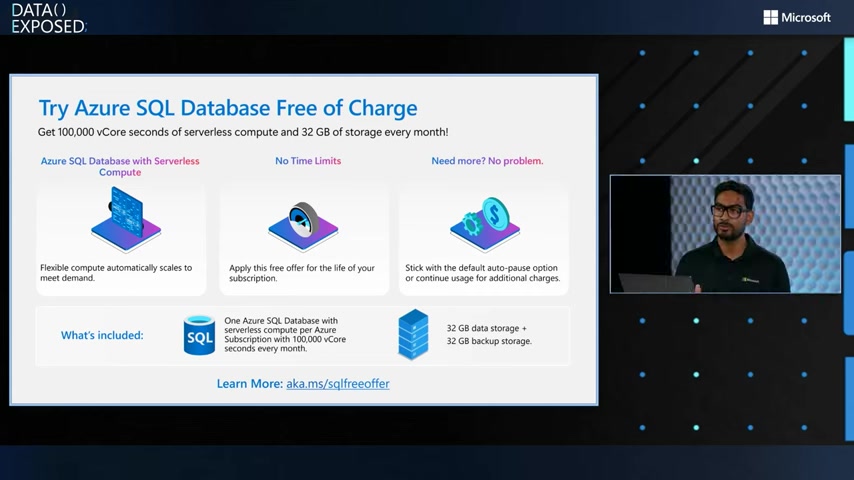
The Azure SQL Database free offer is a program by Microsoft Azure that provides a free tier database instance to new and existing users. Unlike trial periods, this offer provides resources that remain free perpetually, offering a great way to start with cloud databases without any commitment or upfront costs.
This is a fantastic initiative to encourage developers, students, and small businesses to explore the capabilities of Azure SQL Database.
The offer gives you access to a database that’s perfect for light workloads, learning the platform or even staging a small application. You get a database which lets you create tables, relationships and query your data with the SQL language. The new offer allows you to harness this power without restrictive time limits and with plenty of compute and storage to get you started.
Key Improvements Over the Previous Free Offer
The current Azure SQL Database free offer builds upon previous iterations, addressing key limitations and enhancing the overall user experience.
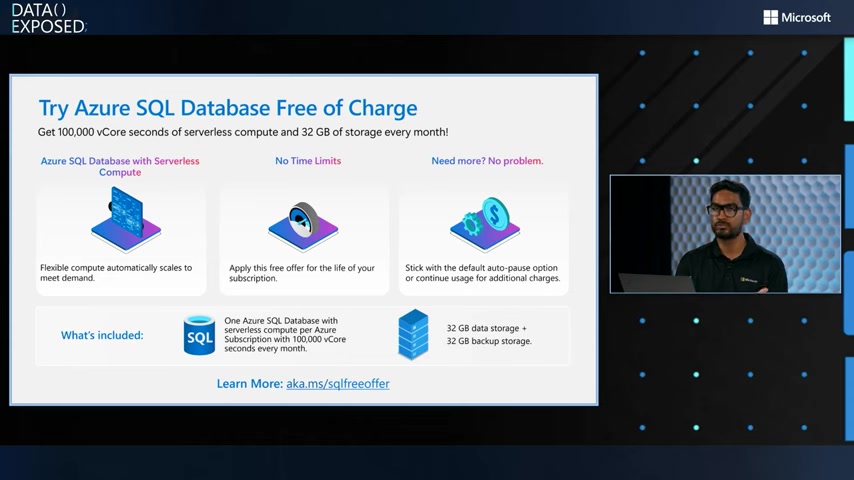
- No Time Limits: The previous free offer was limited to 12 months. The new offer provides a free database for the lifetime of your subscription.
- No Azure Free Account Requirement: Previously, an Azure Free Account was required to get started. The new offer allows users on any Azure Subscription to get started.
- Leverages Serverless Compute: The new free offer is available on the Serverless Compute tier and has autoscaling features which allows the service to turn off resources which are not being used.
- Larger storage: the new tier is entitled to 32 GB of database storage
Who Can Benefit From the Free Offer?
The Azure SQL Database free offer is designed to cater to a wide range of users:
- Developers: Use it for testing, prototyping, and building small applications.
- Students: A great way to build and expand SQL development and cloud skills.
- Small Businesses: Stage applications, run lightweight database workloads, or test out the Azure platform.
- Data Professionals: Get experience with cloud SQL technology
How to Get Started with Azure SQL Database Free Tier
Accessing the Free Offer
Getting started is straightforward. Follow these steps to unlock your free Azure SQL Database:
-
Go to the Azure Portal: Log into your Azure account via the Azure Portal.
-
Navigate to Azure SQL Database: Find the Azure SQL Database service in the Azure portal
-
Create a New SQL Database: Set preferred specifications by entering the basics tab, then go to “Review and Create” to provision it.
-
Apply the Free Offer: Find the “Apply offer” tab and click it to apply the free tier.
-
Start Using Your Free Database: Deploy the service! You can also keep track of the consumption on the service.
Configuring Network Access
To connect to your new Azure SQL Database, you'll need to configure network access:

- Go to Networking: in the database you just created, navigate to the networking tab.
- Add Firewall Rules: Add your IP address so that Azure recognizes you, and you can control your database.
Power Up with Azure SQL Database's Core Features
Integrating with Other Azure Services
The true potential of the Azure SQL Database free tier is unlocked when you integrate it with other Azure services. The following services are easy to connect to your new SQL service and will expand the options you have when working with the database:
-
Power Apps: Create custom applications with data from your SQL Database. no code is required.
-
Power BI: Build dashboards and reports to Visualize data stored in your SQL Database. Analyze and manage your business more effectively
-
Azure Data Studio: Develop the application in a local environment, modify and apply the changes to SQL.
Unleashing Potential: Use Cases for the Free Tier
AI Applications with the Free Tier
You can use Artificial Intelligence in the database to take a search beyond just what the category is, but search what is being said.
The combination of AI and SQL makes it possible to search all kinds of data.
- Semantic Search: With the power of Azure AI services semantic understanding is made possible by AI integrations. The AI and machine learning services on Azure have native connections to your database making it simple to setup data pipelines.
- Recommendation Engines: Build personalized recommendation engines based on user data and preferences.
- Machine Learning: SQL Server has extensive machine learning support, allowing it to be used to train and stage data science pipelines.








Most people like































Report
Please select a reason for reporting
- 13 Reasons to Switch from Snapchat to Text Messaging
- 7 Powerful Speech to Text Apps to Boost Productivity
- 10 Best Speech to Text Tools for Effortless Transcription
- 13 Free Tools to Easily Transcribe Audio to Text
- 15 Surprising Ways Google's Speech-to-Text Boosts Productivity
- 7 Best Free Online Audio to Text Transcription Tools
- 9 Tips to Transcribe Speech to Text Faster and Better
- 13 Best Speech to Text Software for Windows 10 in 2023
- 7 Tips for Choosing the Best Transcriber for Audio to Text
- 11 Reasons Why Dragon Speech-to-Text Apps are Game-Changers
- 6 Secrets to Enhance Your Speech to Text Transcription
- 6 Brilliant Ways to Boost Productivity with Talk-to-Text on Your MacBook
- 6 Ways Transcription Software Converts Audio to Text
- 8 Tips to Transcribe Speech to Text Like a Pro
- 6 Reasons IBM Watson Speech to Text is a Game-Changer
- 14 Powerful Ways Talk-to-Text Improves Your Workflow
- 12 Top Windows Speech-to-Text Software for Efficient Transcription
- 12 Game-Changing Benefits of Apple's Speech to Text Technology
- 9 Powerful Use Cases for AWS Speech to Text Technology
- 10 Easy Steps to Transcribe YouTube Videos to Text
- transcription audio en texte
- online audio transcription
- free audio file transcription
- free ai audio transcription
- audio transcription service
- audio transcription online free
- audio transcription free online
- audio to transcription software
- audio and transcript
- ai audio transcription free
- voice recording to text converter
- translate voice recording to text
- record voice to text
- audio recording to text converter
- voice recording and transcription
- chatgpt voice to text
- gmail voice to text
- speech to text reader
- speech to text ai free
- speech to talk
- How SEO and Marketing Dashboards Empower Agencies to Drive Results
- How to Use AI Tools to Find Internal Linking Opportunities Across a Business Website
- Discover Your Perfect Haircut with AI Hairstyle Apps
- Free Reputation Calculator Tools: How They're Adapting to Score AI Visibility, Not Just Rankings
- Design Professional Flyers for Free on Your Phone
- Best Free Flyer Maker Apps for Android: Design Like a Pro
- How to Know If Your Business Is Ready for an AI Customer Service Agent
- Revolutionizing Storytelling: From Novels to Screenplays with AI
- Create Engaging Animated Explainer Videos with a Free AI Tool
- Stop Multi-Subscribing: Benchmark Top AI Visual Models in One Canvas
- ASOMobile Helps Teams Benchmark App Store Screenshots Against Competitors
- How to Match LMS Software With Your Organization's Training Plan
- Revolutionizing Email Marketing Agency with AI
- How to Convert BTC to HNT
- Unleashing the Power of AI: Cognizant's Roadmap for Transformation
- Frame to Video Review: A Practical Look at Turning Two Still Frames Into Motion
- NVIDIA NIM: Revolutionizing Supply Chain Data Analysis with AI
- Top AI Tools That Help Brands Stand Out Offline (Not Just Online)
- Top 5 Cold Email Software: Maximize Your Outreach in 2025
- Magic School AI: Revolutionizing Quiz & Assessment Generation

Copyright ©2026 toolify