































Table of Contents
- Key Points
- Understanding Snowflake Document AI
- Document AI Benefits and Integration
- Getting Started with Document AI: A Step-by-Step Guide
- Pricing of Document AI
- Pros and Cons
- Core Features and Functionalities
- Real-World Use Cases for Document AI
- Frequently Asked Questions
- Further Exploration: Related Questions and Topics


Understanding Snowflake Document AI
What is Snowflake Document AI?
Snowflake Document AI is a cutting-edge feature designed to extract data from documents quickly and efficiently.

It's particularly beneficial for organizations dealing with a high volume of forms, whether they are scanned images, handwritten documents, or digital PDFs. This feature leverages advanced Large Language Models (LLMs) pre-trained for data extraction use cases, providing a user-friendly and intuitive interface. Customers can process documents in various formats such as PDF, WORD, TXT, and even screenshots, to derive answers to their most pressing questions. This tool dramatically reduces the reliance on manual labor, saving time and resources. Snowflake Document AI essentially acts as a bridge between unstructured document data and structured analytical environments, fostering better decision-making and operational efficiency. It was announced at Summit in June and is now available in Private Preview.
Key benefits of using Snowflake Document AI:
- Reduced manual labor and costs.
- Faster data extraction and insights.
- Improved data quality and accuracy.
- Enhanced decision-making capabilities.
- Streamlined document processing workflows.
- The private preview feature is a testament to Snowflake's commitment to innovation and its vision to offer the broadest set of AI capabilities in the data cloud, enabling customers to leverage AI in a secure and governed environment.
By automating these processes, organizations can reduce operational costs, minimize errors, and accelerate time-to-insights. Document AI empowers them to focus on strategic initiatives rather than being bogged down by manual data entry and document processing tasks.
Document AI Benefits and Integration
Seamless Integration and Enhanced Capabilities
The beauty of Snowflake Document AI lies in its seamless integration with the broader Snowflake ecosystem.

As the Machine Learning Architect explained, this integration means that all data processing occurs directly within your Snowflake account, eliminating the need for external services and complex data transfers. This not only simplifies the workflow but also enhances data security and governance. The extracted information can be easily consumed by downstream applications, such as:
- Power BI: For creating interactive dashboards and reports.
- Tableau: For visualizing complex data relationships and trends.
- Machine Learning Models: To enrich existing models or train new ones with document-derived features.
Furthermore, Document AI is designed with ease of use in mind. You don't need to be a coding expert or an LLM guru to leverage its capabilities. The UI is intuitive, allowing you to extract key information with simple point-and-click actions. This democratizes data access, making it easier for business users to derive value from their document data.
Document AI's Financial Services Use Case
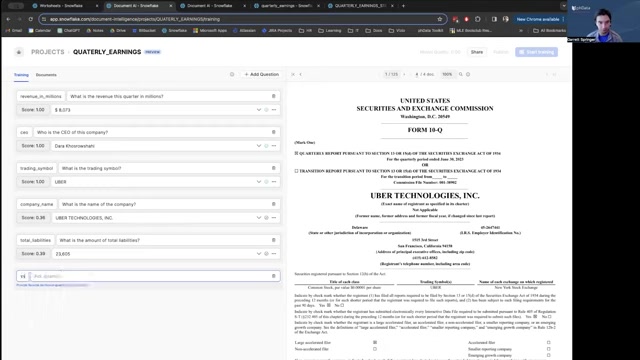
Consider a financial services firm struggling to process quarterly earnings reports.
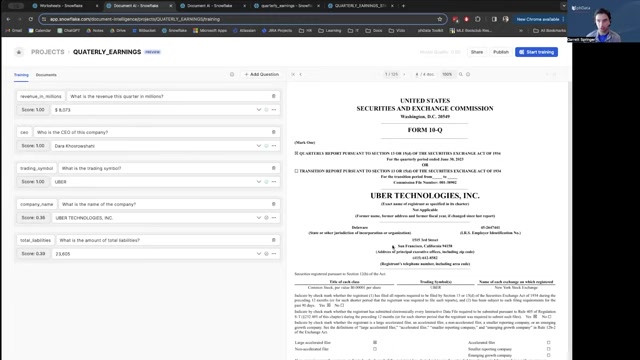
Previously, analysts would have to manually sift through hundreds of pages to extract vital information, such as revenue, liabilities, CEO names, and trading symbols. With Snowflake Document AI, this entire process can be automated.
- The reports are uploaded directly into Snowflake.
- Document AI extracts the relevant information based on pre-defined queries (written in plain English!).
- The extracted data is organized into a structured table within Snowflake.
This new table becomes the single source of truth, making it exceptionally easy to track the financial health of companies, identify trends, and make informed investment decisions.
Getting Started with Document AI: A Step-by-Step Guide
Step 1: Contact Snowflake Support to Enable Document AI
As Snowflake Document AI is still in Private Preview

, you will need to contact Snowflake Support to have this feature enabled in your Snowflake account.
Step 2: Access Document AI Within Snowflake
Once Document AI has been enabled, you'll see a "Document AI" tab directly within your Snowflake interface.
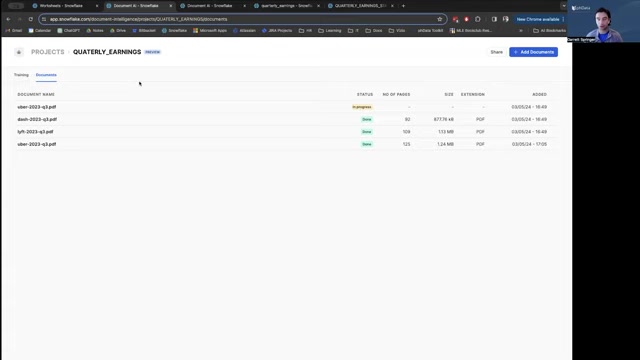
Click on this tab to access the Document AI environment and begin setting up your projects.
Step 3: Create a Project
A Project serves as a container for your documents and queries. Select 'Add Project' to create your first project.
Step 4: Upload Documents
Inside your newly created project, you can now upload the documents you wish to analyze. Snowflake Document AI supports various formats
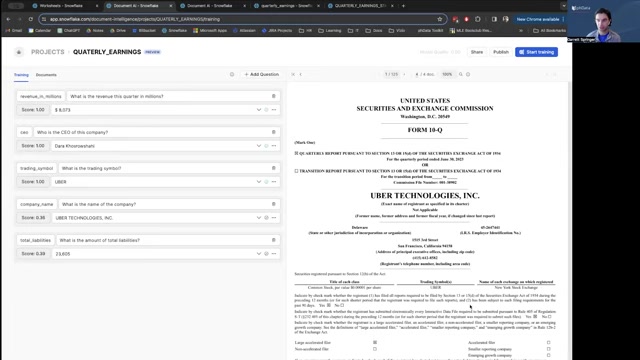
including PDF, Word, Text, and images.
Step 5: Train Model
The power of Document AI increases by training the system to understand where your data exists within the PDF. Tell it what your data should be and Document AI will find where that field exists within your document. This process only needs to be completed once.
Step 6: Start Querying with Natural Language
Now comes the fun part! You can begin asking questions about your documents using natural language.
- You can add specific questions.
- Simply type your queries in plain English.
Document AI will automatically process the documents and provide the answers.
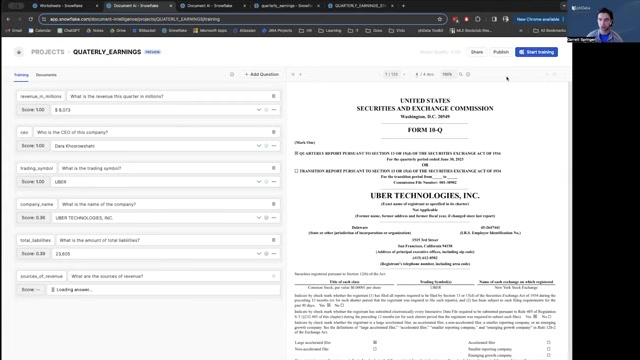
You can utilize the queries or update them as needed to pull the required information.
Step 7: Build a Data Processing Pipeline (Advanced)
For truly automated data extraction, consider setting up a data processing pipeline

. This involves:
- Creating a stage to hold your documents.
- Using SQL queries and functions to process the documents with Document AI.
- Parsing the raw model results into a structured format.
- Organizing the results into a table for downstream applications.
By using Snowflake's built-in features such as Streams and Tasks, you can automate this entire pipeline to process new documents as they become available.
Pricing of Document AI
Understanding the Cost Structure
As Snowflake Document AI is a relatively new feature, the pricing structure might be subject to change. However, based on the information provided, all processing is run on Snowflake's Cortex
. You can use an extra-small warehouse for interacting with Document AI. If you increase the warehouse it does not improve the performance.
- It's recommended to consult with Snowflake's pricing documentation or sales representatives for the most up-to-date information on pricing and usage.








Most people like































Report
Please select a reason for reporting
- 13 Reasons to Switch from Snapchat to Text Messaging
- 7 Powerful Speech to Text Apps to Boost Productivity
- 10 Best Speech to Text Tools for Effortless Transcription
- 13 Free Tools to Easily Transcribe Audio to Text
- 15 Surprising Ways Google's Speech-to-Text Boosts Productivity
- 7 Best Free Online Audio to Text Transcription Tools
- 9 Tips to Transcribe Speech to Text Faster and Better
- 13 Best Speech to Text Software for Windows 10 in 2023
- 7 Tips for Choosing the Best Transcriber for Audio to Text
- 11 Reasons Why Dragon Speech-to-Text Apps are Game-Changers
- 6 Secrets to Enhance Your Speech to Text Transcription
- 6 Brilliant Ways to Boost Productivity with Talk-to-Text on Your MacBook
- 6 Ways Transcription Software Converts Audio to Text
- 8 Tips to Transcribe Speech to Text Like a Pro
- 6 Reasons IBM Watson Speech to Text is a Game-Changer
- 14 Powerful Ways Talk-to-Text Improves Your Workflow
- 12 Top Windows Speech-to-Text Software for Efficient Transcription
- 12 Game-Changing Benefits of Apple's Speech to Text Technology
- 9 Powerful Use Cases for AWS Speech to Text Technology
- 10 Easy Steps to Transcribe YouTube Videos to Text
- transcription audio en texte
- online audio transcription
- free audio file transcription
- free ai audio transcription
- audio transcription service
- audio transcription online free
- audio transcription free online
- audio to transcription software
- audio and transcript
- ai audio transcription free
- voice recording to text converter
- translate voice recording to text
- record voice to text
- audio recording to text converter
- voice recording and transcription
- chatgpt voice to text
- gmail voice to text
- speech to text reader
- speech to text ai free
- speech to talk
- How SEO and Marketing Dashboards Empower Agencies to Drive Results
- How to Use AI Tools to Find Internal Linking Opportunities Across a Business Website
- Discover Your Perfect Haircut with AI Hairstyle Apps
- Free Reputation Calculator Tools: How They're Adapting to Score AI Visibility, Not Just Rankings
- Design Professional Flyers for Free on Your Phone
- Best Free Flyer Maker Apps for Android: Design Like a Pro
- How to Know If Your Business Is Ready for an AI Customer Service Agent
- Revolutionizing Storytelling: From Novels to Screenplays with AI
- Create Engaging Animated Explainer Videos with a Free AI Tool
- Stop Multi-Subscribing: Benchmark Top AI Visual Models in One Canvas
- ASOMobile Helps Teams Benchmark App Store Screenshots Against Competitors
- How to Match LMS Software With Your Organization's Training Plan
- Revolutionizing Email Marketing Agency with AI
- How to Convert BTC to HNT
- Unleashing the Power of AI: Cognizant's Roadmap for Transformation
- Frame to Video Review: A Practical Look at Turning Two Still Frames Into Motion
- NVIDIA NIM: Revolutionizing Supply Chain Data Analysis with AI
- Top AI Tools That Help Brands Stand Out Offline (Not Just Online)
- Top 5 Cold Email Software: Maximize Your Outreach in 2025
- Magic School AI: Revolutionizing Quiz & Assessment Generation

Copyright ©2026 toolify