































Table of Contents
- Key Points
- Introduction to OCR-AI: The Future of Document Digitization
- Practical Applications of OCR-AI
- Step-by-Step Guide to Using OCR-AI
- Cost-Effective Document Digitization with OCR-AI Pricing
- Evaluating OCR-AI: Pros and Cons
- Key Features of Advanced OCR-AI Solutions
- Versatile Use Cases for OCR-AI Across Industries
- Frequently Asked Questions about OCR-AI
- Related Questions on Document Automation



Introduction to OCR-AI: The Future of Document Digitization
What is OCR-AI?
OCR-AI is a revolutionary technology that combines Optical Character Recognition (OCR) with Artificial Intelligence (AI) to automate document processing. OCR technology converts images of text, whether scanned documents or photographs, into machine-readable text. AI enhances this process by learning Patterns, improving accuracy, and enabling extraction of specific data points from complex documents.
This technology is useful for digitalizing documents with AI.
OCR-AI is designed to streamline workflows, reduce manual data entry, and improve overall efficiency in managing and processing large volumes of documents. It supports various file formats, including PDFs and image files, making it a versatile tool for diverse business needs. By automating Data Extraction, businesses can focus on strategic tasks rather than tedious administrative work.
The integration of AI significantly boosts the capabilities of traditional OCR. AI algorithms can recognize different fonts, layouts, and even Handwriting, improving the accuracy of text conversion. Furthermore, AI can be trained to identify and extract specific fields from documents, such as invoice numbers, dates, and amounts, making the data readily available for analysis and reporting.
Benefits of Implementing OCR-AI in Your Business
Implementing OCR-AI in your business provides a lot of benefits. Here is a summary of the core reasons to implement it.
-
Improved Efficiency: Automating data extraction significantly reduces the time and effort required to process documents.
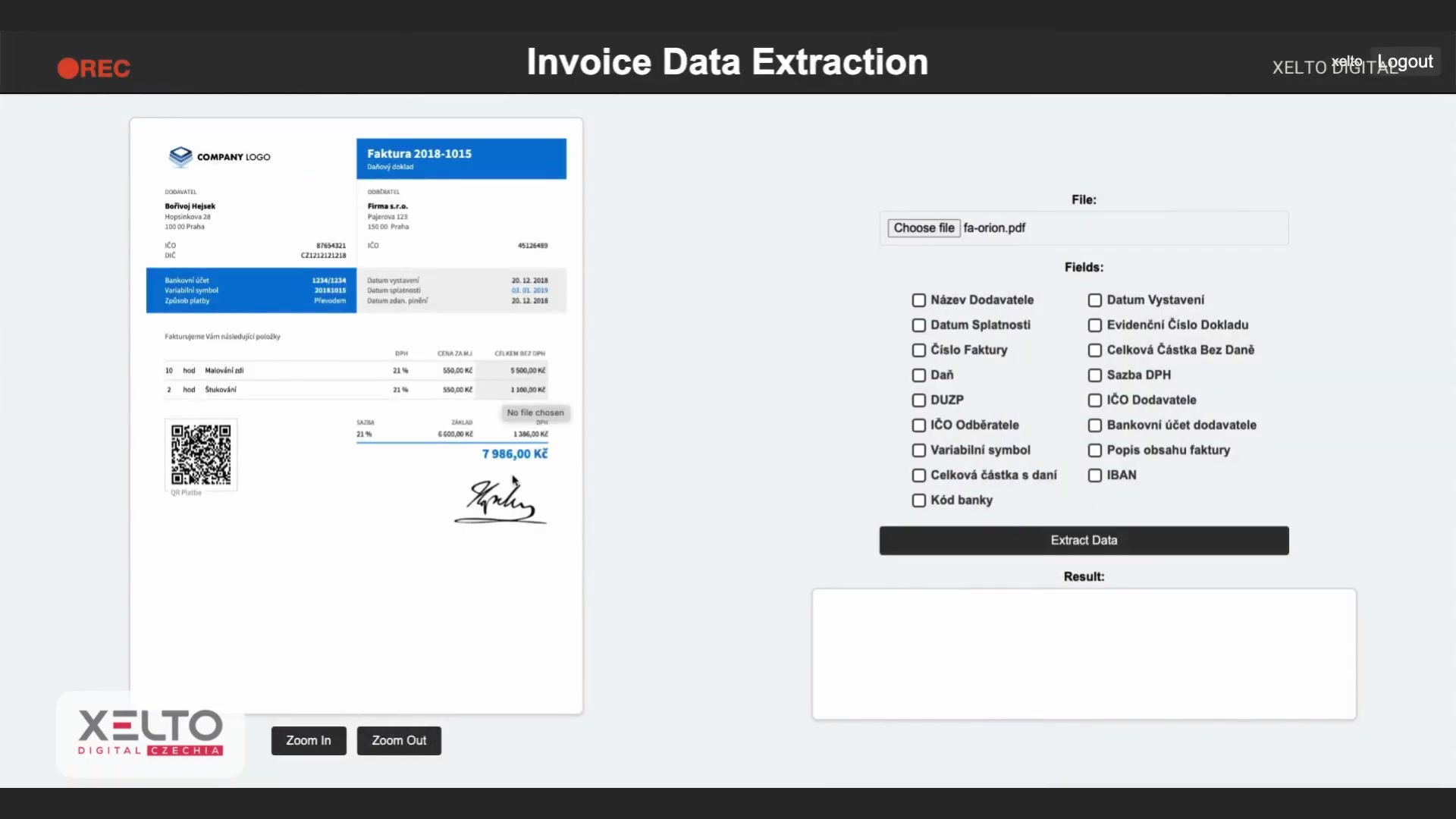
This leads to faster turnaround times and more efficient workflows.
-
Reduced Errors: Manual data entry is prone to errors. OCR-AI minimizes these errors by accurately converting and extracting data, ensuring data integrity.
-
Cost Savings: By automating document processing, businesses can reduce labor costs associated with manual data entry and error correction. With a price as low as €0.05 per document, OCR-AI provides a highly cost-effective solution.
-
Enhanced Data Accessibility: OCR-AI transforms unstructured data in documents into structured, searchable information. This enhances data accessibility and makes it easier to retrieve and analyze critical business information.
-
Scalability: OCR-AI solutions are highly scalable, allowing businesses to process large volumes of documents without significant increases in manual effort.
-
Integration with Existing Systems: OCR-AI can be seamlessly integrated into existing systems, such as Enterprise Resource Planning (ERP) and Customer Relationship Management (CRM) platforms, enhancing overall business process automation.
-
Better Decision-Making: Access to accurate, structured data enables better decision-making. OCR-AI provides the insights needed to optimize processes, identify trends, and improve overall business performance.
Practical Applications of OCR-AI
Invoice Data Extraction with OCR-AI
Invoice data extraction is one of the most common and valuable applications of OCR-AI. Businesses receive numerous invoices in various formats, making manual processing a significant burden. OCR-AI automates the extraction of key information from invoices, such as invoice numbers, dates, vendor details, line items, and amounts.
This automation significantly reduces the time and effort required to process invoices, minimizes errors, and accelerates payment cycles.
To use OCR-AI for invoice data extraction, you typically follow these steps:
-
Upload the Invoice: Start by uploading the invoice file in PDF or image format.
-
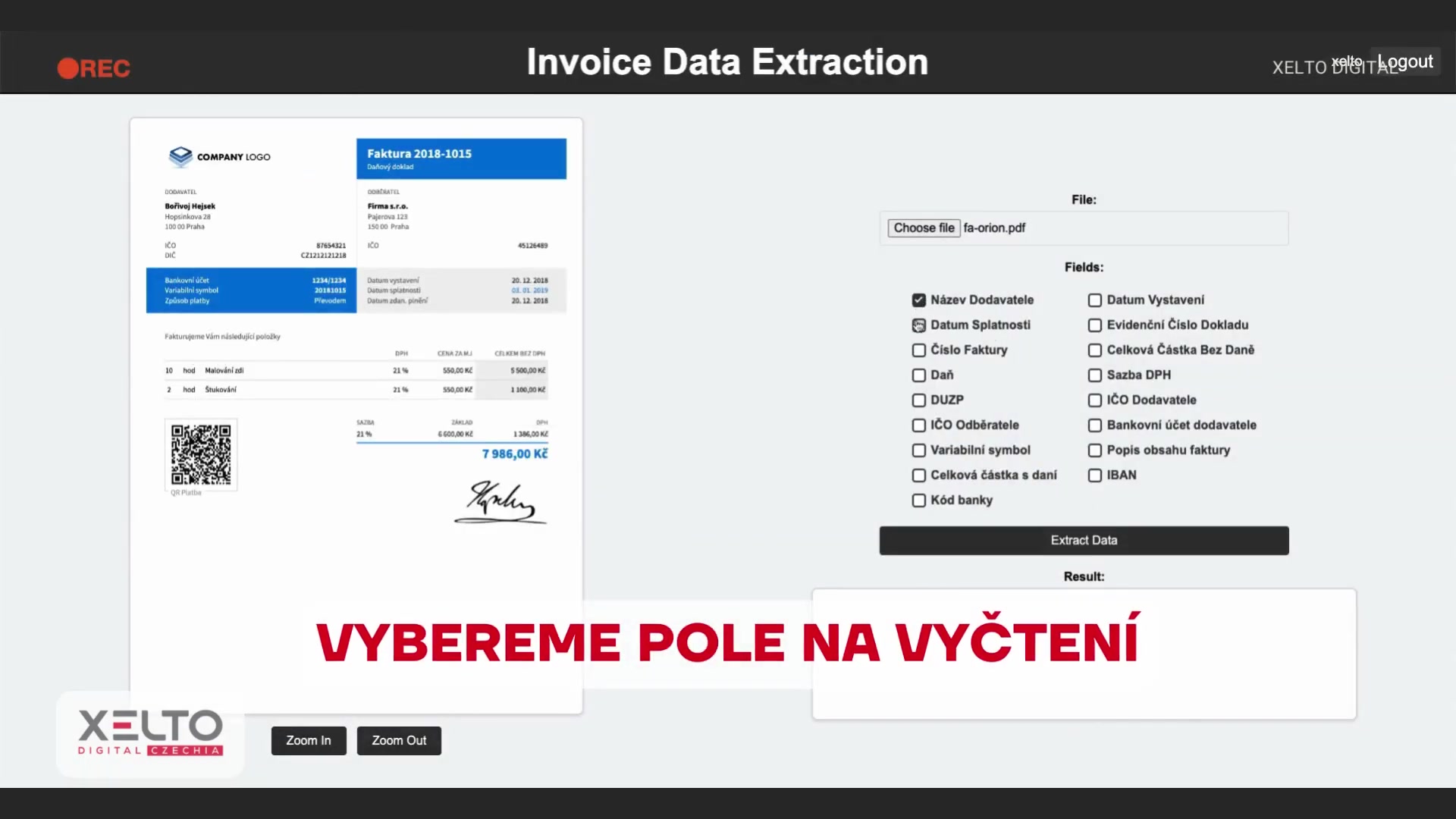
Select Fields for Extraction: Choose the specific data fields you want to extract, such as invoice number, date, vendor name, and total amount.
-
Initiate Data Extraction: Start the OCR-AI process to automatically extract the selected data fields from the invoice.
-
Review and Validate Data: Review the extracted data for accuracy and make any necessary corrections. This ensures the integrity of the extracted information.
-
Export the Data: Export the extracted data in a structured format, such as JSON, for seamless integration with accounting or ERP systems.
By automating invoice data extraction, businesses can improve their accounts payable processes, reduce processing costs, and gain better visibility into their financial data.
Handling Low-Quality Documents with OCR-AI
One of the significant advantages of OCR-AI is its ability to handle low-quality documents. Traditional OCR systems often struggle with documents that have poor image quality, skewed text, or handwritten elements. AI-powered OCR enhances the process of handling these challenges, delivering accurate and reliable data extraction.
OCR-AI employs sophisticated image processing techniques to enhance the Clarity of low-quality images. These techniques include noise reduction, contrast adjustment, and skew correction. AI algorithms can identify and correct skewed text, making it easier to recognize characters accurately.
OCR-AI can recognize and transcribe handwritten text, enabling the digitization of handwritten documents such as receipts, notes, and forms. This is particularly useful for businesses that still receive a significant number of handwritten documents. AI algorithms learn to recognize different handwriting styles, improving accuracy over time. The process of handling handwritten documents in OCR-AI includes:
- Image Enhancement: Improving the quality of the image for better recognition.
- Text Recognition: Identifying and transcribing the handwritten text using AI algorithms.
- Contextual Analysis: Using contextual information to correct errors and improve accuracy.
By effectively handling low-quality documents, OCR-AI ensures that businesses can digitize all their documents, regardless of their initial condition. This leads to more complete and accessible data, improving overall efficiency and decision-making.
Step-by-Step Guide to Using OCR-AI
Extracting Data from Invoices
Here's a detailed guide on how to use OCR-AI to extract data from invoices:
-
Choose an OCR-AI Solution: Select a suitable OCR-AI software or platform that meets your business needs. There are many options available, such as Xelto Digital , each offering unique features and capabilities.
-
Upload Your Invoice: Upload the invoice document in PDF or image format to the OCR-AI platform.
-
Select Fields for Extraction: Specify the data fields you want to extract from the invoice, such as invoice number, date, supplier name, and total amount. Most OCR-AI solutions provide a user-friendly interface for selecting these fields.
-
Initiate the OCR-AI Process: Start the data extraction process. The OCR-AI solution will automatically analyze the invoice and extract the specified data fields.
-
Review and Validate the Extracted Data: Carefully review the extracted data to ensure accuracy. OCR-AI solutions often highlight potential errors or inconsistencies, allowing you to quickly validate the information.
-
Export the Data: Export the extracted data in a structured format, such as JSON or CSV. This allows you to easily import the data into your accounting, ERP, or other business systems.
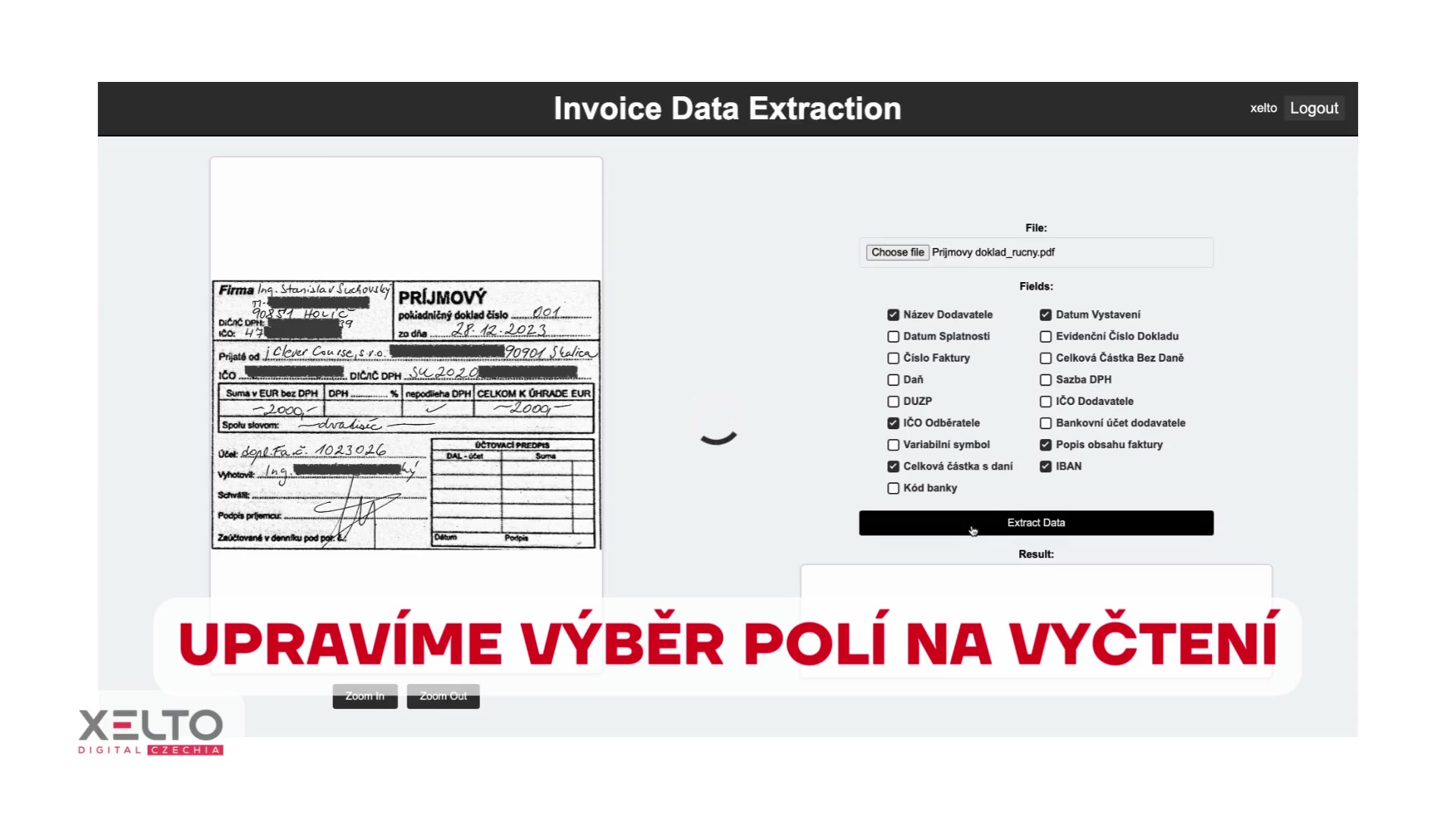
Extracting Data from Receipt
OCR-AI can be used to extract data from Receipt as well, here is the guide.
-
Choose an OCR-AI Solution: Select a suitable OCR-AI software or platform that meets your business needs. There are many options available, such as Xelto Digital , each offering unique features and capabilities.
-
Upload Your Receipt: Upload the receipt document in PDF or image format to the OCR-AI platform.
-
Select Fields for Extraction: Specify the data fields you want to extract from the invoice, such as supplier name, date, and total amount. Most OCR-AI solutions provide a user-friendly interface for selecting these fields.
-
Initiate the OCR-AI Process: Start the data extraction process. The OCR-AI solution will automatically analyze the invoice and extract the specified data fields.
-
Review and Validate the Extracted Data: Carefully review the extracted data to ensure accuracy. OCR-AI solutions often highlight potential errors or inconsistencies, allowing you to quickly validate the information.
-
Export the Data: Export the extracted data in a structured format, such as JSON or CSV. This allows you to easily import the data into your accounting, ERP, or other business systems.
Key Features of Advanced OCR-AI Solutions
Top Features for Efficient Document Processing
OCR-AI boasts several key features that distinguish it from traditional OCR technology.
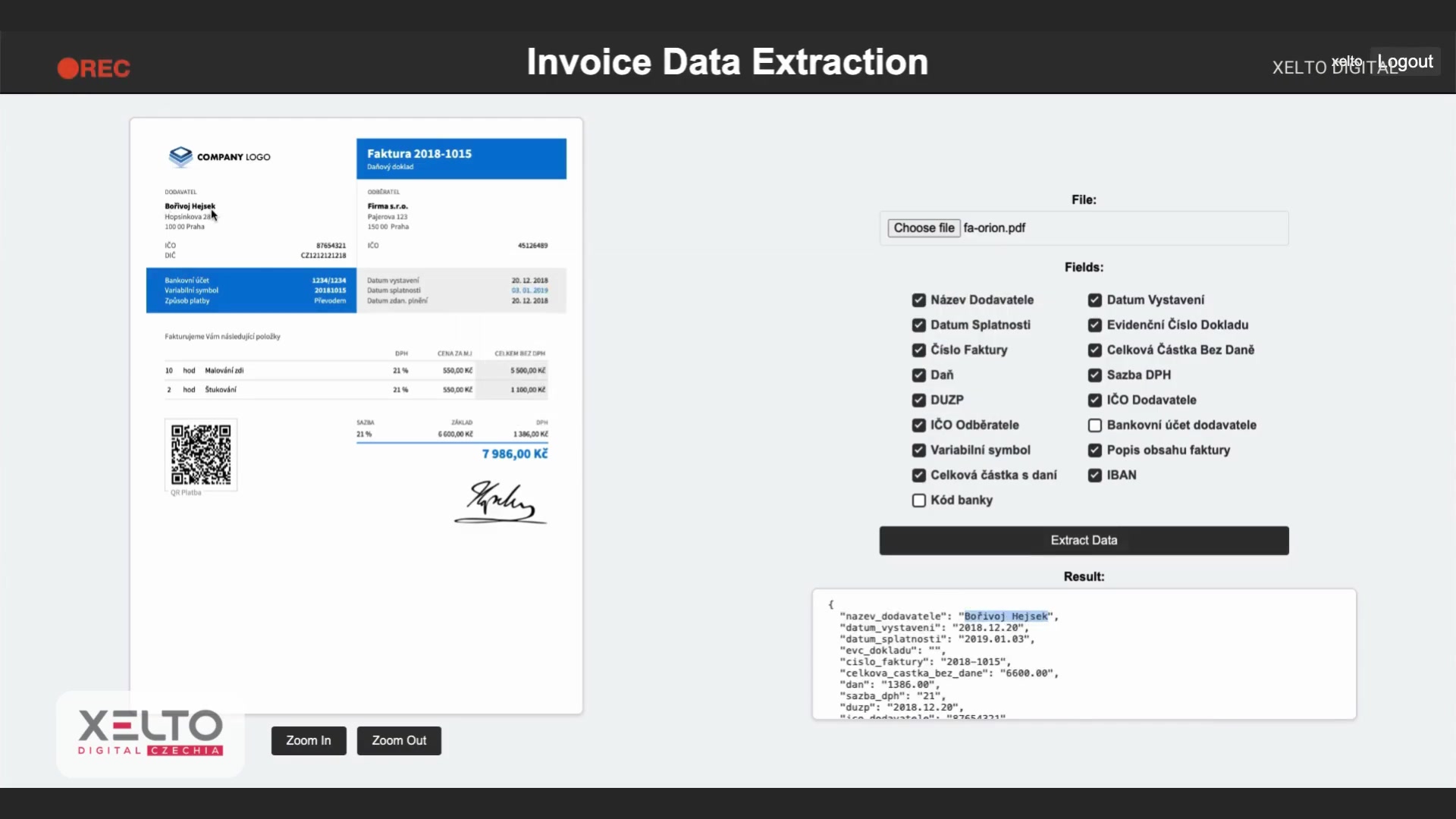
These features combine to deliver a powerful and versatile solution for automated document processing:
-
AI-Powered Accuracy: AI algorithms enhance the accuracy of text recognition, even with varied fonts, layouts, and handwriting.
-
Automated Data Extraction: OCR-AI automatically identifies and extracts specified data fields from documents, eliminating manual data entry.
-
Support for Multiple File Formats: OCR-AI supports a wide range of file formats, including PDFs, images, and scanned documents.
-
Handling Low-Quality Documents: Advanced image processing techniques enable OCR-AI to accurately extract data from documents with poor image quality.
-
Integration Capabilities: OCR-AI can be seamlessly integrated into existing systems such as ERP, CRM, and accounting software.
-
Scalability: OCR-AI solutions are designed to handle large volumes of documents, making them suitable for businesses of all sizes.
-
Customizable Workflows: OCR-AI allows for the creation of customizable workflows, tailoring the data extraction process to meet specific business needs.





Most people like



































Report
Please select a reason for reporting
- 13 Reasons to Switch from Snapchat to Text Messaging
- 7 Powerful Speech to Text Apps to Boost Productivity
- 10 Best Speech to Text Tools for Effortless Transcription
- 13 Free Tools to Easily Transcribe Audio to Text
- 15 Surprising Ways Google's Speech-to-Text Boosts Productivity
- 7 Best Free Online Audio to Text Transcription Tools
- 9 Tips to Transcribe Speech to Text Faster and Better
- 13 Best Speech to Text Software for Windows 10 in 2023
- 7 Tips for Choosing the Best Transcriber for Audio to Text
- 11 Reasons Why Dragon Speech-to-Text Apps are Game-Changers
- 6 Secrets to Enhance Your Speech to Text Transcription
- 6 Brilliant Ways to Boost Productivity with Talk-to-Text on Your MacBook
- 6 Ways Transcription Software Converts Audio to Text
- 8 Tips to Transcribe Speech to Text Like a Pro
- 6 Reasons IBM Watson Speech to Text is a Game-Changer
- 14 Powerful Ways Talk-to-Text Improves Your Workflow
- 12 Top Windows Speech-to-Text Software for Efficient Transcription
- 12 Game-Changing Benefits of Apple's Speech to Text Technology
- 9 Powerful Use Cases for AWS Speech to Text Technology
- 10 Easy Steps to Transcribe YouTube Videos to Text
- transcription audio en texte
- online audio transcription
- free audio file transcription
- free ai audio transcription
- audio transcription service
- audio transcription online free
- audio transcription free online
- audio to transcription software
- audio and transcript
- ai audio transcription free
- voice recording to text converter
- translate voice recording to text
- record voice to text
- audio recording to text converter
- voice recording and transcription
- chatgpt voice to text
- gmail voice to text
- speech to text reader
- speech to text ai free
- speech to talk
- Meshy AI: How to Create 3D Models from Text and Images
- How SEO and Marketing Dashboards Empower Agencies to Drive Results
- How to Use AI Tools to Find Internal Linking Opportunities Across a Business Website
- Discover Your Perfect Haircut with AI Hairstyle Apps
- Free Reputation Calculator Tools: How They're Adapting to Score AI Visibility, Not Just Rankings
- Design Professional Flyers for Free on Your Phone
- Best Free Flyer Maker Apps for Android: Design Like a Pro
- How to Know If Your Business Is Ready for an AI Customer Service Agent
- Revolutionizing Storytelling: From Novels to Screenplays with AI
- Create Engaging Animated Explainer Videos with a Free AI Tool
- Meshy AI: How to Create 3D Models from Text and Images
- ASOMobile Helps Teams Benchmark App Store Screenshots Against Competitors
- How to Match LMS Software With Your Organization's Training Plan
- Revolutionizing Email Marketing Agency with AI
- How to Convert BTC to HNT
- Unleashing the Power of AI: Cognizant's Roadmap for Transformation
- Frame to Video Review: A Practical Look at Turning Two Still Frames Into Motion
- NVIDIA NIM: Revolutionizing Supply Chain Data Analysis with AI
- Top AI Tools That Help Brands Stand Out Offline (Not Just Online)
- Top 5 Cold Email Software: Maximize Your Outreach in 2025

Copyright ©2026 toolify