































Table of Contents
- Key Points
- Understanding Graph RAG
- Building Your Own Graph RAG Chatbot
- How to Use Langchain to Install in Python
- FAQ
- Related Questions


Understanding Graph RAG
What is Graph RAG?
Graph RAG represents the relevance of information within a graph structure, allowing for robust information searches and answer generation.
In simpler terms, it's a technology that organizes data in a way that a chatbot can easily understand and use to answer questions more accurately. This is particularly useful when dealing with abstract queries.
Graph RAG (Retrieval-Augmented Generation) uses Graph Databases to store data, unlike other Vector-based RAGs. These databases are structured using nodes (points) and edges (lines), representing relationships between data. This allows for more flexible and intuitive data handling than traditional relational databases.
Here's how it works: When a question is asked, the Graph RAG system searches for Relevant nodes and their connected edges within the Knowledge Graph. This allows it to understand the context of the question and provide a more accurate and comprehensive answer.
Think of it like a family tree: Each person is a node, and the lines connecting them represent relationships like 'father,' 'sister,' or 'son-in-law.' Graph RAG can efficiently navigate these relationships to answer questions like, 'Who is John's sister's son?'
Why Graph RAG Matters: Combating Hallucinations
One of the biggest challenges in AI Chatbot development is 'hallucination,' where the AI makes up information that isn't true. Graph RAG systems are less prone to this because the knowledge graph provides a structured and reliable source of information.
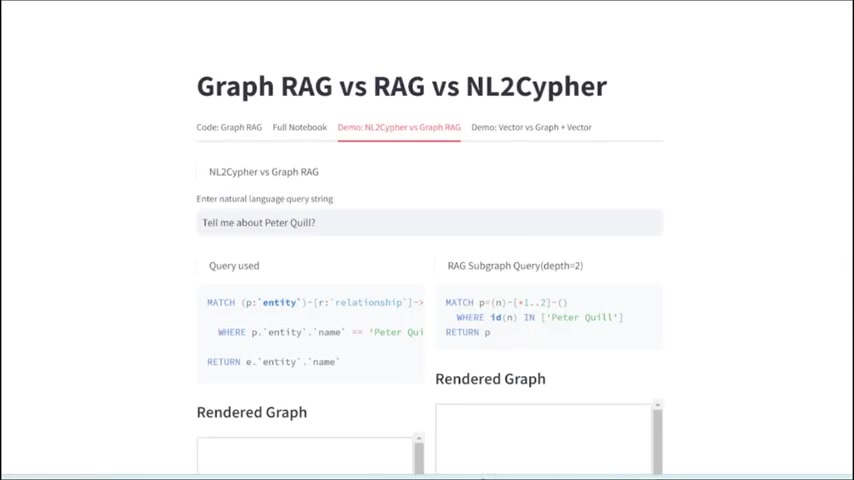
The knowledge graphs provide more relevant, varied, engaging, coherent, and reliable data to the Language Learning Model (LLM), leading to accurate and factual text generation.
By offering more relevant, varied, engaging, coherent, and reliable data, Graph RAG ensures that the LLM is grounded in factual information, minimizing the risk of fabricating responses. This makes Graph RAG a crucial component in building trustworthy and effective AI systems.
Graph RAG vs. Vector Databases
While both Graph RAG and vector databases are used for information retrieval, they differ in their underlying structure and strengths. Vector databases are designed to find similar pieces of data, which is useful in many applications. Graph RAG excels at modeling and querying complex relationships, making it perfect for interconnected information.

Here's a table summarizing the key differences:
| Feature | Graph RAG | Vector Databases |
|---|---|---|
| Data Structure | Nodes, Edges, Relationships | Vectors (Numerical Representations) |
| Strengths | Modeling complex relationships, knowledge retrieval | Similarity search, nearest neighbor queries |
| Best Use Cases | Knowledge graphs, contextual understanding | Image recognition, document similarity, recommendations |
| Data Handling | More flexible & intuitive, handles intricate data links | Efficient for similarity-based searches |
| Query Complexity | Responds well to abstract questions | Performs semantic comparison |
The Power of Gemma 2 and Open Models
Google's recent announcement of Gemma 2 marks a significant step forward in open-source AI.

Gemma 2 is a family of open models (but not open-source models), comparable to Meta's Llama and Mistral AI in performance. These models are designed to be accessible and adaptable, enabling developers to create powerful AI applications without relying on proprietary platforms.
The availability of models like Gemma 2 empowers developers to build customized chatbots tailored to their specific needs. The accessibility of these models, combined with Graph RAG technology, democratizes AI development, making it easier for businesses and individuals to create sophisticated AI solutions.
Building Your Own Graph RAG Chatbot
Step-by-Step Guide to Creating a Graph RAG Application
Creating a Graph RAG application might seem complex, but with the right tools and a structured approach, it's achievable for developers of various skill levels. Here's a breakdown of the key steps:
-
Install Langchain: Use pip or Conda to install Langchain, a crucial library for building chatbots. Keep the packages updated to take advantage of the frequent releases.
pip install langchain langchain-OpenAI tiktoken neo4j sqlalchemy wikipedia langchain-community langchain-core PyPDF2 -
Set up Neo4j: Set up Neo4j, either on the cloud using Neo4j Aura or locally by downloading the desktop application. This provides the graph database infrastructure.
-
Configure OpenAI Functions: The use of OpenAI's Functions is needed to extract data from the LLM. Data structures should be specified for Knowledge Graph nodes.
-
Data Extraction: This will extract a Knowledge Graph from the LLM for you to extract the data from.
Extracting Data: Using Langchain and Neo4j requires to get your data out of the database. You can then link the Langchain for your project.
Essential Python Code Snippets
To fully leverage Graph RAG, it is crucial to use the correct type of code to set up your Neo4J.
Here are some code snippets to get you started, each crucial for a functional chatbot:
-
Importing Libraries:
from langchain_community.chat_models import ChatOpenAI from langchain_community.graphs import Neo4jGraph import os -
Setting up Neo4j:
os.environ["OPENAI-API-KEY"] = 'Your_api' openai_api_key = os.environ["OPENAI-API-KEY"] url = "bolt://localhost:7687" username = "neo4j" password = "letmein" graph = Neo4jGraph( url=url, password=password, username=username ) print(graph) -
Knowledge Graph Classes:
from typing import List, Dict, Any, Optional
from langchain.schema import Document
from langchain.core.pydantic_v1 import BaseModel, Field

class Property(BaseModel):
  key: str = Field(..., description="A single property consisting of key and value")
  value: str = Field(..., description="The value of a key")

class Node(BaseModel):
  id: str = Field(..., description="Node identifier")
  properties: Optional[List[Property]] = Field(None, description="List of node properties")

class Relationship(BaseModel):
  source: str = Field(..., description="Source node identifier")
  target: str = Field(..., description="Target node identifier")
  rel_type: str = Field(..., description="Relationship type")
  properties: Optional[List[Property]] = Field(None, description="List of relationship properties")

class KnowledgeGraph(BaseModel):
  nodes: List[Node] = Field(..., description="List of nodes in the knowledge graph")
  rels: List[Relationship] = Field(..., description="List of relationships in the knowledge graph")
This code sets up the necessary connections and imports the required classes to build the data and extract the models.
How to Use Langchain to Install in Python
How to Run the LLM with Langchain in Python
Install the LLM with Langchain using Conda or PIP, but using PIP is reccommended as Conda will only install previous versions.
See below for specific instructions.
pip install langchain langchain-openai tiktoken neo4j sqlalchemy wikipedia langchain-community langchain-core PyPDF2Now you can create and extract structured information with your models!


Most people like




































Report
Please select a reason for reporting
- 13 Reasons to Switch from Snapchat to Text Messaging
- 7 Powerful Speech to Text Apps to Boost Productivity
- 10 Best Speech to Text Tools for Effortless Transcription
- 13 Free Tools to Easily Transcribe Audio to Text
- 15 Surprising Ways Google's Speech-to-Text Boosts Productivity
- 7 Best Free Online Audio to Text Transcription Tools
- 9 Tips to Transcribe Speech to Text Faster and Better
- 13 Best Speech to Text Software for Windows 10 in 2023
- 7 Tips for Choosing the Best Transcriber for Audio to Text
- 11 Reasons Why Dragon Speech-to-Text Apps are Game-Changers
- 6 Secrets to Enhance Your Speech to Text Transcription
- 6 Brilliant Ways to Boost Productivity with Talk-to-Text on Your MacBook
- 6 Ways Transcription Software Converts Audio to Text
- 8 Tips to Transcribe Speech to Text Like a Pro
- 6 Reasons IBM Watson Speech to Text is a Game-Changer
- 14 Powerful Ways Talk-to-Text Improves Your Workflow
- 12 Top Windows Speech-to-Text Software for Efficient Transcription
- 12 Game-Changing Benefits of Apple's Speech to Text Technology
- 9 Powerful Use Cases for AWS Speech to Text Technology
- 10 Easy Steps to Transcribe YouTube Videos to Text
- transcription audio en texte
- online audio transcription
- free audio file transcription
- free ai audio transcription
- audio transcription service
- audio transcription online free
- audio transcription free online
- audio to transcription software
- audio and transcript
- ai audio transcription free
- voice recording to text converter
- translate voice recording to text
- record voice to text
- audio recording to text converter
- voice recording and transcription
- chatgpt voice to text
- gmail voice to text
- speech to text reader
- speech to text ai free
- speech to talk
- ChatGPT Knows Ford. It Just Doesn't Quote Ford
- Meshy AI: How to Create 3D Models from Text and Images
- How SEO and Marketing Dashboards Empower Agencies to Drive Results
- How to Use AI Tools to Find Internal Linking Opportunities Across a Business Website
- Discover Your Perfect Haircut with AI Hairstyle Apps
- Free Reputation Calculator Tools: How They're Adapting to Score AI Visibility, Not Just Rankings
- Design Professional Flyers for Free on Your Phone
- Best Free Flyer Maker Apps for Android: Design Like a Pro
- How to Know If Your Business Is Ready for an AI Customer Service Agent
- Revolutionizing Storytelling: From Novels to Screenplays with AI
- How to Convert BTC to HNT
- ProxyWing DuckDuckGo Proxy Review: Plans, Setup and Who It Is For
- ChatGPT Knows Ford. It Just Doesn't Quote Ford
- Automate Lead Generation: A Comprehensive Guide with AI Agents
- Revideo.io: The Future of Reverse Video Search Technology
- Revolutionizing Email Marketing Agency with AI
- Breaking the Character Drift Dilemma: A Practical Test of Smart Shot
- Meshy AI: How to Create 3D Models from Text and Images
- ASOMobile Helps Teams Benchmark App Store Screenshots Against Competitors
- How to Match LMS Software With Your Organization's Training Plan

Copyright ©2026 toolify