































Table of Contents
- Key Points
- Understanding the Risks of Using Online Images
- Kittle: An AI-Powered Solution for Unique Image Creation
- Kittle Pricing Options: Choose the Plan That Fits Your Needs
- Benefits of Using Kittle vs Competitors
- Kittle Core Features: Unleashing Your Creative Potential
- Kittle Use Cases: Transforming Creative Workflows
- FAQ
- Related Questions



Understanding the Risks of Using Online Images
The Scenario: Finding Images Online
Imagine you've stumbled upon the perfect image online and you are going to use that image on a product for you to sell online.
What could possibly go wrong? There are a multitude of problems in this Scenario. You may be thinking you have the perfect images and ready to sell; however, that is not always the case.
This article will dive into those situations to help avoid disappointment when it comes to picking the right image for your product.
This leads into the main topic - picking the correct tool to avoid issues and never getting sued.
Problem #1: Difficulty Finding the Right Image
Spending hours searching online for the perfect image can be a common challenge. Free resources like Google Images often fall short, leaving you without precisely what you envisioned for your product. In some cases you can be searching for hours without any results. This can not only be a headache, but time wasted on finding the image vs time using the image for the product itself. Finding the right image can cause a lot of headaches because the lack of specificity in tools offered online.
Problem #2: Navigating Various File Formats
The digital landscape is littered with a range of different image file formats and lots of problems. Bitmap images like JPEGs and PNGs differ significantly from vector formats such as CorelDraw (CDR) or Scalable Vector Graphics (SVG). Vector formats generally offer greater scalability and flexibility for design modifications.
- Bitmap Formats (JPEG, PNG): These formats are pixel-based. While Universally supported, they can lose quality when scaled or edited extensively.
- Vector Formats (CDR, SVG): These formats use mathematical equations to define images. The upside is that they allow for limitless scaling without loss of resolution and easier modification. This flexibility is vital for laser engraving, especially when precise lines and shapes are crucial to preserve detail and quality. Vector images help avoid this problem.
Problem #3: Copyright Infringement - A Legal Minefield
Using images from online sources can be legally complicated. If you’re using images online, and don’t have the correct permission to use them - there is going to be problems. If you don’t pay for the image or give proper attribution, you could easily get into some legal issues.
Copyright infringement is a serious issue, and many individuals mistakenly underestimate its implications. Taking digital properties that you don’t have the license to can lead to a take down order for your store and potential legal damages.
While some may dismiss the significance of copyright, it is essential to realize that organizations such as Disney actively safeguard their intellectual property and can, and will, pursue legal action against infringers. Understand, if caught that there will be some serious headaches on the way.
Kittle: An AI-Powered Solution for Unique Image Creation
Kittle Overview
Kittle is an AI-powered design platform that enables users to create unique, copyright-safe images. The latest version has improved AI capabilities.
This section will go over Kittle and how the software can help in that case. The focus is on vector images, mainly SVGs, to avoid copyright and headaches. One main benefit of Kittle is generating what you want, and worry less about lawyers showing up at your door.
Generating Images with Kittle AI: A Step-by-Step Guide
Let's walk through how you can create custom vector images, particularly SVGs, using Kittle's AI features:
- Create a New Project:
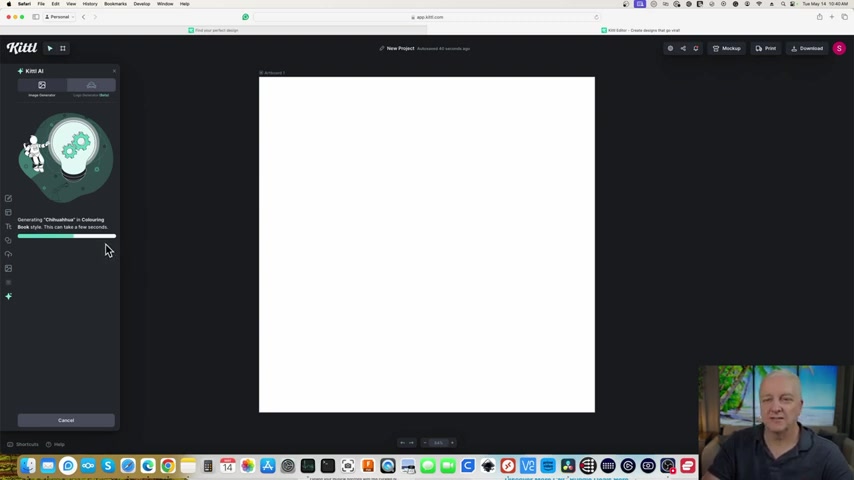
Start a new design project with custom Dimensions on Kittle. Select the 'Standard' preset for typical image and logo design.
- Access Kittle AI: Click on the 'Kittle AI' button located on the left-HAND menu.
- Choose an Image Style: Kittle offers different image output options such as logo generation or vector outputs.
- Add Prompt Text: To get started, add some text to your Prompt. Using text, we will create a Chihuahua. You can also customize the action of the Chihuahua in the text box. Add creative text to help drive the specifications you want.
- Generating your Image: Let the software work its magic in finding the right images.
With just a few clicks, Kittle makes the entire process relatively simple.
Laser Engraving with LightBurn
Once we get our image that Kittle.AI provides - the next logical step is to put that image to work. The next steps is using the output from Kittle to a program called LightBurn.
We can start by dragging our newly created art to LightBurn.
- Set the speed to 18000 mm/min
- Set power to 80%
- Export to our xTool S140W








Most people like

































Report
Please select a reason for reporting
- 13 Reasons to Switch from Snapchat to Text Messaging
- 7 Powerful Speech to Text Apps to Boost Productivity
- 10 Best Speech to Text Tools for Effortless Transcription
- 13 Free Tools to Easily Transcribe Audio to Text
- 15 Surprising Ways Google's Speech-to-Text Boosts Productivity
- 7 Best Free Online Audio to Text Transcription Tools
- 9 Tips to Transcribe Speech to Text Faster and Better
- 13 Best Speech to Text Software for Windows 10 in 2023
- 7 Tips for Choosing the Best Transcriber for Audio to Text
- 11 Reasons Why Dragon Speech-to-Text Apps are Game-Changers
- 6 Secrets to Enhance Your Speech to Text Transcription
- 6 Brilliant Ways to Boost Productivity with Talk-to-Text on Your MacBook
- 6 Ways Transcription Software Converts Audio to Text
- 8 Tips to Transcribe Speech to Text Like a Pro
- 6 Reasons IBM Watson Speech to Text is a Game-Changer
- 14 Powerful Ways Talk-to-Text Improves Your Workflow
- 12 Top Windows Speech-to-Text Software for Efficient Transcription
- 12 Game-Changing Benefits of Apple's Speech to Text Technology
- 9 Powerful Use Cases for AWS Speech to Text Technology
- 10 Easy Steps to Transcribe YouTube Videos to Text
- transcription audio en texte
- online audio transcription
- free audio file transcription
- free ai audio transcription
- audio transcription service
- audio transcription online free
- audio transcription free online
- audio to transcription software
- audio and transcript
- ai audio transcription free
- voice recording to text converter
- translate voice recording to text
- record voice to text
- audio recording to text converter
- voice recording and transcription
- chatgpt voice to text
- gmail voice to text
- speech to text reader
- speech to text ai free
- speech to talk
- How SEO and Marketing Dashboards Empower Agencies to Drive Results
- How to Use AI Tools to Find Internal Linking Opportunities Across a Business Website
- Discover Your Perfect Haircut with AI Hairstyle Apps
- Free Reputation Calculator Tools: How They're Adapting to Score AI Visibility, Not Just Rankings
- Design Professional Flyers for Free on Your Phone
- Best Free Flyer Maker Apps for Android: Design Like a Pro
- How to Know If Your Business Is Ready for an AI Customer Service Agent
- Revolutionizing Storytelling: From Novels to Screenplays with AI
- Create Engaging Animated Explainer Videos with a Free AI Tool
- Stop Multi-Subscribing: Benchmark Top AI Visual Models in One Canvas
- AI & Elections: Defending Democracy Against Misinformation
- Navigating Political Discourse: AI, Deepfakes, and Reality Checks
- Detecting Political Bias in News Articles: A Powerful AI Algorithm
- AI Bias Unveiled: Political Leanings in ChatGPT & Beyond
- Revolutionize Learning: Discover Quizzes AI for Engaging Interactive Quizzes
- From AI-Generated to Audience-Ready: How Quillbot Humanize AI Is Changing the Content Editing Process
- Building an AI Writing Stack in 2026: LLMs, Detectors, and Humanizers
- 7 Top AI-Powered Database Assistant Platforms
- An Objective Look at Modern Web-Based Visual Modifications
- My Honest Experience with VideoAI: The Secret Weapon for Creators Who Need Character Voices

Copyright ©2026 toolify