































Table of Contents
- Key Points
- Understanding the WordPress Automatic Plugin
- Comparison Table: WordPress Automatic Plugin vs. Manual Content Creation
- Getting Started with WordPress Automatic Plugin
- Pricing
- Weighing the Benefits and Drawbacks
- Core Features of WordPress Automatic Plugin
- Use Cases for WordPress Automatic Plugin
- Frequently Asked Questions
- Related Questions


Understanding the WordPress Automatic Plugin
What is the WordPress Automatic Plugin?
The WordPress Automatic Plugin is a versatile tool designed to automatically generate posts on your WordPress website. It leverages AI and integrations with numerous content sources to create a hands-free content creation experience.

Whether you want to curate content from other sites, generate articles with AI, or post products from e-commerce platforms, this plugin offers a comprehensive set of features to streamline your content workflow.
Key Benefits:
- Saves Time: Automates the process of finding, creating, and posting content.
- Increases Engagement: Keeps your website fresh with new and relevant content.
- Drives Traffic: Attracts more visitors by consistently updating your site.
- Enhances SEO: Improves Search Engine rankings through regular content updates.
- Reduces Costs: Lowers the expenses associated with manual content creation.
Sources for content generation
The plugin supports a multitude of content sources, allowing you to tailor your content strategy to your specific needs.
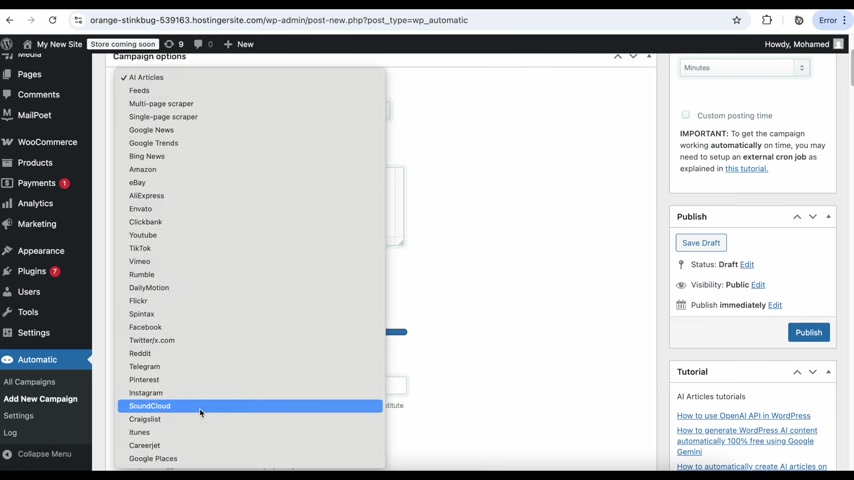
These sources include:
- AI Article Generation: Generate original articles using AI based on specified keywords and prompts.
- RSS Feeds: Import content from other websites using RSS feeds.
- Multi-Page Scrapers: Scrape content from multiple pages of a website.
- Single-Page Scrapers: Extract specific content from a single webpage.
- News Sites: Post news from Google News, Bing News, and Google Trends.
- E-Commerce Platforms: Import products from Amazon, eBay, AliExpress, Clickbank, and Envato.
- Video Platforms: Share videos from YouTube, TikTok, Vimeo, Rumble, and Dailymotion.
- Social Media Sites: Curate content from Facebook, X (formerly Twitter), Reddit, Telegram, Pinterest, Instagram, and SoundCloud.
- Job Boards and Business Listings: Post job listings from Careerjet and business listings from Google Places.
Getting Started with WordPress Automatic Plugin
Step 1: Creating Your First Campaign
The initial step involves setting up a campaign to drive your automatic content creation.
1. Access the WordPress Dashboard: Begin by logging into your WordPress admin panel.
2. Navigate to Automatic: In the left-hand menu, locate and click on the 'Automatic' option.
3. Add New Campaign: Click on 'Add New Campaign' to begin creating your first automated content campaign.
This is where you'll configure the settings to define how the plugin will generate and post content.
Step 2: Configuring Campaign Settings
Configuring the campaign settings is essential for specifying the type and source of content you want to automatically generate.
1. Add Title: Begin by providing a descriptive title to your campaign.
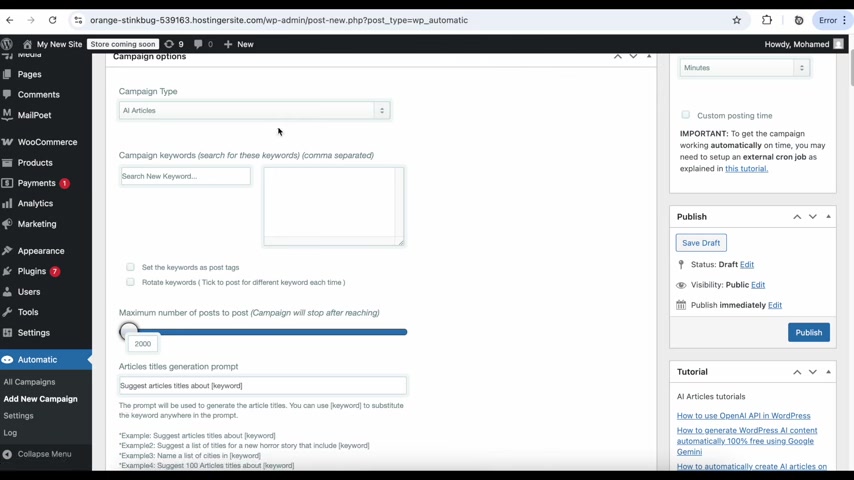
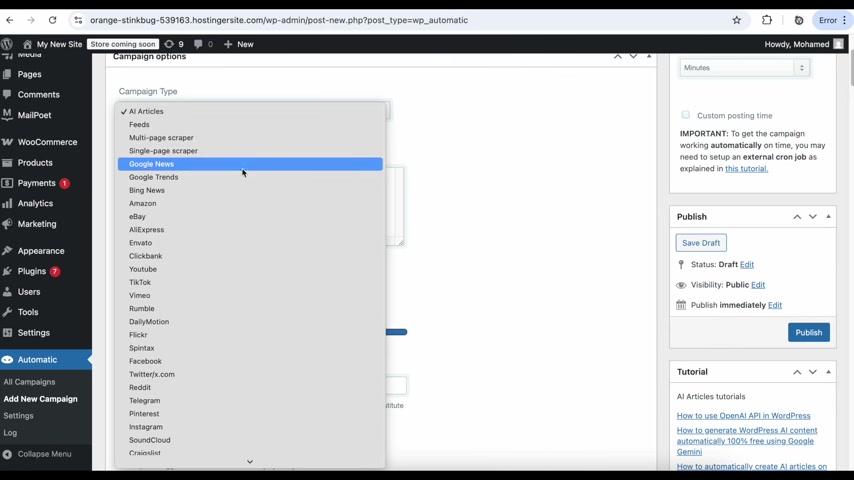
2. Campaign Type: Next, select the desired source of content from the dropdown menu. Available options include AI Articles, Feeds, Google News, Amazon, YouTube, and more.
3. Add Keywords: Add keywords to help refine the content selection.
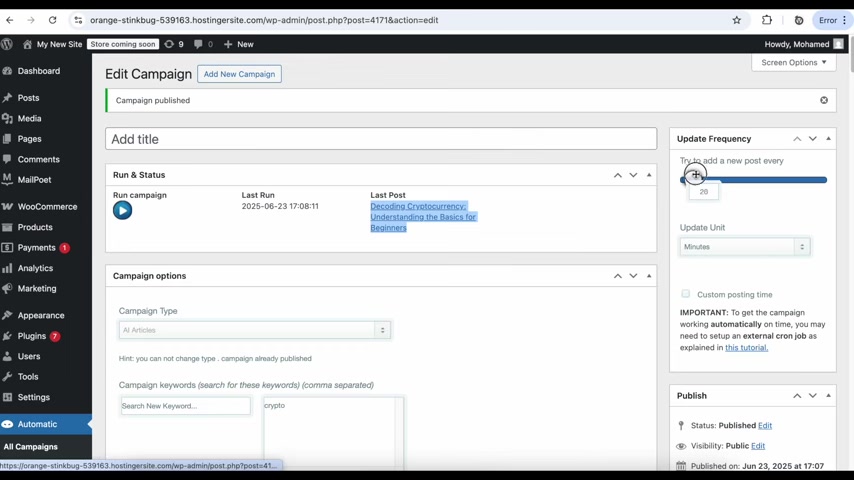
These keywords will be used to search for relevant articles or products based on your selection.
Step 3: Defining Update Frequency
Update frequency ensures that fresh content is always available.
1. Set Update Frequency: Specify the update frequency to determine how often the plugin will attempt to add a new post. This can be set in minutes, hours, or days, depending on your preferences.
2. Fine-Tuning Update Units: Depending on the update frequency you pick, the appropriate update unit will be displayed.
Step 4: Publishing and Running the Campaign
The moment of truth.
1. Publish the Campaign: Click the publish button to finalize your campaign settings.
2. Run the Campaign: After publishing, click ‘Run Campaign’ to initiate the content generation process.
3. Monitor Results: Observe the plugin as it automatically generates and publishes new content to your WordPress website.
Step 5: Enhanced Customization
Advanced features to make your content pipeline more robust.
1. AI Integration: The plugin supports AI integration using providers like Google Gemini and OpenAI.
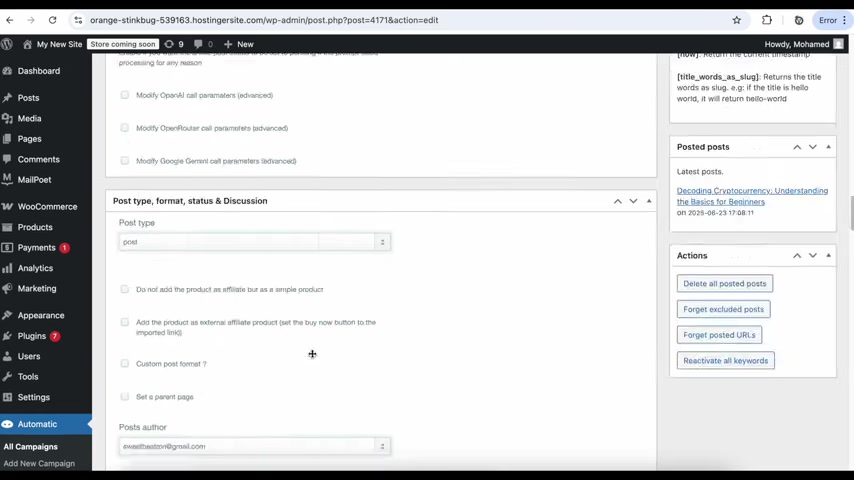
2. Post Template Customization: Use the post template setting to format the title and content how you like.
3. Category and Tag Customization: Tag and categorize the posts with whatever settings you like.
Core Features of WordPress Automatic Plugin
Key Functionalities
The WordPress Automatic Plugin is packed with features designed to automate and enhance your content strategy. Here are some of its core functionalities:
-
AI Content Generation: Use AI to generate original articles based on specified keywords and prompts.
-
Content Source Integration: Import content from various sources, including RSS feeds, news sites, social media platforms, and e-commerce platforms.
-
Post Template Customization: Customize the appearance of your posts using predefined templates or create your own.
-
Automatic Posting: Schedule posts to be published automatically at specified intervals.
-
Content Rewriting: Rewrite imported content to make it unique and avoid plagiarism.
-
Content Translation: Translate content into multiple languages to reach a wider audience.
-
Affiliate Link Integration: Automatically add affiliate links to product posts to monetize your website.
-
WooCommerce Support: Seamlessly post products to your WooCommerce store.
-
Post Filtering: Filter out unwanted content based on keywords, categories, and other criteria.
-
Image Management: Download and manage images for your posts, including adding them to a gallery.
Use Cases for WordPress Automatic Plugin
Various Applications of the WordPress Automatic Plugin
The WordPress Automatic Plugin is useful for a vast array of use cases, including:
-
News Aggregation: Automatically post news from various sources to create a comprehensive news website.
-
Affiliate Marketing: Import product listings from e-commerce platforms and earn affiliate commissions.
-
Content Curation: Curate content from multiple websites to provide value to your audience.
-
Social Media Marketing: Repost content from social media sites to increase engagement.
-
E-commerce Store Automation: Automatically add products to your WooCommerce store and keep your product catalog updated.
-
AI Article Generation: Use AI to generate articles on autopilot, requiring no input from your staff.






Most people like





























Report
Please select a reason for reporting
- 13 Reasons to Switch from Snapchat to Text Messaging
- 7 Powerful Speech to Text Apps to Boost Productivity
- 10 Best Speech to Text Tools for Effortless Transcription
- 13 Free Tools to Easily Transcribe Audio to Text
- 15 Surprising Ways Google's Speech-to-Text Boosts Productivity
- 7 Best Free Online Audio to Text Transcription Tools
- 9 Tips to Transcribe Speech to Text Faster and Better
- 13 Best Speech to Text Software for Windows 10 in 2023
- 7 Tips for Choosing the Best Transcriber for Audio to Text
- 11 Reasons Why Dragon Speech-to-Text Apps are Game-Changers
- 6 Secrets to Enhance Your Speech to Text Transcription
- 6 Brilliant Ways to Boost Productivity with Talk-to-Text on Your MacBook
- 6 Ways Transcription Software Converts Audio to Text
- 8 Tips to Transcribe Speech to Text Like a Pro
- 6 Reasons IBM Watson Speech to Text is a Game-Changer
- 14 Powerful Ways Talk-to-Text Improves Your Workflow
- 12 Top Windows Speech-to-Text Software for Efficient Transcription
- 12 Game-Changing Benefits of Apple's Speech to Text Technology
- 9 Powerful Use Cases for AWS Speech to Text Technology
- 10 Easy Steps to Transcribe YouTube Videos to Text
- transcription audio en texte
- online audio transcription
- free audio file transcription
- free ai audio transcription
- audio transcription service
- audio transcription online free
- audio transcription free online
- audio to transcription software
- audio and transcript
- ai audio transcription free
- voice recording to text converter
- translate voice recording to text
- record voice to text
- audio recording to text converter
- voice recording and transcription
- chatgpt voice to text
- gmail voice to text
- speech to text reader
- speech to text ai free
- speech to talk
- Design Professional Flyers for Free on Your Phone
- Best Free Flyer Maker Apps for Android: Design Like a Pro
- How to Know If Your Business Is Ready for an AI Customer Service Agent
- Revolutionizing Storytelling: From Novels to Screenplays with AI
- Create Engaging Animated Explainer Videos with a Free AI Tool
- Stop Multi-Subscribing: Benchmark Top AI Visual Models in One Canvas
- Best Seedance 2.5 API Provider: Every Price on the Market, Checked at Source
- AI OnlyFans: How to Generate $30,000/Month (Legally)
- Transform Your Script into an Engaging Video with AI Video Maker!
- AI Marketing Automation: A Comprehensive Guide for Small Businesses
- Design Professional Flyers for Free on Your Phone
- Best Free Flyer Maker Apps for Android: Design Like a Pro
- Unleash Creativity: AI Coloring Pages with ColoringBook.ai
- Generate Stunning AI Photos with Google Gemini: A Guide
- Boost Your Etsy Sales with Stunning Digital Invitations!
- Revolutionize Your Etsy Listing with AI Text Generator
- Create Coloring Pages with AI: A Bing AI Tutorial
- Photo Lab App: Transform Your Photos with Stunning AI Effects
- Effortless Design: Rewriting Text with Microsoft Designer's AI
- Create & Sell Kids' Coloring Books with AI - KDP Guide

Copyright ©2026 toolify