































Table of Contents
- Key Points
- Setting Up Your YOLOv4 Training Environment
- Gathering and Preparing Your Custom Dataset
- How to Configure Your YOLOv4 Training
- Pricing for Building a Custom YOLOv4 Custom Object Detector
- The Pros and Cons of YOLOv4
- Frequently Asked Questions
- Custom Object Detection Explained


Setting Up Your YOLOv4 Training Environment
Enabling GPU Acceleration
To start, we need to set up our cloud environment. This Tutorial focuses on using Google Colaboratory, a free platform offering GPU acceleration.
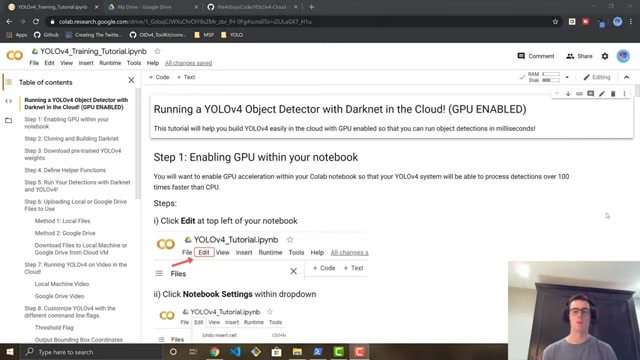
This is crucial for reducing training time. GPU acceleration allows for object detection processing to happen over 100 times faster than what a CPU can process. First, access the Colaboratory through the link in the description and then create a copy of the Colab notebook to your Google Drive by selecting the “Copy to Drive” button. Then, you’ll need a Google Drive account. After saving a copy of your notebook, you need to enable GPU acceleration. To enable GPU acceleration, you must first go to Edit -> Notebook Settings, and select the box which enables GPU in your notebook.
Cloning and Building Darknet
The Darknet framework is the engine that powers YOLOv4. We will use commands that help clone Darknet from GitHub, so your YOLOv4 systems will be able to process hundreds of helper lines.
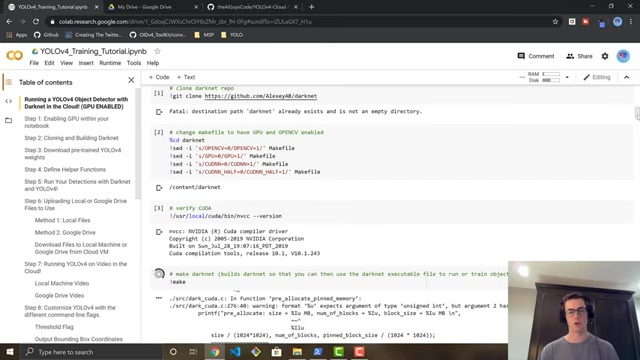
All of the cells that are needed to properly run Darknet have been included and can be accessed by scrolling to the cells that will build Darknet within this Colab notebook.
It is important to run all the set up commands to properly run Darknet and build your custom object detector!
Downloading Pre-Trained YOLOv4 Weights
To accelerate training, we'll download pre-trained weights for the convolutional layers of YOLOv4. These weights allow your custom object detector to be way more accurate and not have to train for nearly as long! Because the weights will already be allocated, your overall iteration times will decrease. This process helps your model to converge and be more accurate way faster! These actions will help in creating a fully custom object detector.
Simply click the code cell and run the download command.
Gathering and Preparing Your Custom Dataset
Gathering Images with Open Images Dataset V6
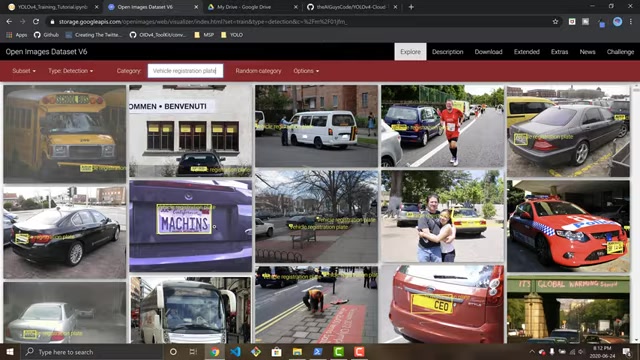
A crucial step in custom object detection is obtaining a relevant dataset. Open Images Dataset V6 offers a vast collection of images with annotations, making it an ideal resource. The OIDv4 toolkit is necessary to download the images and automatically generate labels. It is recommended to have 1500 images within the training set and 300 for your validation data set. You also have to select the classes in your image set.
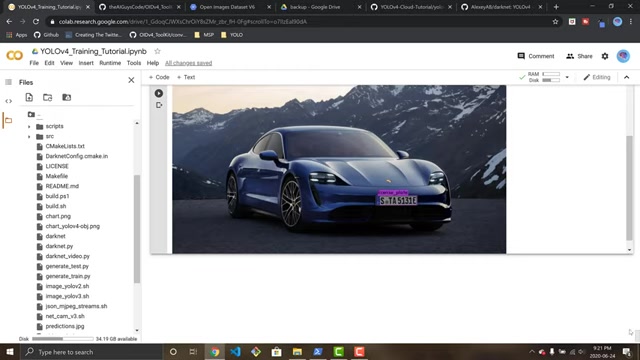
Using the data from Google’s Open Images Dataset is easily manageable for generating custom training data sets for custom object detectors. Google has already worked hard to easily auto-generate these labels within minutes.
Data Annotation Tips
If you want the objects in your model to be properly shown, the objects need to be labeled in the exact center of where the objects are so that this model can be trained to know what an actual object looks like.
- Ensure images and labels are in the proper YOLOv4 format. This means the file structure and content of the label files (.txt) must adhere to YOLOv4 standards.
- Verify class names are consistent. Make sure the class names in your classes.txt file match the labels generated by OIDv4.
- Augment your dataset. Techniques like rotation, scaling, and color jittering can improve the robustness of your detector.
- Clean your data, as this ensures that your model is well-trained and will work much better overall.
The success of your object detector hinges on the quality of your data, so invest time and effort in this step. Consider reviewing and cleaning labels for any inaccuracies.
How to Configure Your YOLOv4 Training
Configuring the YOLOv4 Configuration File
The .cfg file is the blueprint of your YOLOv4 network. Customizing this file is vital for adapting the detector to your specific object and data.
Here's how to configure it:
- Download the YOLOv4 Configuration Copy over the
yolov4.cfgto your Google Drive by running the cell below. This will allow you to edit it in a text editor. - Ensure Batch and Subdivision Sizes For Training, it is optimal to have batch set to
64and subdivisions to16for the ultimate results from YOLOv4 object detection. Change them using the commands in the Colab window text editor. - Adjust filters and classes. I changed the classes in the three YOLO layers and filters = 18 in the three convolutional layers before the YOLO layers and changed the steps for each one based on testing requirements, which will increase model performance.
Configuring Variables
If you've built an outstanding model so far, these parameters can greatly increase the quality of detections for each iteration.
- Width and Height: These (can be any multiple of 32, 416 is standard, you can sometimes improve results by making value larger like 608 but will slow down training) For your width and height, a baseline of 416 can be what provides the best model.










Most people like




























Report
Please select a reason for reporting
- 13 Reasons to Switch from Snapchat to Text Messaging
- 7 Powerful Speech to Text Apps to Boost Productivity
- 10 Best Speech to Text Tools for Effortless Transcription
- 13 Free Tools to Easily Transcribe Audio to Text
- 15 Surprising Ways Google's Speech-to-Text Boosts Productivity
- 7 Best Free Online Audio to Text Transcription Tools
- 9 Tips to Transcribe Speech to Text Faster and Better
- 13 Best Speech to Text Software for Windows 10 in 2023
- 7 Tips for Choosing the Best Transcriber for Audio to Text
- 11 Reasons Why Dragon Speech-to-Text Apps are Game-Changers
- 6 Secrets to Enhance Your Speech to Text Transcription
- 6 Brilliant Ways to Boost Productivity with Talk-to-Text on Your MacBook
- 6 Ways Transcription Software Converts Audio to Text
- 8 Tips to Transcribe Speech to Text Like a Pro
- 6 Reasons IBM Watson Speech to Text is a Game-Changer
- 14 Powerful Ways Talk-to-Text Improves Your Workflow
- 12 Top Windows Speech-to-Text Software for Efficient Transcription
- 12 Game-Changing Benefits of Apple's Speech to Text Technology
- 9 Powerful Use Cases for AWS Speech to Text Technology
- 10 Easy Steps to Transcribe YouTube Videos to Text
- transcription audio en texte
- online audio transcription
- free audio file transcription
- free ai audio transcription
- audio transcription service
- audio transcription online free
- audio transcription free online
- audio to transcription software
- audio and transcript
- ai audio transcription free
- voice recording to text converter
- translate voice recording to text
- record voice to text
- audio recording to text converter
- voice recording and transcription
- chatgpt voice to text
- gmail voice to text
- speech to text reader
- speech to text ai free
- speech to talk
- Create Engaging Animated Explainer Videos with a Free AI Tool
- Stop Multi-Subscribing: Benchmark Top AI Visual Models in One Canvas
- Best Seedance 2.5 API Provider: Every Price on the Market, Checked at Source
- AI OnlyFans: How to Generate $30,000/Month (Legally)
- Transform Your Script into an Engaging Video with AI Video Maker!
- AI Marketing Automation: A Comprehensive Guide for Small Businesses
- Midjourney Alternative for Anime Art Creators: Why PixAI May Be Better for Character Workflows
- 10 Things Most People Get Wrong About AI Image Search
- AI Girlfriend Apps: Top Choices Redefining Relationships 2025
- How to Reduce Quoting Errors in Salesforce with AI-Assisted Quote Creation
- Revideo.io: The Future of Reverse Video Search Technology
- Mastering Cold Calling: The Buffoon Technique for Client Acquisition
- Top AI Image Generators: Photo-Realistic Results in 2025
- Top 5 AI Image Generators: Create Stunning Visuals Easily
- Mastering Camera Angle Control: Top 4 AI Image & Video Generators for Cinematic Precision
- Top 4 AI Tools to Generate Flawless Digital Personas in 2026
- Why AI Language Tutors Underperform in Low-Resource Languages (And How to Work Around It)
- Top 5 AI Detector Tools: Ensuring Originality in Your Content
- How to Tell If an AI Study Tool Is Actually Helping You Learn (6 Checks for 2026)
- From Auto-Cuts to Generative Clips: Top 4 AI Video Editor Platforms Tested

Copyright ©2026 toolify