























YouTube & Website Summarization: Python Tutorial and Tools

Updated on May 09,2025








Table of Contents
- Key Points
- Setting Up the Development Environment
- How to Use the Summarization Tool
- Pricing for OpenAI API
- Frequently Asked Questions
- Related Questions


Setting Up the Development Environment
Creating a Virtual Environment
A virtual environment is essential for managing project dependencies in isolation. This prevents conflicts with other Python projects and ensures reproducibility. Here's how to set up a virtual environment:
-
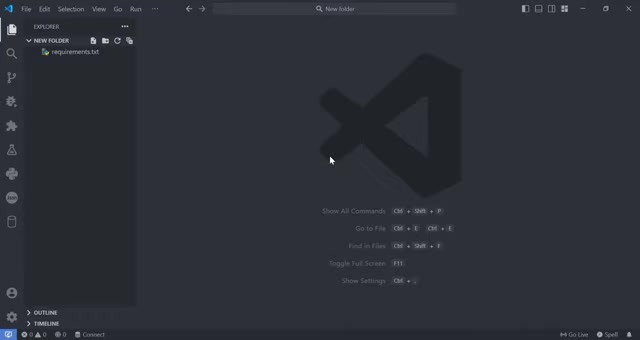
Open a terminal in your project directory.
-
Create a virtual environment using the following command:
python -m venv myvenvThis command creates a new virtual environment named
myvenv. -
Activate the virtual environment:
myvenv\Scripts\activateOnce activated, your terminal Prompt will indicate the active virtual environment (e.g.,
(myvenv)).
Installing Required Libraries
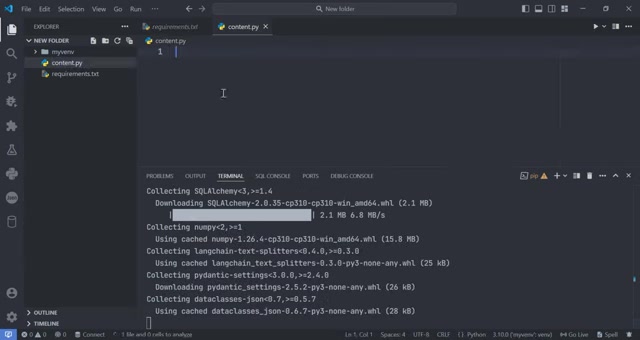
With the virtual environment activated, the next step is to install the necessary Python libraries. Create a requirements.txt file in your project directory to list the dependencies. Here’s an example of a requirements.txt file:
```text
validators
pytube
langchain
langchain_community
streamlit
youtube_transcript_api langchain_openai unstructured
    Install these libraries using the following command:
<img src="https://cdn.louhu.com/5iujaw01000d9n9cy8y3yhh7b5pojd0m.jpeg"/>

    ```bash
    pip install -r requirements.txt
This command installs all the libraries listed in the `requirements.txt` file. These libraries facilitate URL validation, YouTube video downloading, AI model integration, and creating a user interface.Here's a breakdown of the key libraries:
- Validators: Used to validate URLs and ensure they are correctly formatted.
- Pytube: A lightweight library for downloading YouTube videos.
- Langchain: An AI framework for building applications using Large Language Models (LLMs).
- Langchain-community: Provides community-driven integrations and tools for Langchain.
- Streamlit: Simplifies the creation of interactive web applications for data science and machine learning.
- Youtube-transcript-api: Fetches transcripts from YouTube videos, enabling text-based analysis and summarization.
- Langchain-openai: Integrates OpenAI's models into Langchain for AI-driven tasks.
- Unstructured: Helps to parse and structure different types of documents.
How to Use the Summarization Tool
Step-by-Step Instructions
Here’s how to use the summarization tool:
- Enter OpenAI API Key:
Input your OpenAI API key into the sidebar.
- Provide URL: Enter the URL of the YouTube video or website you want to summarize into the URL input field.
- Select Data Source: Choose whether the URL is from 'YouTube' or 'Website' using the dropdown menu.
- Select Summarization Option: You can choose between summarizing the text content either in ‘Words’ or in ‘Characters’ using the dropdown menu.
- Click Summarize: Press the 'Summarize' button to generate the summary.
- View Summary: The summary will be displayed on the screen. The processing time will also be displayed on the front end








Most people like






























Report
Please select a reason for reporting
- 13 Reasons to Switch from Snapchat to Text Messaging
- 7 Powerful Speech to Text Apps to Boost Productivity
- 10 Best Speech to Text Tools for Effortless Transcription
- 13 Free Tools to Easily Transcribe Audio to Text
- 15 Surprising Ways Google's Speech-to-Text Boosts Productivity
- 7 Best Free Online Audio to Text Transcription Tools
- 9 Tips to Transcribe Speech to Text Faster and Better
- 13 Best Speech to Text Software for Windows 10 in 2023
- 7 Tips for Choosing the Best Transcriber for Audio to Text
- 11 Reasons Why Dragon Speech-to-Text Apps are Game-Changers
- 6 Secrets to Enhance Your Speech to Text Transcription
- 6 Brilliant Ways to Boost Productivity with Talk-to-Text on Your MacBook
- 6 Ways Transcription Software Converts Audio to Text
- 8 Tips to Transcribe Speech to Text Like a Pro
- 6 Reasons IBM Watson Speech to Text is a Game-Changer
- 14 Powerful Ways Talk-to-Text Improves Your Workflow
- 12 Top Windows Speech-to-Text Software for Efficient Transcription
- 12 Game-Changing Benefits of Apple's Speech to Text Technology
- 9 Powerful Use Cases for AWS Speech to Text Technology
- 10 Easy Steps to Transcribe YouTube Videos to Text
- transcription audio en texte
- online audio transcription
- free audio file transcription
- free ai audio transcription
- audio transcription service
- audio transcription online free
- audio transcription free online
- audio to transcription software
- audio and transcript
- ai audio transcription free
- voice recording to text converter
- translate voice recording to text
- record voice to text
- audio recording to text converter
- voice recording and transcription
- chatgpt voice to text
- gmail voice to text
- speech to text reader
- speech to text ai free
- speech to talk
- Design Professional Flyers for Free on Your Phone
- Best Free Flyer Maker Apps for Android: Design Like a Pro
- How to Know If Your Business Is Ready for an AI Customer Service Agent
- Revolutionizing Storytelling: From Novels to Screenplays with AI
- Create Engaging Animated Explainer Videos with a Free AI Tool
- Stop Multi-Subscribing: Benchmark Top AI Visual Models in One Canvas
- Best Seedance 2.5 API Provider: Every Price on the Market, Checked at Source
- AI OnlyFans: How to Generate $30,000/Month (Legally)
- Transform Your Script into an Engaging Video with AI Video Maker!
- AI Marketing Automation: A Comprehensive Guide for Small Businesses
- Design Professional Flyers for Free on Your Phone
- Best Free Flyer Maker Apps for Android: Design Like a Pro
- Unleash Creativity: AI Coloring Pages with ColoringBook.ai
- Generate Stunning AI Photos with Google Gemini: A Guide
- Boost Your Etsy Sales with Stunning Digital Invitations!
- Revolutionize Your Etsy Listing with AI Text Generator
- Create Coloring Pages with AI: A Bing AI Tutorial
- Photo Lab App: Transform Your Photos with Stunning AI Effects
- Effortless Design: Rewriting Text with Microsoft Designer's AI
- Create & Sell Kids' Coloring Books with AI - KDP Guide

Copyright ©2026 toolify