































Build a Profitable RX580 GPU Mining Rig for NEURAI


Table of Contents
- Introduction
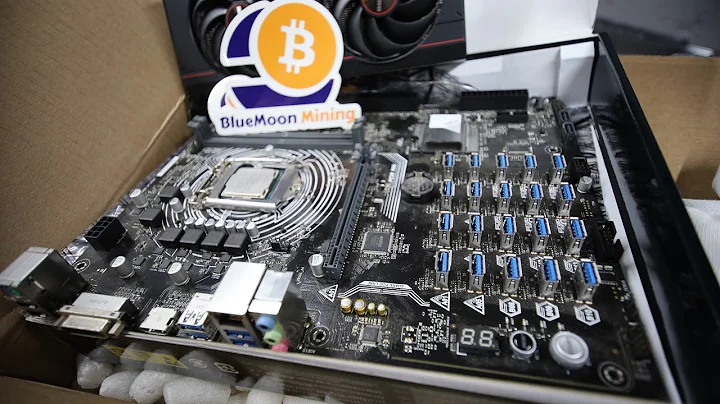
- Building an Eight-Card GPU Mining Rig
- Selecting the GPUs
- Choosing a GPU server case
- Setting Up the Rig
- Installing BIOS firmware updates
- Configuring the wallets and pools
- Overclocking and Monitoring
- Adjusting fan speeds
- Fine-tuning overclock settings
- Mining with RX 580s on Nur AI
- Using Hero Miners pool
- Checking mining statistics
- Conclusion
- Resources
Building an Eight-Card GPU Mining Rig to Mine Nur AI 🚀
In this article, we will dive into the exciting world of GPU mining rigs and explore how to build an eight-card GPU mining rig to mine Nur AI. GPU mining builds have always been a favorite among crypto enthusiasts, and today, we'll walk you through the process of setting up your own rig.
1. Introduction
GPU mining has gained popularity as an efficient way of earning cryptocurrencies. With the right hardware and software setup, you can generate substantial profits. In this guide, we'll focus on building a mining rig using AMD RX 580 8GB GPUs.
2. Building an Eight-Card GPU Mining Rig
Choosing the right GPUs is crucial for a successful mining rig. The AMD RX 580 8GB is a popular choice due to its performance and availability. These GPUs were acquired early during the bull run, and despite the market conditions, they've proven to be profitable.
3. Setting Up the Rig
To house our GPUs, we'll need a suitable GPU server case. While there are many options available, we'll be using a Polo Miner case for this build. Although it may not be a high-end option, it offers the necessary features for our RX 580s.
Once we have the case, we'll need to install the necessary firmware updates, including the BIOS firmware. Updating the GPU firmware is essential to optimize performance and efficiency. We recommend using the OneClick BIOS Editor, a user-friendly software that allows you to tweak memory frequencies and achieve better results across various algorithms.
4. Overclocking and Monitoring
To maximize the mining potential of our RX 580 GPUs, we'll fine-tune their settings for optimal performance. Overclocking involves increasing the core clock, memory clock, and adjusting voltages. However, it's essential to monitor temperatures and power consumption to prevent overheating and ensure stability.
Using the Hero Miners pool, we'll configure our wallets and workers. Hero Miners offers a variety of pools, including one specifically for Nur AI. By providing our wallet address and worker name, we can start mining on the pool.
5. Mining with RX 580s on Nur AI
With our mining rig up and running, it's time to start mining Nur AI. The RX 580 GPUs, known for their efficiency on the Capal algorithm, are well-suited for this coin. Other AMD cards like the RX 6600s and 6700 XTs can also perform admirably on this algorithm. However, we discourage buying RX 580s at the current prices, and instead recommend newer models like the 30 series GPUs.
Monitoring our mining progress is essential to track our earnings. Hero Miners provides detailed statistics and real-time updates on our daily earnings. With the current profitability of Nur AI, it's possible to earn significant returns, especially considering its potential for future growth.
6. Conclusion
Building a GPU mining rig using RX 580s to mine Nur AI is an exciting endeavor. With the right hardware, firmware updates, and overclocking settings, you can create a profitable mining setup. Hero Miners makes it easy to connect to the mining pool and monitor your earnings. Remember to stay updated with the latest trends in the cryptocurrency market and adjust your mining strategy accordingly.
Highlights
- Discover the process of building an eight-card GPU mining rig
- Explore the advantages of using AMD RX 580 8GB GPUs for mining
- Set up a GPU server case and install necessary firmware updates
- Fine-tune the overclocking settings to maximize mining performance
- Mine Nur AI using Hero Miners pool and monitor daily earnings
FAQ
Q: What are the advantages of GPU mining?
A: GPU mining allows for efficient mining of cryptocurrencies by using the processing power of graphics cards. This method provides higher hash rates and better profitability compared to CPU mining.
Q: Can I use different GPUs in the same mining rig?
A: Yes, you can mix different GPU models in a mining rig. However, it's important to consider factors such as power consumption, compatibility, and cooling requirements when choosing different GPUs for your rig.
Q: How do I choose the right mining pool?
A: When selecting a mining pool, consider factors such as pool fees, payout methods, geographical location, and pool stability. It's also recommended to join reputable pools with a large user base for better chances of consistent payouts.
Q: Is mining Nur AI profitable?
A: The profitability of mining Nur AI depends on various factors such as coin price, mining difficulty, and electricity costs. It's crucial to regularly monitor market conditions and adjust your mining strategy accordingly.
Resources






Most people like



































Report
Please select a reason for reporting
- 13 Reasons to Switch from Snapchat to Text Messaging
- 7 Powerful Speech to Text Apps to Boost Productivity
- 10 Best Speech to Text Tools for Effortless Transcription
- 13 Free Tools to Easily Transcribe Audio to Text
- 15 Surprising Ways Google's Speech-to-Text Boosts Productivity
- 7 Best Free Online Audio to Text Transcription Tools
- 9 Tips to Transcribe Speech to Text Faster and Better
- 13 Best Speech to Text Software for Windows 10 in 2023
- 7 Tips for Choosing the Best Transcriber for Audio to Text
- 11 Reasons Why Dragon Speech-to-Text Apps are Game-Changers
- 6 Secrets to Enhance Your Speech to Text Transcription
- 6 Brilliant Ways to Boost Productivity with Talk-to-Text on Your MacBook
- 6 Ways Transcription Software Converts Audio to Text
- 8 Tips to Transcribe Speech to Text Like a Pro
- 6 Reasons IBM Watson Speech to Text is a Game-Changer
- 14 Powerful Ways Talk-to-Text Improves Your Workflow
- 12 Top Windows Speech-to-Text Software for Efficient Transcription
- 12 Game-Changing Benefits of Apple's Speech to Text Technology
- 9 Powerful Use Cases for AWS Speech to Text Technology
- 10 Easy Steps to Transcribe YouTube Videos to Text
- transcription audio en texte
- online audio transcription
- free audio file transcription
- free ai audio transcription
- audio transcription service
- audio transcription online free
- audio transcription free online
- audio to transcription software
- audio and transcript
- ai audio transcription free
- voice recording to text converter
- translate voice recording to text
- record voice to text
- audio recording to text converter
- voice recording and transcription
- chatgpt voice to text
- gmail voice to text
- speech to text reader
- speech to text ai free
- speech to talk
- How to Use AI Tools to Find Internal Linking Opportunities Across a Business Website
- Discover Your Perfect Haircut with AI Hairstyle Apps
- Free Reputation Calculator Tools: How They're Adapting to Score AI Visibility, Not Just Rankings
- Design Professional Flyers for Free on Your Phone
- Best Free Flyer Maker Apps for Android: Design Like a Pro
- How to Know If Your Business Is Ready for an AI Customer Service Agent
- Revolutionizing Storytelling: From Novels to Screenplays with AI
- Create Engaging Animated Explainer Videos with a Free AI Tool
- Stop Multi-Subscribing: Benchmark Top AI Visual Models in One Canvas
- Best Seedance 2.5 API Provider: Every Price on the Market, Checked at Source
- Top AI Social Media Management Tools: Automate Your Content Strategy
- Free AI Text to Video Generator: Create Stunning Videos from Text
- Discover 17 ChatGPT Alternatives: A Comprehensive Comparison
- Character.AI vs. Janitor AI: Which AI Chat Platform Reigns Supreme?
- Top Virtual Assistant Companies in 2026: Reviews, Pricing, and Plans Compared
- Unveiling FaceCheck.ID: Revolutionizing Reverse Image Searches with AI
- 11 Best AI Dialers in 2026: Features, Pricing, Pros and Cons
- How I Direct Consistent AI Clips: A Hands-On Guide to Multi-Model Generation
- A Realistic Review of the Photo Generator Image Tool
- Playwright MCP Server: Automated Web Testing with Agent Mode

Copyright ©2026 toolify