Sponsored by
APIMart



Barra/AI - Chrome Extension
4.2
11 Reviews
0 Saved
Introduction:
A simple AI browser extension that integrates OpenAI models into any text field.
Updated Time
Aug 10 2026
Active Users
38

Nextbrowser
Automate logins, scraping, outreach, and more — just by chatting with AI.

Clico
AI assistant that brings writing, summarization, and search to every browser text box.

Crazyrouter
The enterprise-grade, cost-effective AI API gateway that provides one API key to access 300+ AI models through OpenAI-compatible endpoints, with optimized routing for lower costs and easier integration.

Designkit Free Background Remover
Designkit offers free AI background removal for up to 100 images daily, with batch processing, custom backgrounds, and resizing.

APIMart
AI API, 99.9% SLA. Your AI, Always On.Most models offer cost savings of 20–60%; nanobanana pro api costs only 0.03.

Barra/AI AI Chrome Extension Information
What is Barra/AI ai chrome extension?
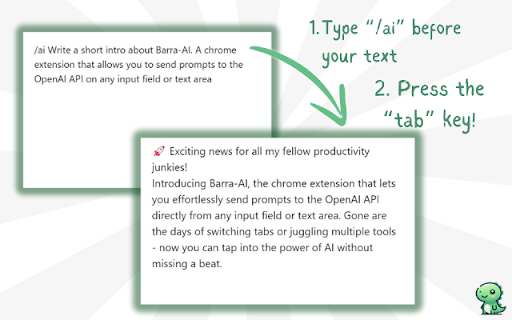
Barra/AI is a straightforward, no-frills, barebones AI browser extension that allows users to leverage OpenAI models directly within any text field. By typing '/ai' followed by a prompt and pressing Tab, the extension replaces the field's content with the AI-generated response. It emphasizes simplicity, privacy, and user control, requiring users to bring their own OpenAI API key and processing data client-side.
How to use Barra/AI ai chrome extension?
1. Install the Barra/AI extension. 2. Open the extension options/settings page and enter your OpenAI API key, selecting your preferred GPT model. 3. In any text input field, type '/ai ' followed by your prompt. 4. Press the Tab key to generate the AI response.
Barra/AI ai chrome extension's Core Features
AI-powered text generation within any text field
Client-side processing for data privacy
OpenAI model integration
No subscriptions or hidden fees
Barra/AI ai chrome extension's Use Cases
#1
Generating text for emails, social media posts, or documents directly within the browser.
FAQ from Barra/AI
Does Barra/AI require a subscription?
Where is my data stored when using Barra/AI?
Why doesn't Barra/AI work on Facebook, Instagram, and Threads?
Vmake Labs Video Enhancer
Vmake Labs Video Enhancer uses AI to improve video quality, restore details, reduce blur, and upscale videos to 8K.
Try Now
AD
seedrouter
One API for image, video, language, and audio AI models
Try Now
AD
Analytic of Barra/AI AI Chrome Extension
Barra/AI Active Users
Total Installed User
38 (-2)
Alternative of Barra/AI AI Chrome Extension