Sponsored by
Designkit Free Background Remover



Crackerjack Resume Scanner - Chrome Extension
5
12 Reviews
0 Saved
Introduction:
Resume optimization tool for tailoring resumes to job descriptions and bypassing ATS filters.
Updated Time
Jun 09 2024
Active Users
150

APIMart
AI API, 99.9% SLA. Your AI, Always On.Most models offer cost savings of 20–60%; nanobanana pro api costs only 0.03.

Designkit Free Background Remover
Designkit offers free AI background removal for up to 100 images daily, with batch processing, custom backgrounds, and resizing.

Crazyrouter
The enterprise-grade, cost-effective AI API gateway that provides one API key to access 300+ AI models through OpenAI-compatible endpoints, with optimized routing for lower costs and easier integration.

Vmake Labs Video Enhancer
Vmake Labs Video Enhancer uses AI to improve video quality, restore details, reduce blur, and upscale videos to 8K.

seedrouter
One API for image, video, language, and audio AI models

Crackerjack Resume Scanner AI Chrome Extension Information
What is Crackerjack Resume Scanner ai chrome extension?
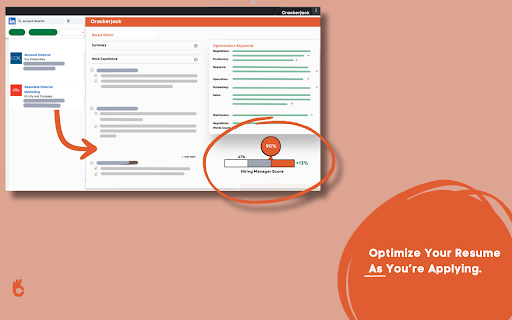
Crackerjack Resume Scanner is a tool designed to help job applicants tailor their resumes to specific job descriptions. It operates as a Chrome extension on LinkedIn, allowing users to scan their resume and a job posting simultaneously to identify essential keywords and formatting that will increase their chances of passing through Applicant Tracking Systems (ATS) and getting noticed by hiring managers.
How to use Crackerjack Resume Scanner ai chrome extension?
1. Install the Crackerjack Resume extension from the Google Chrome Store. 2. Navigate to LinkedIn and open a job posting. 3. Activate the extension to scan your resume and the job description. 4. Receive instant suggestions on how to optimize your resume with targeted keywords. 5. Submit your tailored resume.
Crackerjack Resume Scanner ai chrome extension's Core Features
Real-time Resume Scanning
Customization at Your Fingertips
ATS Filter Optimization
Crackerjack Resume Scanner ai chrome extension's Use Cases
#1
Tailoring a resume to a specific job description on LinkedIn to increase the chances of getting an interview.
FAQ from Crackerjack Resume Scanner
How does Crackerjack Resume Scanner help me get past ATS filters?
Do I need to leave LinkedIn to use Crackerjack Resume Scanner?
ThumbnailCreator.com
AI tool for creating stunning YouTube thumbnails quickly.
Try Now
AD
AdsCreator.com
AI Ad Creation Tool - Just Paste your Website URL & get Professional AI Ads
Try Now
AD
Analytic of Crackerjack Resume Scanner AI Chrome Extension
Crackerjack Resume Scanner Active Users
Total Installed User
150
Alternative of Crackerjack Resume Scanner AI Chrome Extension
Website
Freemium
Free Trial
Paid
AI Resume CheckerAI Product ManagerAI Writing AssistantsAI Coaching
Open site
 100.00%
--
100.00%SearchOrganic (40.44%)
Direct (31.63%)
Referrals (9.08%)
