



DeerHome Plugin - Chrome Extension




What is DeerHome Plugin ai chrome extension?
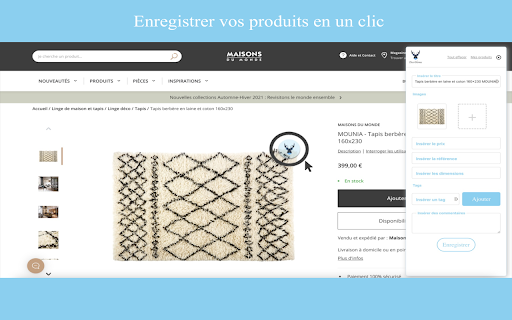
The DeerHome Chrome plugin allows users to save products from their favorite websites. For each product, users can enter a title, price, reference, dimensions, tags, and comments, and select the images they need. All saved products can be found in the user's personal space under "My Products" on deerhome.fr. The plugin also allows users to save products that match their projects directly from merchant sites and find them in their personal space. Each product has its own information sheet, and users can download the images needed for their renderings (e.g., mood boards) without the image background, thanks to an AI that automatically removes the background for a transparent product image.
How to use DeerHome Plugin ai chrome extension?
Install the DeerHome Chrome plugin, browse your favorite websites, and save products with their details. Find all saved products in your personal space on deerhome.fr.
DeerHome Plugin ai chrome extension's Core Features
Save products from any website
Add product details (title, price, reference, dimensions, tags, comments)
Select and save product images
AI-powered background removal for product images
Centralized product management on deerhome.fr
DeerHome Plugin ai chrome extension's Use Cases
Interior designers saving furniture and decor items for projects
Architects collecting product specifications for building materials
Individuals creating mood boards for home renovations
E-commerce businesses tracking competitor products
FAQ from DeerHome Plugin
Where can I find my saved products?
What kind of information can I save for each product?
How does the background removal feature work?
Analytic of DeerHome Plugin AI Chrome Extension
DeerHome Plugin Active Users
Total Installed User
Alternative of DeerHome Plugin AI Chrome Extension
