Sponsored by
Vmake Labs Video Enhancer



Alation ChatGPT Description Generator Extension - Chrome Extension
0
0 Reviews
0 Saved
Introduction:
Chrome extension to auto-generate Alation catalog descriptions using ChatGPT.
Updated Time
Dec 19 2023
Active Users
21

APIMart
AI API, 99.9% SLA. Your AI, Always On.Most models offer cost savings of 20–60%; nanobanana pro api costs only 0.03.

Vmake Labs Video Enhancer
Vmake Labs Video Enhancer uses AI to improve video quality, restore details, reduce blur, and upscale videos to 8K.

Designkit Free Background Remover
Designkit offers free AI background removal for up to 100 images daily, with batch processing, custom backgrounds, and resizing.

seedrouter
One API for image, video, language, and audio AI models

AdsCreator.com
AI Ad Creation Tool - Just Paste your Website URL & get Professional AI Ads

Alation ChatGPT Description Generator Extension AI Chrome Extension Information
What is Alation ChatGPT Description Generator Extension ai chrome extension?
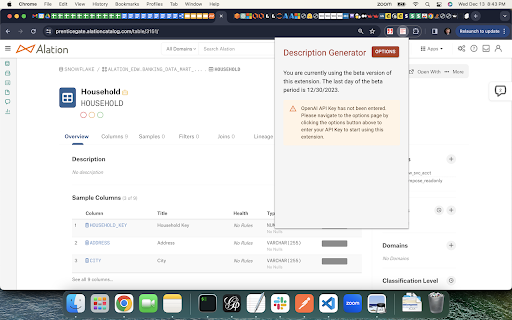
This Chrome extension helps Alation users automatically generate descriptions for schemas, tables, columns, terms, policies, and queries using ChatGPT. It simplifies the process of documenting assets in the Alation catalog by providing suggested descriptions, reducing the manual effort required.
How to use Alation ChatGPT Description Generator Extension ai chrome extension?
1. Download and load the unpacked extension in Chrome. 2. Pin the extension. 3. Sign up for the beta and verify your account via the extension options. 4. Add your OpenAI API key. 5. Log out and back into Alation or refresh the page. 6. Navigate to a schema, table, column, term, policy, or query page. 7. Click the extension icon to generate three descriptions. 8. Copy and paste the desired description into the Alation catalog.
Alation ChatGPT Description Generator Extension ai chrome extension's Core Features
Automatic description generation for Alation catalog assets using ChatGPT
Right-click integration for easy access
Support for schemas, tables, columns, terms, policies, and queries
Generates up to three sample descriptions
Works with both on-prem and managed cloud Alation configurations
Alation ChatGPT Description Generator Extension ai chrome extension's Use Cases
#1
Quickly populate Alation catalog descriptions to improve data governance and understanding
#2
Reduce the time and effort required to document data assets
#3
Encourage more users to contribute to the Alation catalog
FAQ from Alation ChatGPT Description Generator Extension
What is required to use this extension?
How do I install the extension?
Why isn't the extension working after installation?
ThumbnailCreator.com
AI tool for creating stunning YouTube thumbnails quickly.
Try Now
AD
Kivo
AI presentations inspired by your favorite designs.
Try Now
AD
Analytic of Alation ChatGPT Description Generator Extension AI Chrome Extension
Alation ChatGPT Description Generator Extension Active Users
Total Installed User
21 (-4)
Alternative of Alation ChatGPT Description Generator Extension AI Chrome Extension
Website
Contact for Pricing
AI Description GeneratorAI Product Description GeneratorAI CopywritingAI Text Generator
Open site
--
Mail (0.00%)
GenAi (0.00%)
Direct (0.00%)