



flomo OpenAI Plugin - Chrome Extension




What is flomo OpenAI Plugin ai chrome extension?
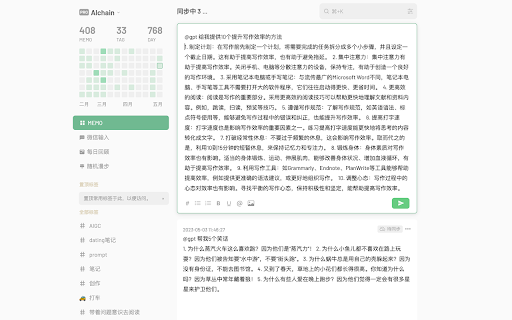
This is a very simple plugin developed based on the OpenAI API. After installation, it will not add any additional UI interface to your flomo interface. To simply describe the effect, you can think of it as adding a free (10%) capability similar to NotionAI to your flomo. To use the plugin, you only need to remember one trigger word and two guide words.
How to use flomo OpenAI Plugin ai chrome extension?
Enter "gpt:" followed by your desired instruction in any line of the flomo top edit box, then press Enter. The GPT response will usually be added below your instruction in 1-2 seconds. For processing existing text, use guide words like "above" or "below" in your instruction, and the plugin will send the text above or below the instruction line along with your instruction to OpenAI. For example, write "gpt: Check the text above for typos or grammatical errors."
flomo OpenAI Plugin ai chrome extension's Core Features
Integrates OpenAI API with flomo
Processes text within flomo using GPT
No additional UI elements added to flomo
Uses trigger word 'gpt:' to activate
flomo OpenAI Plugin ai chrome extension's Use Cases
Checking for typos and grammatical errors in existing flomo notes
Asking general questions and receiving answers directly in flomo
Processing and summarizing existing text in flomo
FAQ from flomo OpenAI Plugin
How do I install the plugin?
How do I get an OpenAI API key?
How do I use the plugin?
Is my data safe?
