Sponsored by
iMean AI Trip Planner



DragGPT Chrome Extension - Chrome Extension
5
3 Reviews
0 Saved
Introduction:
Chrome extension for easy Chat GPT API interaction via drag and drop and quick chats.
Updated Time
Feb 03 2025
Active Users
355

APIMaster
GPT up to 95% off + $20 trial. Fingerprint-verified APIs. Low-cost and stable.

APIMart
AI API, 99.9% SLA. Your AI, Always On.

PoYo.AI
High concurrency. Stable AI API. Better pricing.

PostMcpAi
AI-powered social media publishing across seven networks

Tripo AI
AI-powered 3D model generator from images and text.

DragGPT Chrome Extension AI Chrome Extension Information
What is DragGPT Chrome Extension ai chrome extension?
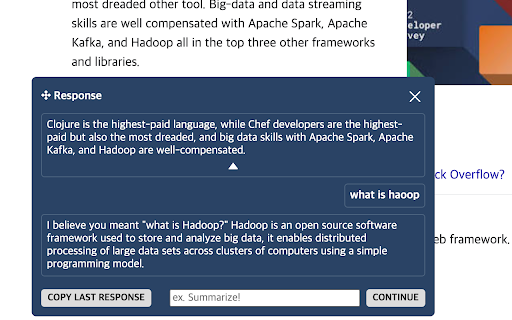
DragGPT is a Chrome extension designed to streamline interactions with the Chat GPT API. It allows users to easily initiate conversations by dragging text and using preset prompts, which can be customized based on the situation. The extension also features a popup window for quick chats, providing a convenient way to access Chat GPT's capabilities directly from the browser.
How to use DragGPT Chrome Extension ai chrome extension?
Install the DragGPT Chrome extension. Configure your favorite prompts in the settings. Drag text on any webpage and use the DragGPT button to send it to Chat GPT with a selected prompt. Use the popup window for quick chats.
DragGPT Chrome Extension ai chrome extension's Core Features
Drag-and-drop functionality for initiating Chat GPT conversations
Preset and customizable prompts
Quick chat popup window
Adjustable temperature for prompt slots
Stream support for DragGPT and Quick Chat
Optional GPT4 enablement
Chat history viewing on the options page
DragGPT Chrome Extension ai chrome extension's Use Cases
#1
Quickly summarize articles by dragging the text and using a 'Summarize' prompt.
#2
Translate selected text into another language using a 'Translate to [Language]' prompt.
#3
Generate creative content based on a highlighted phrase using a 'Write a story about' prompt.
#4
Analyze sentiment of a selected paragraph using a 'Sentiment Analysis' prompt.
FAQ from DragGPT Chrome Extension
How do I use DragGPT?
Does DragGPT support GPT4?
Where can I view my chat history?
Can I adjust the creativity of the Chat GPT responses?
ChatHawk
Find the Best Answer Across the Top AI Models
Try Now
AD
Typecast
AI voice generator and content creation tool with realistic AI voices and avatars.
Try Now
AD
Analytic of DragGPT Chrome Extension AI Chrome Extension
DragGPT Chrome Extension Active Users
Total Installed User
355 (12)