Sponsored by
APIMart



Find Similar Image - Chrome Extension
2.4
292 Reviews
0 Saved
Introduction:
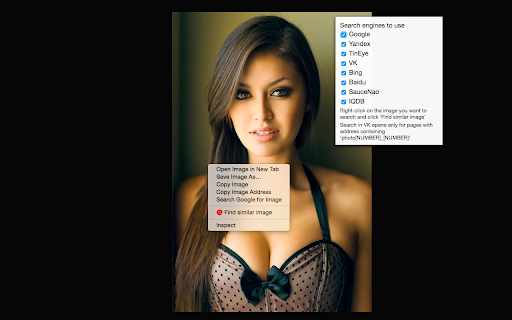
Reverse image search extension for finding similar images, social profiles, and detecting image theft.
Updated Time
Feb 02 2022
Active Users
10.0K

CalBye
AI-powered nutrition app for instant calorie tracking and personalized diet coaching via meal photos.

fridgesnap.AI
AI tool turning fridge photos into chef-crafted recipes to save money and reduce waste.

Designkit Free Background Remover
Designkit offers free AI background removal for up to 100 images daily, with batch processing, custom backgrounds, and resizing.

Vmake Labs Video Enhancer
Vmake Labs Video Enhancer uses AI to improve video quality, restore details, reduce blur, and upscale videos to 8K.

APIMart
AI API, 99.9% SLA. Your AI, Always On.Most models offer cost savings of 20–60%; nanobanana pro api costs only 0.03.

Find Similar Image AI Chrome Extension Information
What is Find Similar Image ai chrome extension?
Find Similar Image is a browser extension that allows users to perform reverse image searches using popular search engines like Yandex and TinEye. It helps users find people's social media profiles by their photos, identify cloned or fake profiles on platforms like Facebook and Instagram, detect stolen or illegally re-published images, locate free alternatives to images from paid photo directories, and find people's contacts on other social networks using their LinkedIn profile photos.
How to use Find Similar Image ai chrome extension?
To use the extension, right-click on an image and select 'Find similar image'. Choose the desired search engine or search in all available engines simultaneously.
Find Similar Image ai chrome extension's Core Features
Reverse image search using multiple search engines
Social media profile identification
Detection of cloned and fake profiles
Identification of stolen or illegally re-published images
Finding free alternatives to paid images
Finding contacts on other social networks
Find Similar Image ai chrome extension's Use Cases
#1
Finding the source of an image
#2
Identifying individuals in photos
#3
Detecting copyright infringement
#4
Locating free stock photos
#5
Verifying the authenticity of online profiles
FAQ from Find Similar Image
How do I use the Find Similar Image extension?
What search engines are supported by the extension?
Can this extension help me find fake profiles on social media?
seedrouter
One API for image, video, language, and audio AI models
Try Now
AD
ThumbnailCreator.com
AI tool for creating stunning YouTube thumbnails quickly.
Try Now
AD
Analytic of Find Similar Image AI Chrome Extension
Find Similar Image Active Users
Total Installed User
10.0K
