Sponsored by
APIMart



ImageTrans Chrome Extension - Chrome Extension
1.9
47 Reviews
0 Saved
Introduction:
Chrome extension for translating images on websites using OCR and machine translation.
Updated Time
Sep 23 2026
Active Users
7.0K

Lufe AI Translator
AI-powered bilingual translation extension for web, PDF, and images.

APIMaster
GPT up to 95% off + $20 trial. Fingerprint-verified APIs. Low-cost and stable.

APIMart
AI API, 99.9% SLA. Your AI, Always On.

iMean AI Trip Planner
AI trip planner that creates personalized itineraries, finds cheap flights and hotels, and helps you plan an entire trip in one chat.

Free
PoYo.AI
High concurrency. Stable AI API. Better pricing.

ImageTrans Chrome Extension AI Chrome Extension Information
What is ImageTrans Chrome Extension ai chrome extension?
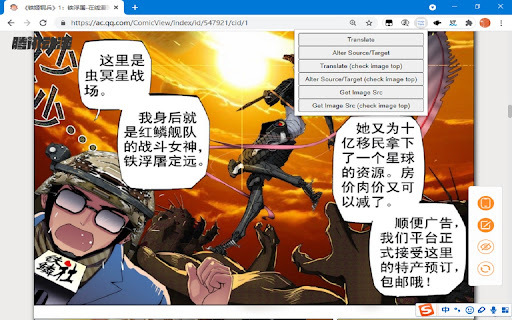
ImageTrans is a Chrome extension that translates images on websites, including posters, brochures, comics, manga, manhua, and webtoons. It utilizes state-of-the-art OCR and machine translation services to ensure high translation quality. The desktop version of ImageTrans is a dependency, and the plugin won't function without it.
How to use ImageTrans Chrome Extension ai chrome extension?
1. Install the extension and ImageTrans desktop application. 2. Right-click on the image you want to translate. 3. If the context menu is disabled, use the shortcut (CTRL+SHIFT+F) to call the popup, use Tab to switch operations, and press Enter to perform the operation.
ImageTrans Chrome Extension ai chrome extension's Core Features
Image translation using OCR and machine translation
Support for various image types (posters, brochures, comics, etc.)
Context menu integration for easy access
Keyboard shortcut for accessibility when context menu is disabled
ImageTrans Chrome Extension ai chrome extension's Use Cases
#1
Translating manga and comics from Japanese to English
#2
Understanding foreign language posters and brochures
#3
Reading webtoons in different languages
#4
Translating images on websites for better comprehension
FAQ from ImageTrans Chrome Extension
Does the ImageTrans Chrome extension work without the desktop application?
What image types does ImageTrans support?
What should I do if the context menu is disabled?
YouArt
Agentic Creative OS
Try Now
AD
PostMcpAi
AI-powered social media publishing across seven networks
Try Now
AD
Analytic of ImageTrans Chrome Extension AI Chrome Extension
ImageTrans Chrome Extension Active Users
Total Installed User
7.0K
