Sponsored by
APIMart



Definition Extension - Chrome Extension
5
8 Reviews
0 Saved
Introduction:
An extension for easy word definitions and pronunciation.
Updated Time
Jun 01 2026
Active Users
1000

PoYo.AI
High concurrency. Stable AI API. Better pricing.

YouArt
Agentic Creative OS

APIMart
AI API, 99.9% SLA. Your AI, Always On.

Agentkit
AI agents trained on business content for support, lead capture, and automation

PostMcpAi
AI-powered social media publishing across seven networks

Definition Extension AI Chrome Extension Information
What is Definition Extension ai chrome extension?
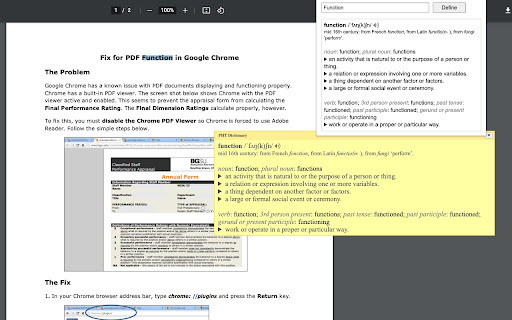
This extension enhances your reading experience by providing easy access to definitions. Select a word or phrase, then use Alt+Shift+Z (except for local PDFs) or right-click to define it. Customize shortcuts, choose definition providers (including ChatGPT), and personalize the popup window. It also offers a web search link and ChatGPT backup. A special feature enables word pronunciation on CSP-protected pages.
How to use Definition Extension ai chrome extension?
Install the extension. Select a word or phrase. Use Alt+Shift+Z (except for local PDFs) or right-click and choose 'Define [your selected word(s)]'. Customize settings via the extension button.
Definition Extension ai chrome extension's Core Features
Word definition lookup via selection and shortcut/right-click
Customizable shortcuts and definition providers
ChatGPT integration for definitions and language support
Popup window configuration
Web search link for extended information
CSP Page Pronunciation for specific websites
Definition Extension ai chrome extension's Use Cases
#1
Quickly define unfamiliar words while reading online articles.
#2
Improve vocabulary and comprehension while studying.
#3
Translate words into different languages using ChatGPT.
#4
Hear the pronunciation of words on websites with CSP restrictions.
FAQ from Definition Extension
Why doesn't the Alt+Shift+Z shortcut work on local PDF documents?
How do I access definitions in local PDF documents?
How do I use ChatGPT as a definition provider?
What is the 'CSP Page Pronunciation' feature?
Tripo AI
AI-powered 3D model generator from images and text.
Try Now
AD
Skild Art
一站式 AI 视觉创作平台,为商业营销而生
Try Now
AD
Analytic of Definition Extension AI Chrome Extension
Definition Extension Active Users
Total Installed User
1000

