Sponsored by
AdsCreator.com



Selection Translator - Chrome Extension
3.4
190 Reviews
0 Saved
Introduction:
Browser extension for translating selected text using ChatGPT and Microsoft Translator.
Updated Time
Dec 01 2025
Active Users
30.0K

MenuForma
AI-powered digital QR menu and online ordering platform for restaurants.

Lufe AI Translator
AI-powered bilingual translation extension for web, PDF, and images.

Palabra.ai
Palabra.ai is a real-time AI speech translation platform for video calls, live events, broadcasting and API integrations, supporting 60+ languages with near-zero latency.

Vmake Labs Video Enhancer
Vmake Labs Video Enhancer uses AI to improve video quality, restore details, reduce blur, and upscale videos to 8K.

AdsCreator.com
AI Ad Creation Tool - Just Paste your Website URL & get Professional AI Ads

Selection Translator AI Chrome Extension Information
What is Selection Translator ai chrome extension?
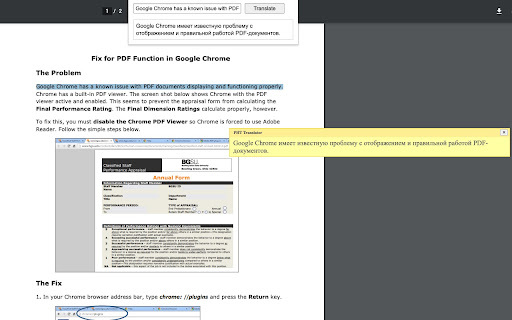
Selection Translator is a browser extension that allows users to translate selected text within any document directly. It supports immediate translation via a shortcut (Alt+Shift+A) or a right-click context menu option. The extension integrates ChatGPT and Microsoft Translator to provide accurate and context-aware translations for a wide range of language preferences.
How to use Selection Translator ai chrome extension?
Select text within any document, then press Alt+Shift+A or right-click and choose 'Translate <your selected text>'. The translation appears directly under the selection. You can also edit your selection in the popup window by clicking the extension button.
Selection Translator ai chrome extension's Core Features
Immediate text translation via shortcut or right-click
Integration with ChatGPT and Microsoft Translator
Customizable settings for shortcuts and languages
Popup window for editing selections
Option to add a 'Search the web' link for detailed information
Support for right-to-left language direction
Remove Line Breaks feature
Selection Translator ai chrome extension's Use Cases
#1
Translating foreign language articles and documents
#2
Understanding text in different languages while browsing the web
#3
Learning new languages by comparing original text with translations
FAQ from Selection Translator
How do I translate text using the extension?
Does the extension work with local PDF documents?
Why is the translation quality not good for some PDF files?
Is the extension compatible with all websites?
APIMart
AI API, 99.9% SLA. Your AI, Always On.Most models offer cost savings of 20–60%; nanobanana pro api costs only 0.03.
Try Now
AD
ThumbnailCreator.com
AI tool for creating stunning YouTube thumbnails quickly.
Try Now
AD
Analytic of Selection Translator AI Chrome Extension
Selection Translator Active Users
Total Installed User
30.0K
Alternative of Selection Translator AI Chrome Extension
Open site
127 users

Website
Contact for Pricing
AI TranslateAI MarketingAI Video TranslatorAI Subtitle GeneratorGoogle Ads AI
Open site
--
Mail (0.00%)
GenAi (0.00%)
Direct (0.00%)