



Kick to Twitch - Chrome Extension




What is Kick to Twitch ai chrome extension?
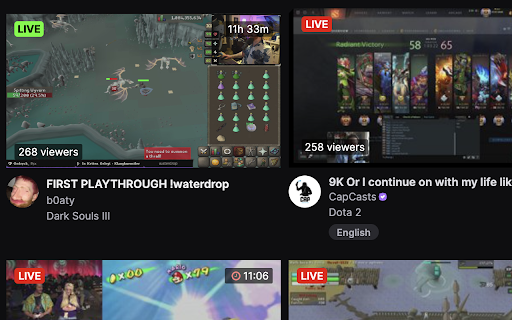
Kick to Twitch puts your Kick streams into your Twitch directory, creating a consolidated view of all your live streams. Add Kick streams you follow and then they appear in your Twitch directory, just like Twitch streams, with all streams ordered by viewer count. Kick streams are clear, with a green and white LIVE button on the thumbnail. Click on the thumbnail or title and it'll take you to the Kick stream. Click on the button to get the popup that allows you to add Kick streamer names. Seperate by comma and add as many as you need. A very simple extension that requires minimal permissions.
How to use Kick to Twitch ai chrome extension?
Add Kick streamer names (separated by commas) via the extension's popup. Their streams will then appear in your Twitch directory, ordered by viewer count.
Kick to Twitch ai chrome extension's Core Features
Integrates Kick streams into Twitch directory
Displays Kick streams with a distinct 'LIVE' indicator
Orders streams by viewer count
Direct links to Kick streams from Twitch
Kick to Twitch ai chrome extension's Use Cases
Consolidating all followed live streams (Twitch and Kick) into one place.
FAQ from Kick to Twitch
How do I add Kick streamers?
How are the streams ordered?
How can I tell which streams are from Kick?