



LingoCloud - Chrome Extension
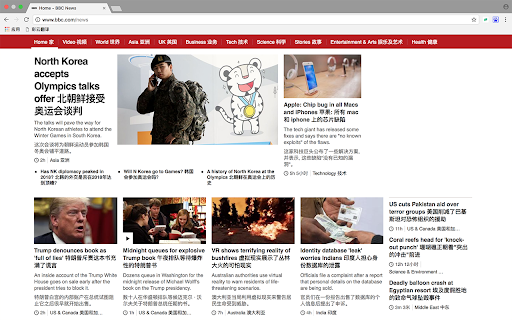


What is LingoCloud ai chrome extension?
LingoCloud is a tool designed to help users overcome language barriers while browsing the web. It allows users to view websites in their native language, regardless of the original language of the site. For those already proficient in foreign languages, LingoCloud provides access to interesting online reading resources to enhance their learning experience.
How to use LingoCloud ai chrome extension?
1. Click the LingoCloud Extension Icon on an English webpage to enter Chinese-English parallel text mode. 2. Click on the translated text to edit and review the translation, earning Cloud Points. 3. Select text content on English/Japanese pages for immediate word translation. 4. Enable video translation for real-time subtitle translation of English videos. 5. Adjust settings for text translation, automatic page translation, and video subtitle translation in the options page.
LingoCloud ai chrome extension's Core Features
Website translation to native language
Chinese-English parallel text mode
Editable translations with Cloud Point rewards
Word translation on English/Japanese pages
Real-time video subtitle translation
LingoCloud ai chrome extension's Use Cases
Effortlessly browse foreign language websites in your native language.
Improve foreign language skills by reading translated content and editing translations.
Quickly understand unfamiliar words while browsing English or Japanese websites.
Watch English videos with real-time translated subtitles.
FAQ from LingoCloud
What languages does LingoCloud support?
How can I earn Cloud Points?
Where can I configure the translation settings?
Analytic of LingoCloud AI Chrome Extension
LingoCloud Active Users
Total Installed User
Alternative of LingoCloud AI Chrome Extension