



Maken Similarity Service Browser Extension - Chrome Extension


What is Maken Similarity Service Browser Extension ai chrome extension?
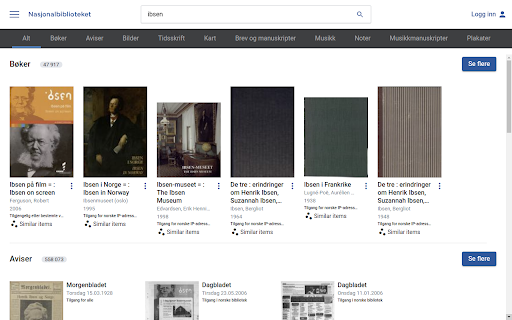
This browser extension enhances the National Library of Norway's (nb.no) search functionality by integrating the Maken similarity service. It adds a "Lignende gjenstander" ("Similar items") button to each result in the books and images categories. Clicking this button opens a section at the bottom of the screen displaying similar items, providing links to related items for further inspection. This offers a new discovery tool developed by the AI Lab at the National Library of Norway, all within the main library website.
How to use Maken Similarity Service Browser Extension ai chrome extension?
After installing the extension, navigate to the books or images search results on nb.no. A "Lignende gjenstander" button will appear for each result. Click the button to view similar items in a section at the bottom of the screen.
Maken Similarity Service Browser Extension ai chrome extension's Core Features
Adds "Similar items" button to search results on nb.no
Displays similar items in a section at the bottom of the screen
Provides links to related items for further inspection
Maken Similarity Service Browser Extension ai chrome extension's Use Cases
Discovering related books and images within the National Library of Norway's collection.
FAQ from Maken Similarity Service Browser Extension
What is the purpose of the "Lignende gjenstander" button?
Where does the data for similar items come from?
Does this extension require a separate account?
Analytic of Maken Similarity Service Browser Extension AI Chrome Extension
Maken Similarity Service Browser Extension Active Users
Total Installed User
Alternative of Maken Similarity Service Browser Extension AI Chrome Extension