


MUI VS Code Extension






What is MUI VS Code Extension?
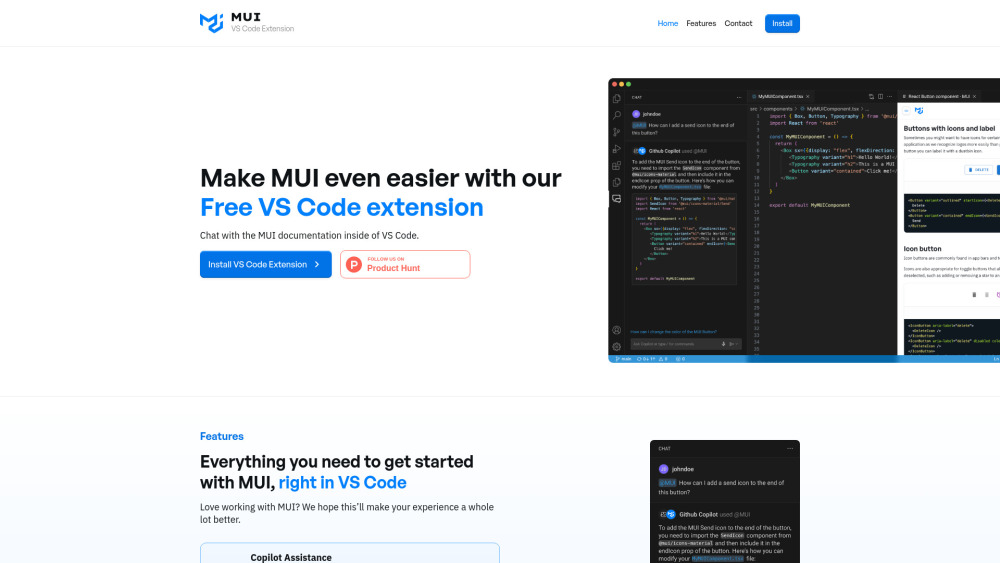
The MUI VS Code Extension allows developers to chat with an AI expert on MUI directly within VS Code. By typing "@mui" into GitHub Copilot, users can receive high-quality answers with references to the most up-to-date MUI documentation. This extension aims to make working with MUI easier by providing in-editor documentation access, Copilot assistance, and direct feedback channels.
How to use MUI VS Code Extension?
Install the VS Code extension. Then, in GitHub Copilot, type "@mui" followed by your question to get answers grounded in the MUI documentation.
MUI VS Code Extension's Core Features
Copilot Assistance with MUI documentation
In-IDE Documentation Search (Coming Soon)
Direct Feedback to MUI team (Coming Soon)
MUI VS Code Extension's Use Cases
Quickly find answers to MUI-related questions without leaving VS Code
Access MUI documentation directly within the editor
Provide feedback and suggestions to the MUI team
FAQ from MUI VS Code Extension
How do I use the MUI VS Code Extension?
What features are currently available?
MUI VS Code Extension Support Email & Customer service contact & Refund contact etc.
More Contact, visit the contact us page(https://www.chatwithmui.com/?utm_source=toolify#contact)
MUI VS Code Extension Reviews (0)
Analytic of MUI VS Code Extension
MUI VS Code Extension Website Traffic Analysis
MUI VS Code Extension Launch embeds
Use website badges to drive support from your community for your Toolify Launch. They're easy to embed on your homepage or footer.



Alternative of MUI VS Code Extension


Social Listening