Sponsored by
Designkit Free Background Remover



Read Out - Chrome Extension
2.8
20 Reviews
0 Saved
Introduction:
Free browser extension for AI-powered text-to-speech functionality.
Updated Time
Apr 24 2024
Active Users
793

Wondershare Filmora
AI video editor with tools for all skill levels and creative assets.

Rekam AI-Your One-Stop Voice Creation Platform
All-in-one AI voice creation platform for text-to-speech, voice clone, and speech-to-text.

Easy-Peasy.AI
All-in-one AI platform for content, images, audio, and transcription.

APIMart
AI API, 99.9% SLA. Your AI, Always On.Most models offer cost savings of 20–60%; nanobanana pro api costs only 0.03.

Designkit Free Background Remover
Designkit offers free AI background removal for up to 100 images daily, with batch processing, custom backgrounds, and resizing.

Read Out AI Chrome Extension Information
What is Read Out ai chrome extension?
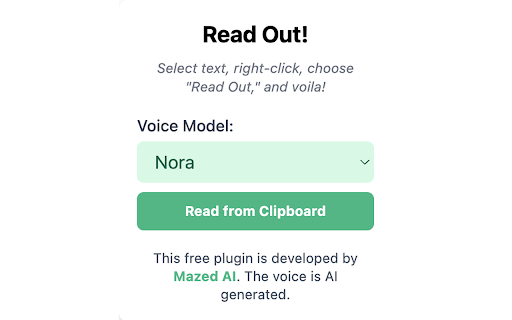
Read Out is a free browser extension that provides multilingual, AI-powered text-to-speech (TTS) functionality. To use it, simply select the text you want to hear, right-click, and choose "Read Out." The extension will then convert the text into natural, human-like speech. Additionally, you can play any copied text out loud on any webpage using the extension's popup, which is accessible from the icon pinned to your browser's navigation bar.
How to use Read Out ai chrome extension?
Select text, right-click, and choose "Read Out" to convert text to speech. Use the popup for copied text.
Read Out ai chrome extension's Core Features
Multilingual AI-powered text-to-speech
Read Out ai chrome extension's Use Cases
#1
Listen to articles and documents while multitasking.
FAQ from Read Out
How do I use Read Out?
Is Read Out free?
Why doesn't Read Out work on some websites?
Vmake Labs Video Enhancer
Vmake Labs Video Enhancer uses AI to improve video quality, restore details, reduce blur, and upscale videos to 8K.
Try Now
AD
seedrouter
One API for image, video, language, and audio AI models
Try Now
AD
Analytic of Read Out AI Chrome Extension
Read Out Active Users
Total Installed User
793 (-13)
Alternative of Read Out AI Chrome Extension
Open site
57 users
Website
Freemium
Paid
Contact for Pricing
AI Text-to-SpeechAI Voice GeneratorAI Voice CloningAI Speech SynthesisAI Stems SplitterAI Audio EditingAI Audio EnhancerAI Vocal Remover
Open site
 35.48%
564.8K
35.48%SearchOrganic (70.56%)
Direct (22.58%)
SearchPaid (2.84%)