Sponsored by
Tripo AI



Rosie - Chrome Extension
5
16 Reviews
0 Saved
Introduction:
Chrome extension that suggests confident phrasing by detecting undermining language.
Updated Time
Mar 07 2018
Active Users
33

Diagrimo
AI-powered tool to turn ideas/text into clear diagrams & infographics.

Easy-Peasy.AI
All-in-one AI platform for content, images, audio, and transcription.

HitPublish AI
AI content generator and automatic multi-site publisher for WordPress.

getsolved.ai
AI assistant for writing, research, and learning.

Clico
AI assistant that brings writing, summarization, and search to every browser text box.

Rosie AI Chrome Extension Information
What is Rosie ai chrome extension?
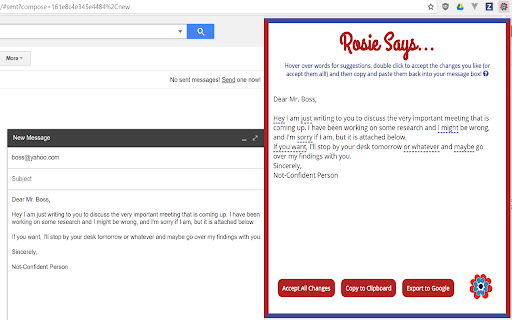
Rosie is a Chrome extension designed to detect undermining language in your writing and suggest more confident phrasing. It helps users, especially women, represent themselves as the professionals they are by identifying and offering alternatives to words and phrases that diminish confidence in the workplace.
How to use Rosie ai chrome extension?
1) Type your message in a supported website. 2) Click the "Rosie" icon. 3) Hover over underlined words for suggestions. 4) Double-click to accept changes (or "Accept All Changes"). 5) Copy to clipboard. 6) Paste your stronger message.
Rosie ai chrome extension's Core Features
Detects undermining language
Suggests more confident phrasing
Works with Gmail, Google Inbox, Outlook, Yahoo, LinkedIn, and Slack
Offers an 'Accept All Changes' button
Provides a 'Copy to Clipboard' button
Rosie ai chrome extension's Use Cases
#1
Improve communication with colleagues
#2
Negotiate salary offers more effectively
#3
Establish credibility as a professional
FAQ from Rosie
What platforms does Rosie work with?
How do I use Rosie?
How does Rosie identify undermining language?
Tripo AI
AI-powered 3D model generator from images and text.
Try Now
AD
APIMart
AI API, 99.9% SLA. Your AI, Always On.
Try Now
AD
Analytic of Rosie AI Chrome Extension
Rosie Active Users
Total Installed User
33 (-4)
Alternative of Rosie AI Chrome Extension
Website
Free Trial
Paid
AI Writing AssistantsAI MarketingAI CopywritingAI Blog GeneratorAI Social Media Post GeneratorSEO Writing AIAI Email GeneratorAI HashtagAI Caption GeneratorAI Title GeneratorAI Outline Generator
Open site
 100.00%
--
100.00%Direct (36.20%)
SearchOrganic (32.81%)
Referrals (11.45%)
Website
Freemium
Paid
Contact for Pricing
AI Writing AssistantsNo-Code&Low-CodeAI Text GeneratorAI Blog GeneratorAI Documents GeneratorAI Translate
Open site
--
Mail (0.00%)
GenAi (0.00%)
Direct (0.00%)