Sponsored by
AdsCreator.com



Voice DIM - Chrome Extension
5
13 Reviews
0 Saved
Introduction:
Voice-controlled Destiny 2 item management for quick transfers and loadouts.
Updated Time
Jul 28 2024
Active Users
839

WZRD
AI workspace for creating interactive, voice-enabled documents, forms, slides, and business experiences

Cheetu AI
Your Lightweight Interpreter & AI Notetaker

Free
APIMart
AI API, 99.9% SLA. Your AI, Always On.Most models offer cost savings of 20–60%; nanobanana pro api costs only 0.03.

Vmake Labs Video Enhancer
Vmake Labs Video Enhancer uses AI to improve video quality, restore details, reduce blur, and upscale videos to 8K.

AdsCreator.com
AI Ad Creation Tool - Just Paste your Website URL & get Professional AI Ads

Voice DIM AI Chrome Extension Information
What is Voice DIM ai chrome extension?
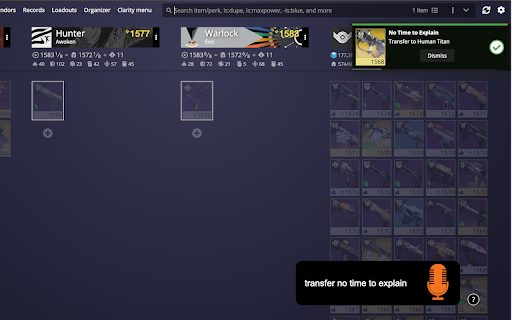
Voice DIM is a tool designed to enhance the Destiny Item Manager (DIM) experience by allowing users to control item transfers and loadout management within Destiny 2 using voice commands. It enables players to quickly transfer weapons, equip loadouts, and manage their inventory without needing to Alt-Tab out of the game.
How to use Voice DIM ai chrome extension?
After installing Voice DIM, use a global shortcut (default Ctrl+Shift+0) or enable Always Listening mode with the activation phrase "okay ghost". Then, use voice commands like "Transfer/Equip <weapon name>" or "Loadout <loadout name>" to manage your inventory.
Voice DIM ai chrome extension's Core Features
Voice-controlled item transfers and loadout management
Global shortcut and Always Listening mode
Configurable voice commands
Farming Mode to prevent items from going to the postmaster
Max Power equipping
Postmaster collection
Voice DIM ai chrome extension's Use Cases
#1
Quickly transfer a specific weapon during a Crucible match.
#2
Equip a preferred loadout before a raid encounter.
#3
Store unwanted weapons in the vault without interrupting gameplay.
#4
Prevent items from being sent to the postmaster during farming sessions.
#5
Equip the highest power gear before an activity.
FAQ from Voice DIM
How do I activate Voice DIM?
Can I customize the voice commands?
What is Farming Mode?
Why are my loadouts with numbers not working?
ThumbnailCreator.com
AI tool for creating stunning YouTube thumbnails quickly.
Try Now
AD
Kivo
AI presentations inspired by your favorite designs.
Try Now
AD
Analytic of Voice DIM AI Chrome Extension
Voice DIM Active Users
Total Installed User
839 (31)
Alternative of Voice DIM AI Chrome Extension
Website
Free
AI Voice AssistantsAI AgentAI Speech RecognitionAI Speech SynthesisAI Developer ToolsAI ChatbotAI Workflow
Open site
--
Mail (0.00%)
GenAi (0.00%)
Direct (0.00%)