Sponsored by
Designkit Free Background Remover



YouTube Auto Skipper - Chrome Extension
0
0 Reviews
0 Saved
Introduction:
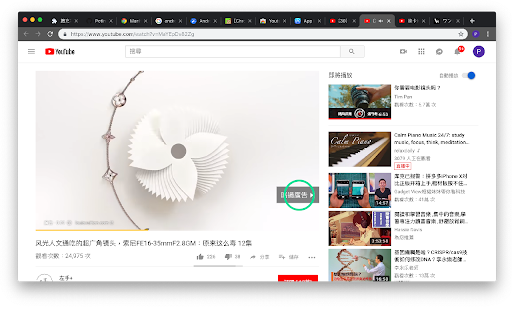
Automatically skips YouTube ads, confirms 'Continue Watching', and plays next video.
Updated Time
Nov 15 2019
Active Users
18

Designkit Free Background Remover
Designkit offers free AI background removal for up to 100 images daily, with batch processing, custom backgrounds, and resizing.

Crazyrouter
The enterprise-grade, cost-effective AI API gateway that provides one API key to access 300+ AI models through OpenAI-compatible endpoints, with optimized routing for lower costs and easier integration.

APIMart
AI API, 99.9% SLA. Your AI, Always On.Most models offer cost savings of 20–60%; nanobanana pro api costs only 0.03.

Vmake Labs Video Enhancer
Vmake Labs Video Enhancer uses AI to improve video quality, restore details, reduce blur, and upscale videos to 8K.

seedrouter
One API for image, video, language, and audio AI models

YouTube Auto Skipper AI Chrome Extension Information
What is YouTube Auto Skipper ai chrome extension?
This tool automatically skips YouTube ads by clicking the 'Skip Ad' button. It also addresses the 'Video paused. Continue watching?' prompt by automatically clicking 'OK'. Additionally, when YouTube automatically pauses music playback after a prolonged period, it automatically clicks 'Next video'.
How to use YouTube Auto Skipper ai chrome extension?
This tool likely operates as a browser extension or script. Once installed/enabled, it runs in the background and automatically performs the described actions on YouTube.
YouTube Auto Skipper ai chrome extension's Core Features
Automatic ad skipping
Automatic confirmation of 'Continue Watching' prompt
Automatic 'Next video' selection after prolonged pause
YouTube Auto Skipper ai chrome extension's Use Cases
#1
Uninterrupted YouTube viewing experience
#2
Hands-free music playback on YouTube
#3
Avoidance of repetitive ad watching
FAQ from YouTube Auto Skipper
Is this tool legal to use?
Is this tool safe to use?
How does this tool work?
ThumbnailCreator.com
AI tool for creating stunning YouTube thumbnails quickly.
Try Now
AD
AdsCreator.com
AI Ad Creation Tool - Just Paste your Website URL & get Professional AI Ads
Try Now
AD
Analytic of YouTube Auto Skipper AI Chrome Extension
YouTube Auto Skipper Active Users
Total Installed User
18
Alternative of YouTube Auto Skipper AI Chrome Extension


Website
Freemium
AI BypasserHumanizer AIUndetectable AIAI ParaphraserAI APISEO Writing AIAI Content DetectorAI Writing Assistants
Open site
 66.33%
16.5K
66.33%Direct (36.53%)
SearchOrganic (34.16%)
SocialOrganic (9.83%)