Sponsored by
Designkit Free Background Remover



Zoovu Chrome Extension - Chrome Extension
5
1 Reviews
0 Saved
Introduction:
Zoovu Chrome Extension for testing and implementing digital assistants in-browser.
Updated Time
Jun 07 2025
Active Users
105

iMean AI Trip Planner
AI trip planner that creates personalized itineraries, finds cheap flights and hotels, and helps you plan an entire trip in one chat.

Free
Demi AI
Proactive AI assistant for sales professionals to automate emails, scheduling, and deal prioritization.

iDox.ai Guardrail
Real-time AI guardrails that prevent sensitive data exposure in AI tools, copilots, and autonomous AI agents.

Maxworker.ai
Max is an AI coworker for your team inside Slack. He connects to 25+ essential work tools today, with 3,000+ tools coming soon, and turns your team’s context into ready-to-review work. Fixed price, no surprise.

Auditfyy
AI-powered white-label SEO audit software with Google integrations for digital agencies.

Zoovu Chrome Extension AI Chrome Extension Information
What is Zoovu Chrome Extension ai chrome extension?
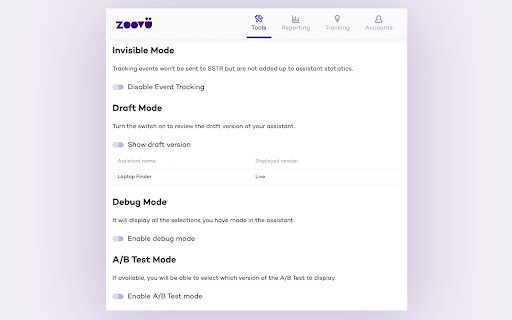
The Zoovu Chrome Extension allows users to test, integrate, and implement their digital assistant directly within the browser page where the assistant is integrated. It provides features like Invisible Mode, Draft Preview, and Debug Mode to streamline the development and testing process.
How to use Zoovu Chrome Extension ai chrome extension?
Install the Zoovu Chrome Extension. Use Invisible Mode to disable interaction tracking, Draft Preview to see recent changes without publishing, and Debug Mode to verify recommendation logic. When running A/B tests, select the assistant version to view. The Tracking tab generates code for 'Thank You' page integration.
Zoovu Chrome Extension ai chrome extension's Core Features
Invisible Mode
Draft Preview
Debug Mode
A/B Test Version Selection
Key Performance Indicator (KPI) Display
Tracking Code Generation
Zoovu Chrome Extension ai chrome extension's Use Cases
#1
Testing a digital assistant's functionality before publishing it live.
#2
Integrating tracking code into a 'Thank You' page without custom JavaScript.
FAQ from Zoovu Chrome Extension
What is Invisible Mode?
What does Draft Preview do?
How does Debug Mode help?
What does the Tracking tab do?
ezsub
Unbeatable Price! Get ChatGPT Plus for only $12.95 with NO credit card required. Smooth local payments for global users.
Try Now
AD
Runable
Runable is a general AI agent that can execute any task, from building web apps, slides, reports, and documents to generating images, videos, and podcasts, all in one place. It doesn’t just create it connects. Runable integrates with thousands of your favorite apps so you can simply ask it to do the work for you.
Try Now
AD
Analytic of Zoovu Chrome Extension AI Chrome Extension
Zoovu Chrome Extension Active Users
Total Installed User
105 (-4)
Alternative of Zoovu Chrome Extension AI Chrome Extension
Browser Extension
Contact for Pricing
AI AssistantAI Social MediaAI Writing AssistantsAI Social Media Post GeneratorAI ChatbotAI Affiliate Marketing
Open site
7.0K users
Open site
466 users