




Total runs:
1.0M
Run Growth:
275.6K
Growth Rate:
26.40%
The mobile-side seal text detection model of PP-OCRv4, on the other hand, offers greater efficiency and is suitable for deployment on end devices. The key accuracy metrics are as follow:
| Model | Hmean (%) |
|---|---|
| PP-OCRv4_mobile_seal_det | 96.47 |
Note : The metric is based on PaddleX Custom Test Dataset, Containing 500 Images of Circular Stamps.
Please refer to the following commands to install PaddlePaddle using pip:
# for CUDA11.8
python -m pip install paddlepaddle-gpu==3.0.0 -i https://www.paddlepaddle.org.cn/packages/stable/cu118/

# for CUDA12.6
python -m pip install paddlepaddle-gpu==3.0.0 -i https://www.paddlepaddle.org.cn/packages/stable/cu126/

# for CPU
python -m pip install paddlepaddle==3.0.0 -i https://www.paddlepaddle.org.cn/packages/stable/cpu/
For details about PaddlePaddle installation, please refer to the PaddlePaddle official website .
Install the latest version of the PaddleOCR inference package from PyPI:
python -m pip install paddleocr
You can quickly experience the functionality with a single command:
paddleocr seal_text_detection \
    --model_name PP-OCRv4_mobile_seal_det \
    -i https://cdn-uploads.huggingface.co/production/uploads/63d7b8ee07cd1aa3c49a2026/k02u35x60XZmaL9hzeQ0T.png
You can also integrate the model inference of the seal text detection module into your project. Before running the following code, please download the sample image to your local machine.
from paddleocr import SealTextDetection
model = SealTextDetection(model_name="PP-OCRv4_mobile_seal_det")
output = model.predict(input="k02u35x60XZmaL9hzeQ0T.png", batch_size=1)
for res in output:
    res.print()
    res.save_to_img(save_path="./output/")
    res.save_to_json(save_path="./output/res.json")
After running, the obtained result is as follows:
{'res': {'input_path': '/root/.paddlex/predict_input/k02u35x60XZmaL9hzeQ0T.png', 'page_index': None, 'dt_polys': [array([[463, 477],
       ...,
       [428, 505]]), array([[297, 444],
       ...,
       [230, 443]]), array([[457, 346],
       ...,
       [267, 345]]), array([[325,  38],
       ...,
       [322,  37]])], 'dt_scores': [0.9912813174046151, 0.9906722305163783, 0.9847175812219835, 0.9914792941713804]}}
The visualized image is as follows:

For details about usage command and descriptions of parameters, please refer to the Document .
The ability of a single model is limited. But the pipeline consists of several models can provide more capacity to resolve difficult problems in real-world scenarios.
Seal text recognition is a technology that automatically extracts and recognizes the content of seals from documents or images. The recognition of seal text is part of document processing and has many applications in various scenarios, such as contract comparison, warehouse entry and exit review, and invoice reimbursement review.And there are 5 modules in the pipeline:
Run a single command to quickly experience the OCR pipeline:
paddleocr seal_recognition -i https://cdn-uploads.huggingface.co/production/uploads/63d7b8ee07cd1aa3c49a2026/k02u35x60XZmaL9hzeQ0T.png \
    --seal_text_detection_model_name PP-OCRv4_mobile_seal_det \
    --use_doc_orientation_classify False \
    --use_doc_unwarping False \
    --save_path ./output \
    --device gpu:0
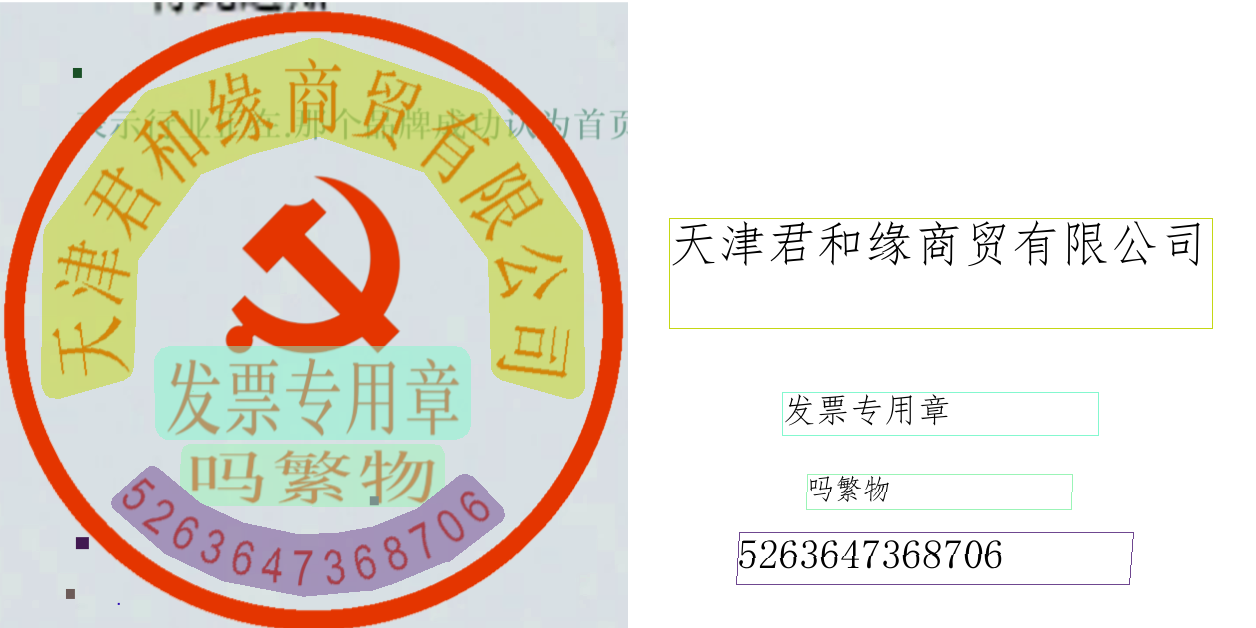
Results are printed to the terminal:
{'res': {'input_path': '/root/.paddlex/predict_input/k02u35x60XZmaL9hzeQ0T.png', 'model_settings': {'use_doc_preprocessor': True, 'use_layout_detection': True}, 'doc_preprocessor_res': {'input_path': None, 'page_index': None, 'model_settings': {'use_doc_orientation_classify': False, 'use_doc_unwarping': False}, 'angle': -1}, 'layout_det_res': {'input_path': None, 'page_index': None, 'boxes': [{'cls_id': 16, 'label': 'seal', 'score': 0.9755404591560364, 'coordinate': [6.19458, 0.17910767, 634.38385, 628.8424]}]}, 'seal_res_list': [{'input_path': None, 'page_index': None, 'model_settings': {'use_doc_preprocessor': False, 'use_textline_orientation': False}, 'dt_polys': [array([[320,  39],
       ...,
       [317,  38]]), array([[456, 348],
       ...,
       [299, 346]]), array([[436, 445],
       ...,
       [188, 443]]), array([[159, 470],
       ...,
       [154, 468]])], 'text_det_params': {'limit_side_len': 736, 'limit_type': 'min', 'thresh': 0.2, 'max_side_limit': 4000, 'box_thresh': 0.6, 'unclip_ratio': 0.5}, 'text_type': 'seal', 'textline_orientation_angles': array([-1, ..., -1]), 'text_rec_score_thresh': 0, 'rec_texts': ['天津君和缘商贸有限公司', '发票专用章', '吗繁物', '5263647368706'], 'rec_scores': array([0.99007857, ..., 0.99880081]), 'rec_polys': [array([[320,  39],
       ...,
       [317,  38]]), array([[456, 348],
       ...,
       [299, 346]]), array([[436, 445],
       ...,
       [188, 443]]), array([[159, 470],
       ...,
       [154, 468]])], 'rec_boxes': array([], dtype=float64)}]}}
If save_path is specified, the visualization results will be saved under
save_path
. The visualization output is shown below:
The command-line method is for quick experience. For project integration, also only a few codes are needed as well:
from paddleocr import PaddleOCR

ocr = PaddleOCR(
    seal_text_detection_model_name="PP-OCRv4_mobile_seal_det",
    use_doc_orientation_classify=False, # Use use_doc_orientation_classify to enable/disable document orientation classification model
    use_doc_unwarping=False, # Use use_doc_unwarping to enable/disable document unwarping module
    device="gpu:0", # Use device to specify GPU for model inference
)
result = ocr.predict("https://cdn-uploads.huggingface.co/production/uploads/63d7b8ee07cd1aa3c49a2026/k02u35x60XZmaL9hzeQ0T.png")
for res in result:
    res.print()
    res.save_to_img("output")
    res.save_to_json("output")
The default model used in pipeline is
PP-OCRv4_server_seal_det
, so it is needed that specifing to
PP-OCRv4_mobile_seal_det
by argument
seal_text_detection_model_name
. And you can also use the local model file by argument
seal_text_detection_model_dir
. For details about usage command and descriptions of parameters, please refer to the
Document
.