



Sponsored by
Vmake Labs Video Enhancer
Qwen / Qwen-Image
Model's Last Updated: August 18 2025
text-to-image
Introduction of Qwen-Image
Model Details of Qwen-Image

💜
Qwen Chat
| 🤗
Hugging Face
| 🤖
ModelScope
| 📑
Tech Report
| 📑
Blog
🖥️
Demo
| 💬
WeChat (微信)
| 🫨
Discord

Introduction
We are thrilled to release Qwen-Image , an image generation foundation model in the Qwen series that achieves significant advances in complex text rendering and precise image editing . Experiments show strong general capabilities in both image generation and editing, with exceptional performance in text rendering, especially for Chinese.

News
- 2025.08.04: We released the Technical Report of Qwen-Image!
- 2025.08.04: We released Qwen-Image weights! Check at huggingface and Modelscope !
- 2025.08.04: We released Qwen-Image! Check our blog for more details!
Quick Start
Install the latest version of diffusers
pip install git+https://github.com/huggingface/diffusers
The following contains a code snippet illustrating how to use the model to generate images based on text prompts:
from diffusers import DiffusionPipeline
import torch

model_name = "Qwen/Qwen-Image"

# Load the pipeline
if torch.cuda.is_available():
    torch_dtype = torch.bfloat16
    device = "cuda"
else:
    torch_dtype = torch.float32
    device = "cpu"

pipe = DiffusionPipeline.from_pretrained(model_name, torch_dtype=torch_dtype)
pipe = pipe.to(device)

positive_magic = [
    "en": "Ultra HD, 4K, cinematic composition." # for english prompt,
    "zh": "超清,4K,电影级构图" # for chinese prompt,
]

# Generate image
prompt = '''A coffee shop entrance features a chalkboard sign reading "Qwen Coffee 😊 $2 per cup," with a neon light beside it displaying "通义千问". Next to it hangs a poster showing a beautiful Chinese woman, and beneath the poster is written "π≈3.1415926-53589793-23846264-33832795-02384197". Ultra HD, 4K, cinematic composition'''

negative_prompt = " "


# Generate with different aspect ratios
aspect_ratios = {
    "1:1": (1328, 1328),
    "16:9": (1664, 928),
    "9:16": (928, 1664),
    "4:3": (1472, 1140),
    "3:4": (1140, 1472)
}

width, height = aspect_ratios["16:9"]

image = pipe(
    prompt=prompt + positive_magic["en"],
    negative_prompt=negative_prompt,
    width=width,
    height=height,
    num_inference_steps=50,
    true_cfg_scale=4.0,
    generator=torch.Generator(device="cuda").manual_seed(42)
).images[0]

image.save("example.png")
Show Cases
One of its standout capabilities is high-fidelity text rendering across diverse images. Whether it’s alphabetic languages like English or logographic scripts like Chinese, Qwen-Image preserves typographic details, layout coherence, and contextual harmony with stunning accuracy. Text isn’t just overlaid—it’s seamlessly integrated into the visual fabric.
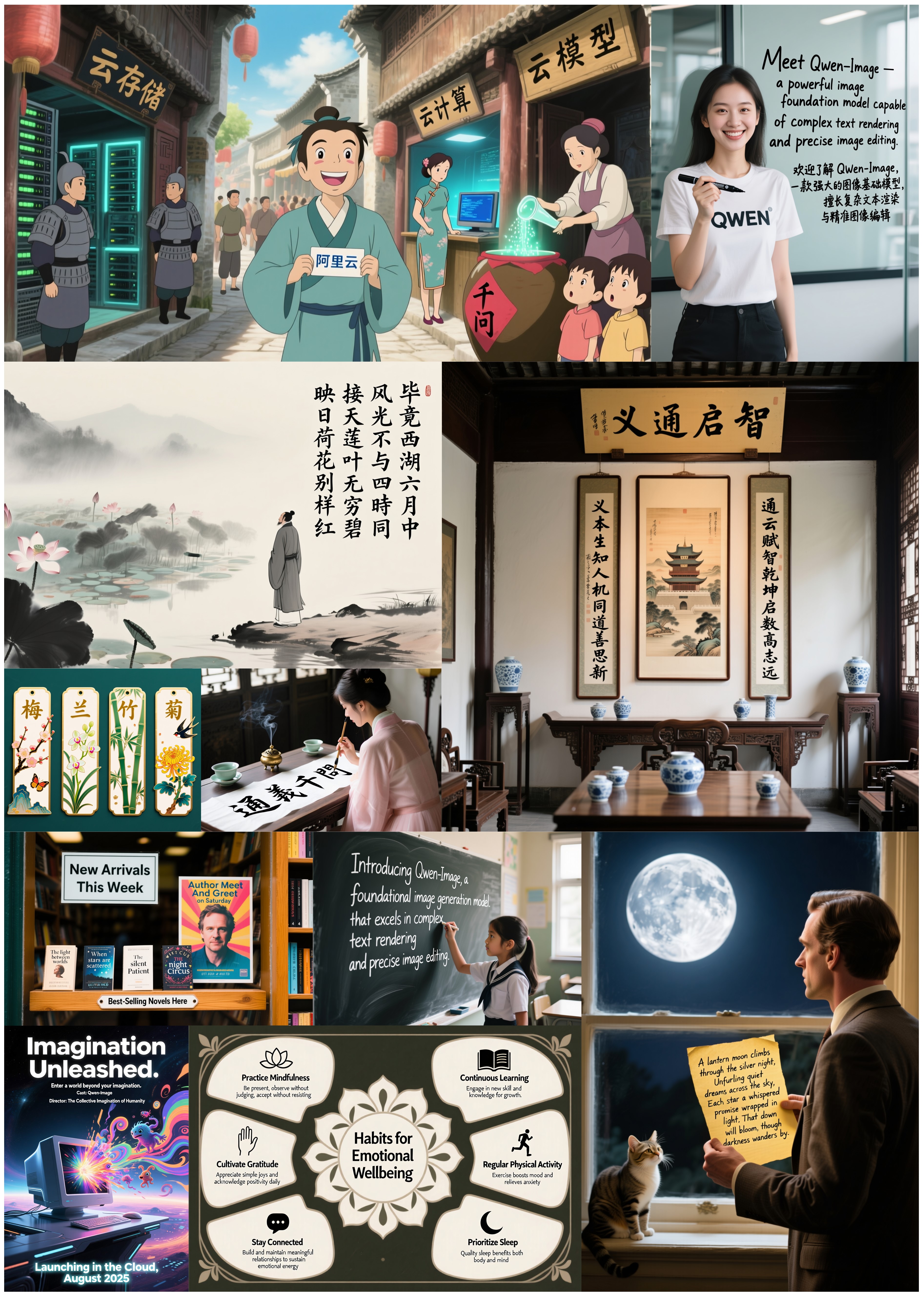
Beyond text, Qwen-Image excels at general image generation with support for a wide range of artistic styles. From photorealistic scenes to impressionist paintings, from anime aesthetics to minimalist design, the model adapts fluidly to creative prompts, making it a versatile tool for artists, designers, and storytellers.

When it comes to image editing, Qwen-Image goes far beyond simple adjustments. It enables advanced operations such as style transfer, object insertion or removal, detail enhancement, text editing within images, and even human pose manipulation—all with intuitive input and coherent output. This level of control brings professional-grade editing within reach of everyday users.

But Qwen-Image doesn’t just create or edit—it understands. It supports a suite of image understanding tasks, including object detection, semantic segmentation, depth and edge (Canny) estimation, novel view synthesis, and super-resolution. These capabilities, while technically distinct, can all be seen as specialized forms of intelligent image editing, powered by deep visual comprehension.

Together, these features make Qwen-Image not just a tool for generating pretty pictures, but a comprehensive foundation model for intelligent visual creation and manipulation—where language, layout, and imagery converge.
License Agreement
Qwen-Image is licensed under Apache 2.0.
Citation
We kindly encourage citation of our work if you find it useful.
@article{qwen-image,
    title={Qwen-Image Technical Report},
    author={Qwen Team},
    journal={arXiv preprint},
    year={2025}
}
Runs of Qwen Qwen-Image on huggingface.co
280.6K
Total runs
0
24-hour runs
3.7K
3-day runs
9.7K
7-day runs
-30.9K
30-day runs
More Information About Qwen-Image huggingface.co Model
Url of Qwen-Image
Qwen-Image huggingface.co Url
Provider of Qwen-Image huggingface.co
Other API from Qwen
Total runs:
8.6M
Run Growth:
54.7K
Growth Rate:
0.64%
Total runs:
6.9M
Run Growth:
-2.9M
Growth Rate:
-41.67%
Total runs:
6.0M
Run Growth:
-13.6M
Growth Rate:
-227.44%
Total runs:
5.9M
Run Growth:
-2.6M
Growth Rate:
-44.73%
Total runs:
5.8M
Run Growth:
-1.4M
Growth Rate:
-24.18%
Total runs:
5.2M
Run Growth:
-1.7M
Growth Rate:
-31.97%
Total runs:
4.3M
Run Growth:
-812.4K
Growth Rate:
-18.99%
Total runs:
3.4M
Run Growth:
-306.3K
Growth Rate:
-9.07%
Total runs:
3.1M
Run Growth:
-727.8K
Growth Rate:
-23.53%
Total runs:
2.9M
Run Growth:
-1.1M
Growth Rate:
-37.55%
Total runs:
2.7M
Run Growth:
2.6M
Growth Rate:
96.22%
Total runs:
2.5M
Run Growth:
1.8M
Growth Rate:
71.60%
Total runs:
2.2M
Run Growth:
-178.9K
Growth Rate:
-8.14%
Total runs:
2.2M
Run Growth:
-863.2K
Growth Rate:
-39.53%
Total runs:
2.1M
Run Growth:
-470.4K
Growth Rate:
-22.19%
Total runs:
2.0M
Run Growth:
-522.7K
Growth Rate:
-25.70%
Total runs:
1.9M
Run Growth:
-620.6K
Growth Rate:
-33.15%
Total runs:
1.8M
Run Growth:
-144.7K
Growth Rate:
-8.22%
Total runs:
1.7M
Run Growth:
-131.6K
Growth Rate:
-7.72%
Total runs:
1.7M
Run Growth:
-432.9K
Growth Rate:
-25.44%
Total runs:
1.6M
Run Growth:
6.8K
Growth Rate:
0.42%
Total runs:
1.5M
Run Growth:
-1.1M
Growth Rate:
-71.17%
Total runs:
1.5M
Run Growth:
-171.7K
Growth Rate:
-11.61%
Total runs:
1.5M
Run Growth:
-781.4K
Growth Rate:
-53.77%
Total runs:
1.4M
Run Growth:
241.5K
Growth Rate:
17.07%
Total runs:
1.4M
Run Growth:
-658.7K
Growth Rate:
-48.01%
Total runs:
1.3M
Run Growth:
375.2K
Growth Rate:
28.52%
Total runs:
1.2M
Run Growth:
-1.2M
Growth Rate:
-108.53%
Total runs:
1.1M
Run Growth:
-901.4K
Growth Rate:
-78.44%
Total runs:
1.1M
Run Growth:
17.5K
Growth Rate:
1.53%
Total runs:
1.1M
Run Growth:
292.4K
Growth Rate:
27.44%
Total runs:
1.0M
Run Growth:
-30.7K
Growth Rate:
-3.03%
Total runs:
1.0M
Run Growth:
-485.9K
Growth Rate:
-48.12%
Total runs:
1.0M
Run Growth:
39.6K
Growth Rate:
3.95%
Total runs:
993.7K
Run Growth:
-8.3K
Growth Rate:
-0.84%
Total runs:
961.8K
Run Growth:
-1.4M
Growth Rate:
-144.63%
Total runs:
819.3K
Run Growth:
683.8K
Growth Rate:
83.46%
Total runs:
810.5K
Run Growth:
-422.5K
Growth Rate:
-52.13%
Total runs:
806.0K
Run Growth:
-61.5K
Growth Rate:
-7.63%
Total runs:
788.4K
Run Growth:
186.9K
Growth Rate:
23.70%
Total runs:
739.3K
Run Growth:
181.6K
Growth Rate:
24.57%
Total runs:
724.4K
Run Growth:
27.0K
Growth Rate:
3.73%
Total runs:
722.7K
Run Growth:
-684.8K
Growth Rate:
-94.76%
Total runs:
721.1K
Run Growth:
-210.7K
Growth Rate:
-29.22%
Total runs:
680.4K
Run Growth:
-182.6K
Growth Rate:
-26.84%
Total runs:
665.1K
Run Growth:
-119.2K
Growth Rate:
-17.92%
Total runs:
657.4K
Run Growth:
235.0K
Growth Rate:
35.75%
Total runs:
643.0K
Run Growth:
389.2K
Growth Rate:
60.53%
Total runs:
611.1K
Run Growth:
-32.4K
Growth Rate:
-5.30%
Total runs:
573.7K
Run Growth:
-63.6K
Growth Rate:
-11.09%
Total runs:
539.3K
Run Growth:
172.1K
Growth Rate:
31.91%
Total runs:
503.6K
Run Growth:
-43.4K
Growth Rate:
-8.61%
Total runs:
502.2K
Run Growth:
163.5K
Growth Rate:
32.55%
Total runs:
498.0K
Run Growth:
-28.6K
Growth Rate:
-5.74%
Total runs:
494.9K
Run Growth:
8.5K
Growth Rate:
1.72%
Total runs:
490.5K
Run Growth:
-108.7K
Growth Rate:
-22.15%
Total runs:
489.7K
Run Growth:
-79.3K
Growth Rate:
-16.20%
Total runs:
484.0K
Run Growth:
222.3K
Growth Rate:
45.93%
Total runs:
471.0K
Run Growth:
-2.7K
Growth Rate:
-0.57%
Total runs:
448.8K
Run Growth:
-354.7K
Growth Rate:
-79.04%
Total runs:
443.4K
Run Growth:
-26.6K
Growth Rate:
-6.00%
Total runs:
433.7K
Run Growth:
-135.9K
Growth Rate:
-31.35%
Total runs:
429.4K
Run Growth:
129.8K
Growth Rate:
30.24%
Total runs:
408.3K
Run Growth:
-42.4K
Growth Rate:
-10.38%
Total runs:
402.4K
Run Growth:
273.2K
Growth Rate:
67.90%
Total runs:
399.2K
Run Growth:
38.3K
Growth Rate:
9.60%
Total runs:
392.6K
Run Growth:
354.2K
Growth Rate:
90.20%
Total runs:
390.1K
Run Growth:
390.1K
Growth Rate:
100.00%
Total runs:
385.0K
Run Growth:
-43.1K
Growth Rate:
-11.19%
Total runs:
381.6K
Run Growth:
-385.2K
Growth Rate:
-100.96%
Total runs:
375.1K
Run Growth:
82.5K
Growth Rate:
21.99%
Total runs:
373.7K
Run Growth:
89.0K
Growth Rate:
23.80%
Total runs:
373.7K
Run Growth:
-31.3K
Growth Rate:
-8.38%
Total runs:
368.1K
Run Growth:
-25.2K
Growth Rate:
-6.85%
Total runs:
347.4K
Run Growth:
133.8K
Growth Rate:
38.51%
Total runs:
346.7K
Run Growth:
-860.1K
Growth Rate:
-248.05%
Total runs:
332.4K
Run Growth:
109.5K
Growth Rate:
32.93%
Total runs:
330.5K
Run Growth:
56.5K
Growth Rate:
17.09%
Total runs:
329.0K
Run Growth:
-322.5K
Growth Rate:
-98.02%
Total runs:
322.5K
Run Growth:
-124.0K
Growth Rate:
-38.44%