































Table of Contents
- Key Points
- Building an Interactive AI Assistant with Python and Webcam
- Coding the AI Assistant: A Step-by-Step Guide
- How to Use
- Potential Challenges in Building and Deploying AI Assistants
- FAQ
- Related Questions



Building an Interactive AI Assistant with Python and Webcam
The Power of Multi-Modal AI Assistants
The world of AI assistants is evolving rapidly. What was once confined to responding to voice commands is now expanding to include visual understanding.

This means that AI assistants can now 'see' through your device's camera and use that visual context to answer questions and perform tasks more intelligently. This article delves into the exciting realm of creating a simple AI assistant that leverages webcam input to make more informed decisions. We are seeing AI models that can interact with the world because the AI models have access to a device, like a phone or computer, and the cameras or microphones that go with it.
Imagine the Possibilities
Consider scenarios where your AI assistant can identify objects in its field of view, understand the colors of your clothing, or even recognize the items on your desk. It's the leap from a voice-controlled interface to a truly interactive, context-aware partner. We are going to explore one example of how a webcam running on your computer can be integrated with AI to open up these possibilities.
The Building Blocks
Creating such an AI assistant involves several key components working together:
- Speech Recognition: Converting spoken words into text.
- Image Processing: Analyzing the visual data captured by the webcam.
- Language Modeling: Understanding the meaning of the user's request and generating a relevant response.
- Text-to-Speech: outputting information in spoken form
Our Mission
In this discussion, we will be exploring what the code looks like and how easy it is to start building. Our mission will be to understand how we can begin using Python to connect all of these elements to build a more dynamic AI assistant.
The Core Components: Libraries and APIs
To build our AI assistant, we rely on a selection of powerful Python libraries and APIs

:
- OpenCV (cv2): This is the powerhouse for computer vision tasks. It allows us to capture the feed from the webcam and process the images in real-time. OpenCV is essential for tasks like object detection, facial recognition, and image manipulation.
- SpeechRecognition: This is used for converting audio into text.
- Langchain: A framework designed to simplify the creation of applications using Large Language Models (LLMs). Langchain helps manage complex interactions and orchestrate different components of the AI assistant, such as image and textual analysis, making development more efficient.
- Python-dotenv: This library is used for loading environment variables from a
.envfile. This is crucial for storing sensitive information like API keys securely, preventing them from being hardcoded into your script. - PyAudio and Soundfile: These libraries are used for capturing audio from the microphone and handling audio files, respectively. They facilitate the interaction between the user's speech and the AI assistant.
- OpenAI's Text-to-Speech API: This API is responsible for transforming text responses generated by the AI assistant into spoken language. This allows the assistant to communicate verbally with the user.
- Large Language Model (LLM): This forms the intelligence of our assistant. The LLM analyzes the text input, understands the request, and generates the appropriate response. We are using Gemini Flash for this specific project and may reference GPT-4o.
To create this project, you will have to have these Python libraries installed and configured in your working directory.
What is Base64?
Base64 is a method for encoding binary data (like images) into an ASCII string format. This format is web-friendly, making it ideal for transferring data over the internet or embedding data directly within text-based files such as JSON or HTML. By converting images to Base64, we can easily include them in our API requests.
Coding the AI Assistant: A Step-by-Step Guide
Webcam Stream Setup
Our journey begins with setting up the webcam stream.
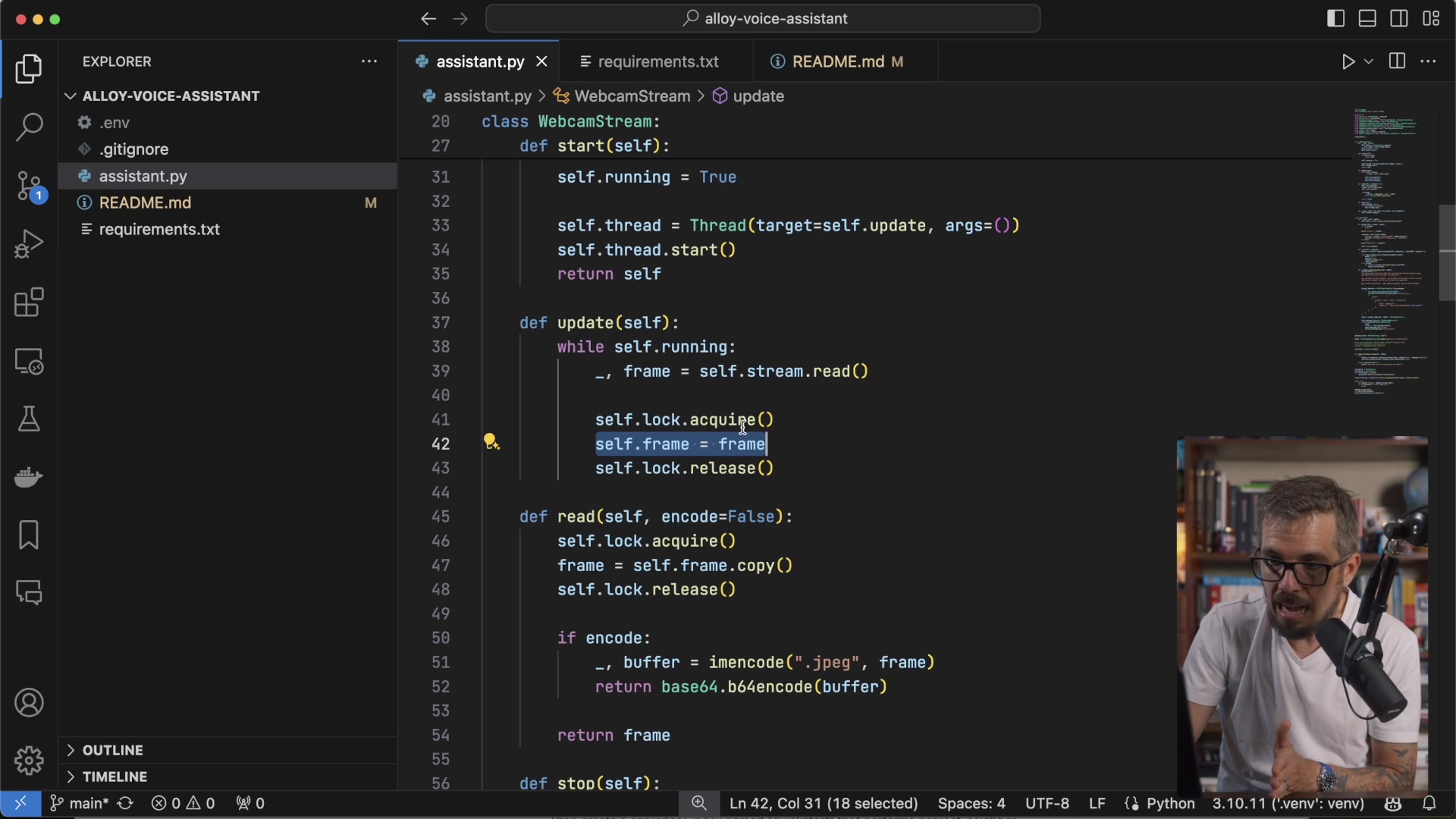
This will be built by a Webcam Stream Class. In this class, we want to set up the video capture class from OpenCV. The class provides threading and capture frames from our webcam.
- Initialize the webcam stream (lines 20-25):
- This sets up the connection to the webcam.
self.stream = cv2.VideoCapture(index=0): Opens the default webcam (index 0). You might need to change the index if you have multiple cameras.self.stream.read(): Reads the first frame from the stream to ensure everything is working.
- Start the webcam stream on a separate thread (lines 27-35):
- This ensures that the webcam feed doesn't block the main program.
- The function is to mark this class as running, start a thread and pull those images.
- This is going to execute it thread to repeatedly start capturing those images.
- Continously update the frames:
- This is going to run in a infinite look and is going to call in the update function and then get all those pictures.
- Define the read function (lines 45-51):
- Lock access before reading to prevent race conditions.
- Encode the frame in Base64 for compatibility.
- Release the lock.
The Role of Langchain and Gemini Flash
Langchain and Gemini Flash are pivotal in orchestrating the AI's response to the webcam's input. Langchain's community and core libraries assist in setting up the structure to create image-based prompts in the assistant.py file. Gemini Flash is the model we will use to understand our prompts.
What's particularly helpful is this integration is that it gives you access to these prompts.
How Langchain is used in this example
LangChain is used for creating message templates that help format prompts. It defines specific prompts for humans and system messages to help guide the AI assistant. This includes specifying image URLs that the AI model will use to create image URL messages with instructions and image data encoded in Base64.

The goal of all of this is so, based on this prompt, we can pass the Prompt in the webcam data in a multi-modal large language model, and then based on what's going on at that second in that webcam it's going to give us the answer.
The language model has a few functions.
- It gets a model (Gemini Flash is an option but not exclusive).
- It creates an inference chain so that there are different prompts being passed to the model.
- There will then be output parsers, and message placeholders.
In the example we will look at shortly, the model is asked about the color of glasses. By showing the webcam stream to the model with the message, it can accurately discern the color.
For the code to run, it also needs some access keys. For more information, check out the ReadMe file.






Most people like

































Report
Please select a reason for reporting
- 13 Reasons to Switch from Snapchat to Text Messaging
- 7 Powerful Speech to Text Apps to Boost Productivity
- 10 Best Speech to Text Tools for Effortless Transcription
- 13 Free Tools to Easily Transcribe Audio to Text
- 15 Surprising Ways Google's Speech-to-Text Boosts Productivity
- 7 Best Free Online Audio to Text Transcription Tools
- 9 Tips to Transcribe Speech to Text Faster and Better
- 13 Best Speech to Text Software for Windows 10 in 2023
- 7 Tips for Choosing the Best Transcriber for Audio to Text
- 11 Reasons Why Dragon Speech-to-Text Apps are Game-Changers
- 6 Secrets to Enhance Your Speech to Text Transcription
- 6 Brilliant Ways to Boost Productivity with Talk-to-Text on Your MacBook
- 6 Ways Transcription Software Converts Audio to Text
- 8 Tips to Transcribe Speech to Text Like a Pro
- 6 Reasons IBM Watson Speech to Text is a Game-Changer
- 14 Powerful Ways Talk-to-Text Improves Your Workflow
- 12 Top Windows Speech-to-Text Software for Efficient Transcription
- 12 Game-Changing Benefits of Apple's Speech to Text Technology
- 9 Powerful Use Cases for AWS Speech to Text Technology
- 10 Easy Steps to Transcribe YouTube Videos to Text
- transcription audio en texte
- online audio transcription
- free audio file transcription
- free ai audio transcription
- audio transcription service
- audio transcription online free
- audio transcription free online
- audio to transcription software
- audio and transcript
- ai audio transcription free
- voice recording to text converter
- translate voice recording to text
- record voice to text
- audio recording to text converter
- voice recording and transcription
- chatgpt voice to text
- gmail voice to text
- speech to text reader
- speech to text ai free
- speech to talk
- How SEO and Marketing Dashboards Empower Agencies to Drive Results
- How to Use AI Tools to Find Internal Linking Opportunities Across a Business Website
- Discover Your Perfect Haircut with AI Hairstyle Apps
- Free Reputation Calculator Tools: How They're Adapting to Score AI Visibility, Not Just Rankings
- Design Professional Flyers for Free on Your Phone
- Best Free Flyer Maker Apps for Android: Design Like a Pro
- How to Know If Your Business Is Ready for an AI Customer Service Agent
- Revolutionizing Storytelling: From Novels to Screenplays with AI
- Create Engaging Animated Explainer Videos with a Free AI Tool
- Stop Multi-Subscribing: Benchmark Top AI Visual Models in One Canvas
- AI & Elections: Defending Democracy Against Misinformation
- Navigating Political Discourse: AI, Deepfakes, and Reality Checks
- Detecting Political Bias in News Articles: A Powerful AI Algorithm
- AI Bias Unveiled: Political Leanings in ChatGPT & Beyond
- Revolutionize Learning: Discover Quizzes AI for Engaging Interactive Quizzes
- From AI-Generated to Audience-Ready: How Quillbot Humanize AI Is Changing the Content Editing Process
- Building an AI Writing Stack in 2026: LLMs, Detectors, and Humanizers
- 7 Top AI-Powered Database Assistant Platforms
- An Objective Look at Modern Web-Based Visual Modifications
- My Honest Experience with VideoAI: The Secret Weapon for Creators Who Need Character Voices

Copyright ©2026 toolify