































Table of Contents
- Key Points
- Getting Started with AI Chatbot Development in Python
- Deeper Dive into Dataset
- Coding the AI Chatbot with Python
- FAQ
- Related Questions


Getting Started with AI Chatbot Development in Python
Introduction to AI Chatbots and Python
AI chatbots are transforming the way businesses and individuals interact with technology. By leveraging natural language processing (NLP) and machine learning, chatbots can understand and respond to human language, providing automated Customer Service, personalized assistance, and engaging conversational experiences. Python, known for its simplicity and extensive libraries, is an excellent choice for developing AI chatbots.
Why Python for AI Chatbots?
- Ease of Use: Python's clear syntax makes it easy to learn and use, reducing the learning curve for new developers.
- Rich Libraries: Python boasts numerous libraries like NLTK, spaCy, and ChatterBot, which offer pre-built functions and tools for NLP and machine learning tasks.
- Community Support: A large and active Python community provides ample resources, tutorials, and support for developers.
Key Concepts in AI Chatbot Design:
- Natural Language Processing (NLP): The ability of a computer to understand and process human language.
- Machine Learning (ML): Algorithms that allow computers to learn from data and improve over time without being explicitly programmed.
- ChatterBot: A Python library designed to create conversational AI chatbots.
- Training Data: Datasets used to teach the chatbot how to understand and respond to various inputs.
Installing the ChatterBot Module
Before you can start building your AI chatbot, you'll need to install the ChatterBot Python module. This module provides the necessary tools and functions to create a conversational AI.
Step-by-Step Installation:
- Open Command Prompt (CMD) or Anaconda Prompt: Depending on your Python environment, open either CMD or Anaconda Prompt.
-
Type the Installation Command: Enter the following command and press Enter:
pip install chatterbotThis command uses pip, the Python Package installer, to download and install ChatterBot and its dependencies.
-
Verify Installation: To ensure ChatterBot is installed correctly, you can import it in a Python script:
import chatterbotIf no errors occur, the installation was successful.
Downloading the ChatterBot Corpus Dataset
To make your chatbot intelligent and capable of engaging in Meaningful conversations, you need to train it using a dataset of conversational data. The ChatterBot corpus dataset contains a wide variety of pre-built conversations in different languages.
Accessing the Dataset:
The dataset is available on GitHub, making it easy to download and integrate into your project.
Steps to Download:
- Go to GitHub: Open a web browser and navigate to the GitHub repository. The GitHub URL is:
https://github.com/AmbidHarshavardhan/Chat-Bot - Download the Zip File: Click on the "Code" button, then select "Download ZIP". This will download the entire repository as a zip file.
- Extract the Files: Once the zip file is downloaded, extract its contents to a directory on your computer. You will find the necessary files, including the chatterbot-corpus data. This can typically be found inside the
chatterbot-corpus-masterfolder.
Alternatively, you can directly copy the dataset from the video's description for convenience.
Deeper Dive into Dataset
Understanding the ChatterBot Corpus
The ChatterBot Corpus is a collection of YAML files, each representing different conversations in various languages. These files are structured to include questions and corresponding responses, forming the basis for training the AI Chatbot.
-
Directory Structure: After extracting the zip file, you'll find a directory structure organized by language. For example, the 'english' directory contains conversational data in English.
-
YAML Files: Within each language directory, YAML files represent specific conversational topics. Each file contains a list of statements and responses.
-
Exploring Language Options: You can explore various languages like Bengali, Chinese, French, German, and Hebrew to customize your chatbot for different locales. Each language folder contains .yml files that enable training chatbot to have conversations in that particular language.
Understanding the structure of these files will help you train your chatbot more effectively. You can also modify or add new YAML files to customize the chatbot's knowledge and responses. Now, armed with the dataset, you can fine-tune your chatbot to have responses as close to real-world human conversation as possible.
Coding the AI Chatbot with Python
Setting Up the Python Environment
With the ChatterBot module installed and the corpus dataset downloaded, you can now start coding your AI chatbot. This section provides step-by-step instructions for setting up the Python environment and writing the code.
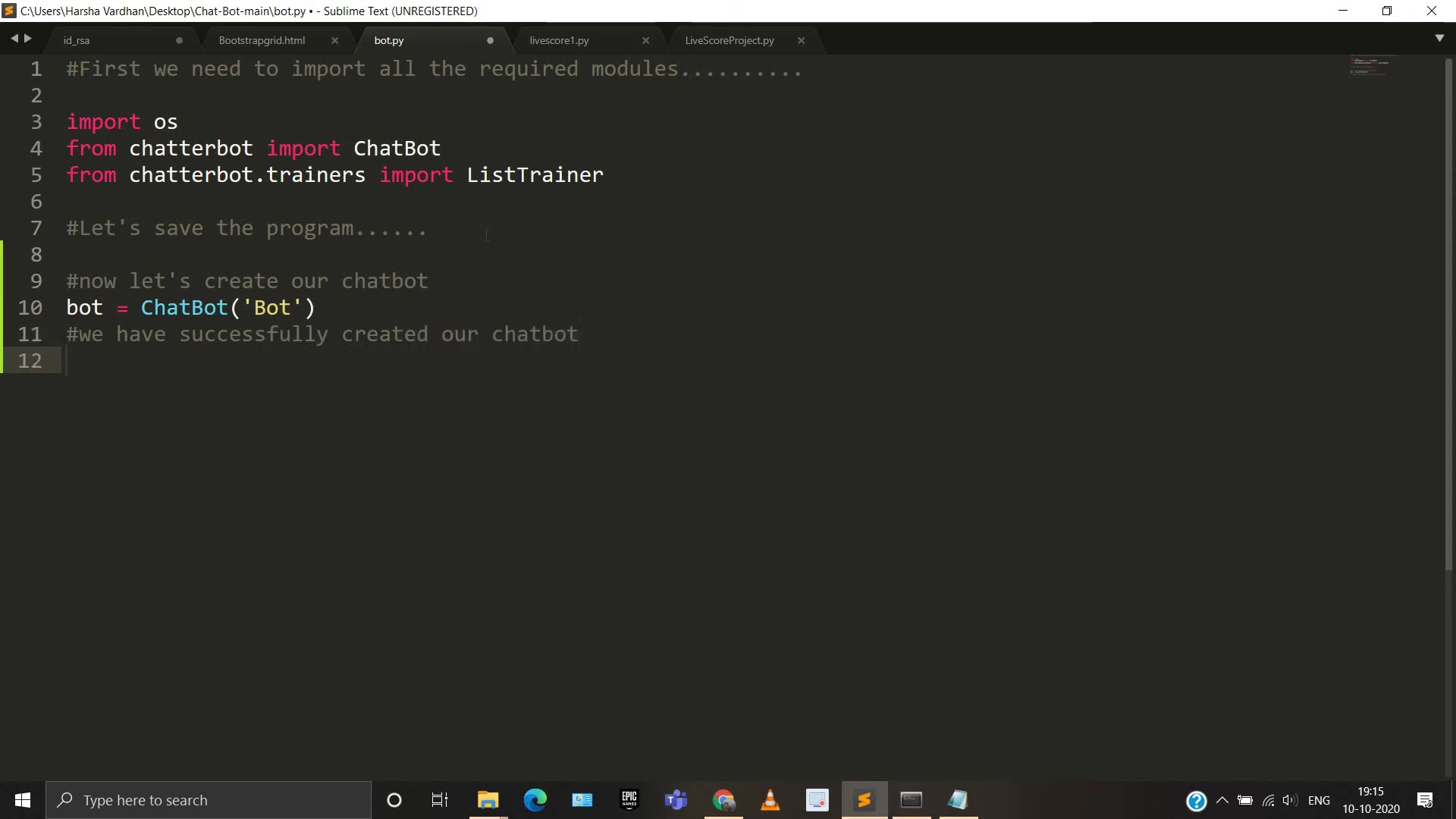
Steps to Set Up:
- Import Necessary Libraries: Begin by importing the required modules, including
osfor file operations,ChatBotfromchatterbot, andListTrainerfromchatterbot.trainers. - Create a Python File: Create a new Python file (e.g.,
bot.py) where you'll write the code. Open your preferred text editor or IDE (Integrated Development Environment). - Write the Code: Now, you’ll need to write the code that ties the chatbot together. Follow along as we introduce you to some simple-to-use but very powerful code.
Here is how your basic AI Chatbot code could look:
import os
from chatterbot import ChatBot
from chatterbot.trainers import ListTrainer

# Now let's create our chatbot
bot = ChatBot('Bot')

# We have successfully created our chatbot
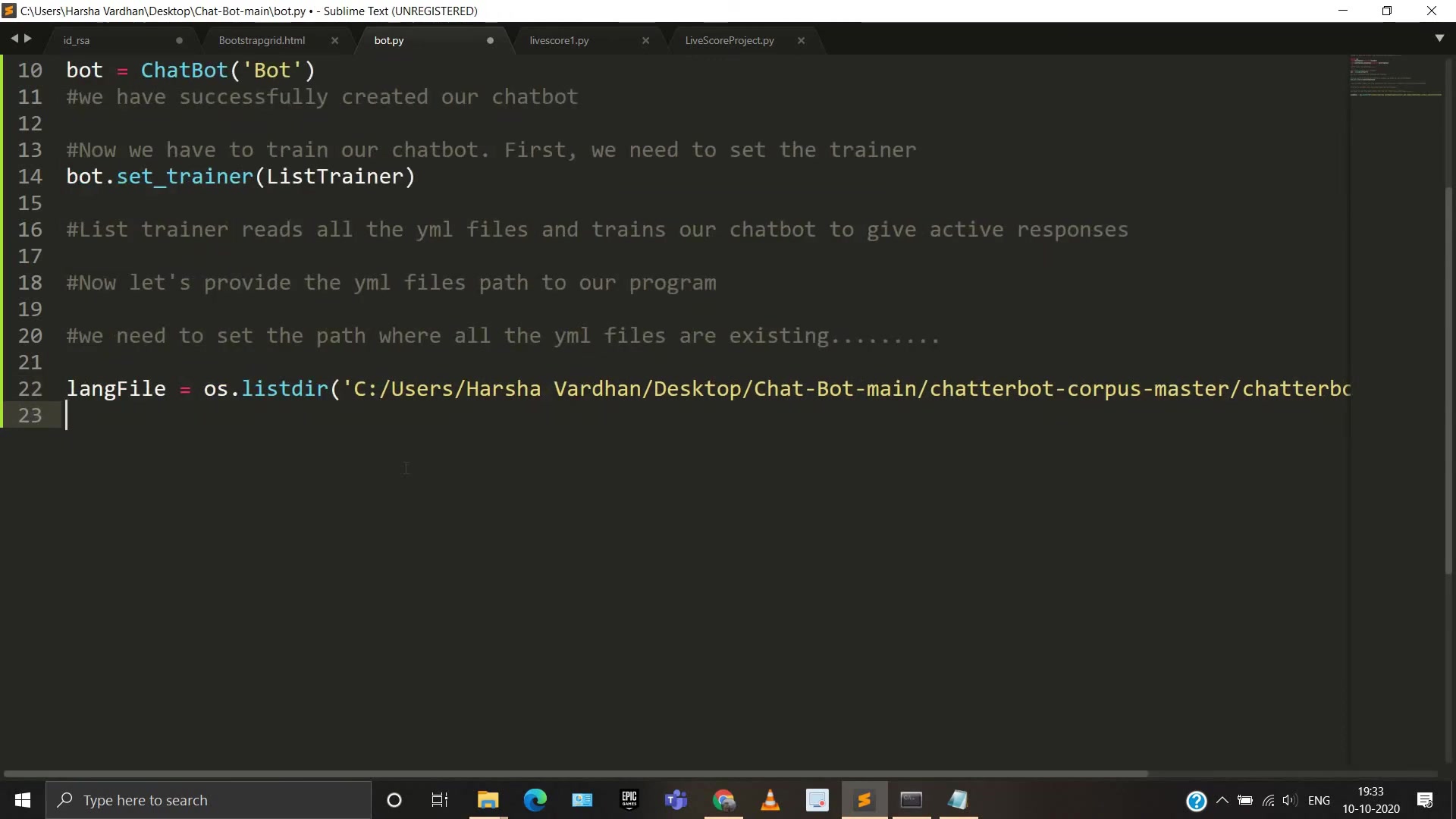
# Now we have to train our chatbot. First, we need to set the trainer
bot.set_trainer(ListTrainer)

# List trainer reads all the yml files and trains our chatbot to give active responses
# Now let's provide the yml files path to our program
# We need to set the path where all the yml files are existing
langfile = os.listdir('C:/Users/Harsha Vardhan/Desktop/Chat-Bot-main/chatterbot-corpus-master/chatterbot_corpus/data/english/')
Explanation:
- The initial setup imports necessary libraries and creates a ChatBot instance named 'Bot'.
- Next, you need to provide the full directory of where your training
.ymldocuments are located.
Training Your Chatbot
To train the chatbot, you'll need to provide the dataset path and use the ListTrainer to teach the chatbot conversational Patterns. This involves reading the YAML files from the dataset and using the Q&A pairs to train the bot.
Detailed Training Procedure:
- Create Trainer Instance:
trainer = ListTrainer(bot) -
Set Data Path In order to provide data for the chatbot to train against, the specific data path has to be defined. Take the entire folder, and add to the langfile value. Be sure to use forward slashes rather than backward slashes for this step to work! Take note as well that this can be edited in the code after compiling the program, but it may not be saved.
Example:
langfile = os.listdir('C:/Users/Harsha Vardhan/Desktop/Chat-Bot-main/chatterbot-corpus-master/chatterbot_corpus/data/english/')
- Train the Chatbot: After setting a filepath, feed it to your AI chatbot.
trainer.train([ 'Hi, How are you?', 'I am doing great.', 'That is good to hear', 'Thank you', 'You are welcome'])Important considerations for training:
- Utilizing diverse conversational data ensures that your chatbot can comprehend and respond to a wide variety of user inquiries.
- Adjusting the training data may result in Altered reactions from your chatbot to specific questions. If there are certain answers that you want the bot to produce every single time, then its helpful to set that value in the training data.
- The more conversations that you train the bot against, the more flexible it becomes. You can also specify multiple different languages, however, you need to be sure that you are training against those different language packs at the same time.
Creating an Interactive Chat Loop
To enable users to interact with your AI chatbot, create a loop that takes user input and generates responses. This loop processes the input, retrieves an appropriate response from the chatbot, and displays it to the user.
Creating the Chat Loop:
- User Input: Use the
input()function to get input from the user. - Generate Response: Use the chatbot's
get_response()method to retrieve a response based on the user input. - Print Response: Display the chatbot's response to the user.
- Loop: Continue the loop until the user decides to exit (e.g., by typing 'exit').
Here is how a code block should look like:
while True:
    request = input('You: ')
    if request == 'Bye' or request == 'bye':
        print('Bot: Bye')
        break
    else:
        response = bot.get_response(request)
        print('Bot: ', response)
Explanation:
- The
while Truestatement sets up an infinite loop, allowing continuous interaction between the user and the chatbot. - If the user enters 'Bye' or 'bye', the loop breaks, and the program terminates. Otherwise, the bot will always continue responding.



Most people like
































Report
Please select a reason for reporting
- 13 Reasons to Switch from Snapchat to Text Messaging
- 7 Powerful Speech to Text Apps to Boost Productivity
- 10 Best Speech to Text Tools for Effortless Transcription
- 13 Free Tools to Easily Transcribe Audio to Text
- 15 Surprising Ways Google's Speech-to-Text Boosts Productivity
- 7 Best Free Online Audio to Text Transcription Tools
- 9 Tips to Transcribe Speech to Text Faster and Better
- 13 Best Speech to Text Software for Windows 10 in 2023
- 7 Tips for Choosing the Best Transcriber for Audio to Text
- 11 Reasons Why Dragon Speech-to-Text Apps are Game-Changers
- 6 Secrets to Enhance Your Speech to Text Transcription
- 6 Brilliant Ways to Boost Productivity with Talk-to-Text on Your MacBook
- 6 Ways Transcription Software Converts Audio to Text
- 8 Tips to Transcribe Speech to Text Like a Pro
- 6 Reasons IBM Watson Speech to Text is a Game-Changer
- 14 Powerful Ways Talk-to-Text Improves Your Workflow
- 12 Top Windows Speech-to-Text Software for Efficient Transcription
- 12 Game-Changing Benefits of Apple's Speech to Text Technology
- 9 Powerful Use Cases for AWS Speech to Text Technology
- 10 Easy Steps to Transcribe YouTube Videos to Text
- transcription audio en texte
- online audio transcription
- free audio file transcription
- free ai audio transcription
- audio transcription service
- audio transcription online free
- audio transcription free online
- audio to transcription software
- audio and transcript
- ai audio transcription free
- voice recording to text converter
- translate voice recording to text
- record voice to text
- audio recording to text converter
- voice recording and transcription
- chatgpt voice to text
- gmail voice to text
- speech to text reader
- speech to text ai free
- speech to talk
- Create Engaging Animated Explainer Videos with a Free AI Tool
- Stop Multi-Subscribing: Benchmark Top AI Visual Models in One Canvas
- Best Seedance 2.5 API Provider: Every Price on the Market, Checked at Source
- AI OnlyFans: How to Generate $30,000/Month (Legally)
- Transform Your Script into an Engaging Video with AI Video Maker!
- AI Marketing Automation: A Comprehensive Guide for Small Businesses
- Midjourney Alternative for Anime Art Creators: Why PixAI May Be Better for Character Workflows
- 10 Things Most People Get Wrong About AI Image Search
- AI Girlfriend Apps: Top Choices Redefining Relationships 2025
- How to Reduce Quoting Errors in Salesforce with AI-Assisted Quote Creation
- AI Resume Builders: EnhanceCV, ResumeNerd AI, & Teal Compared
- ResumeAI: Crafting ATS-Optimized Resumes with AI
- AI in Resume Writing: A New Era for Job Seekers
- AI Resume Tools: Streamline Your Job Search and Land Your Dream Role
- AI Resume Optimization: The Right Way to Land Interviews
- Crafting a Killer Resume with AI: A Step-by-Step Guide
- Crafting a Winning Resume: AI Tools and Expert Tips
- AI Job Search: Level Up Your Career with AI Automation
- Empower Your Career Journey: Dynamic Resumes with AI
- AI Resume Builder: Create Professional Resumes Effortlessly

Copyright ©2026 toolify