































Table of Contents
- Key Takeaways on AI and Developer Productivity
- The Debate: AI-Driven Productivity vs. Developer Resistance
- Understanding the Nuances of AI's Impact
- Tips for Maximizing AI's Benefits in Coding
- Cost Considerations for AI Coding Tools
- Weighing the Options: Pros and Cons of AI Coding Tools
- Essential Features of AI Coding Assistants
- Real-World Applications of AI in Coding
- Frequently Asked Questions About AI Coding Tools
- Exploring Further: Related Questions on AI and the Future of Coding



The Debate: AI-Driven Productivity vs. Developer Resistance
The Promise of AI in Software Development
The software development landscape is rapidly evolving, with AI Tools promising to revolutionize how developers work. These tools, often referred to as AI agents or AI coding assistants, aim to automate repetitive tasks, assist in debugging, and even generate code, theoretically freeing up developers to focus on more creative and strategic aspects of their projects.

Many companies are actively exploring how to leverage these technologies to enhance developer efficiency. It's a big topic right now.
Developer Skepticism and the Rework Factor
However, alongside the hype, there's a growing undercurrent of skepticism from developers themselves.

Many find that AI-generated code requires significant rework, negating the initial time-saving benefits. This resistance stems from a lack of trust in the quality and accuracy of AI-generated code, as well as the perception that these tools can sometimes increase the overall development effort. Some developers feel forced to use AI, which is not ideal. They are experiencing that these AI tools are actually increasing their workflow efforts.
This creates a tension between management's desire to implement AI solutions and developers' concerns about their practical impact. The core question is, 'Is it actually helping?'
Understanding the Nuances of AI's Impact
The Stack Overflow Developer Survey: A Reality Check
The latest Stack Overflow Developer Survey paints a more nuanced picture of AI's impact on developer productivity.

It reveals that a significant portion of developers, 66%, are frustrated with AI solutions that are "almost right" but not quite, requiring additional debugging and refinement. This directly addresses the concern about increased rework, suggesting that many AI tools aren't yet seamlessly integrating into existing development workflows.
There are some developers who are saying they don't use AI tools at all. In addition, there is the statistic that very few people have not encountered any problems when using AI tools. Therefore, we have to ask, 'Why are we not talking about it?' It's really important to investigate the accuracy of AI.
Here's a breakdown of the survey findings:
| Frustration with AI Tool | Percentage of Developers |
|---|---|
| AI solutions are almost right | 66% |
| Debugging AI-generated code | 45.2% |
| I don't use AI tools | 23.5% |
| I've become less productive | 20% |
| It's hard to understand | 16.3% |
| Other | 11.6% |
| I haven't encountered problems | 4% |
The survey highlights that 66% of developers are frustrated with AI solutions that are almost right. Also, only 4.4% handled complex tasks very well. That is too low, and we must address this. The numbers just don't align.
Agentic Development and the Codebase Challenge
The survey also sheds light on the adoption of AI agents in development.

A majority of developers (52%) are not yet using AI agents, either sticking to simpler AI tools or having no plans to adopt them. This suggests that agentic development, a more advanced form of AI-assisted coding, is still in its early stages of adoption.
So, with that information, we learn that more developers distrust the accuracy of AI tools than trust them. So, the positive sentiment is decreasing with respect to AI tools, dropping to 60% from 70% in the last year .
One of the key factors influencing AI's effectiveness is the size and maturity of the codebase. Large, complex codebases can present challenges for AI tools, leading to decreased accuracy and increased rework.
The productivity gain from AI decreases as codebase size increases. The context window limitation is that performance gains decrease with larger context windows. A large codebase may have noise that can mislead the model. Complexity is increased with dependencies and domain specific logic. These facts show maturity of the codebase plays a very important role. So, we must ask, 'What really is the developer productivity with these tools?'
The Impact of Task Complexity and Language Popularity
The effectiveness of AI coding tools is also heavily influenced by the complexity of the task at hand and the programming language used.
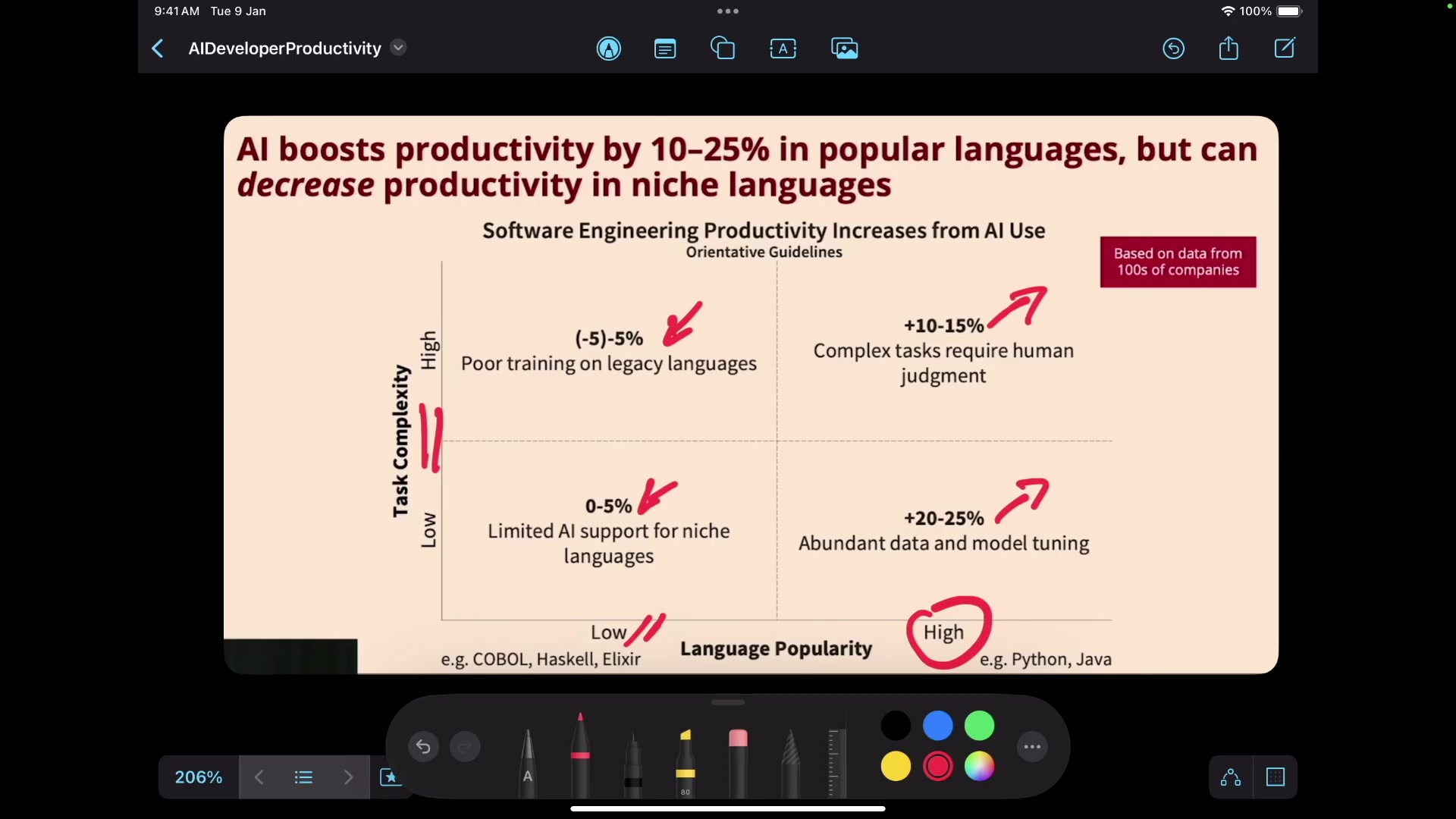
Recent research indicates that AI tools are most effective for simple, repetitive tasks in greenfield projects (new projects). As task complexity increases, the productivity gains from AI diminish. AI can boost productivity by 10-25% in popular languages, but can decrease productivity in niche languages.
Also, a factor in AI adoption is language popularity. The most popular programming languages, like Python and Java, have much better productivity. Older languages don't perform as well and are often legacy languages. Limited AI support will only see a 0-5% production boost. Data proves this.





Most people like



































Report
Please select a reason for reporting
- 13 Reasons to Switch from Snapchat to Text Messaging
- 7 Powerful Speech to Text Apps to Boost Productivity
- 10 Best Speech to Text Tools for Effortless Transcription
- 13 Free Tools to Easily Transcribe Audio to Text
- 15 Surprising Ways Google's Speech-to-Text Boosts Productivity
- 7 Best Free Online Audio to Text Transcription Tools
- 9 Tips to Transcribe Speech to Text Faster and Better
- 13 Best Speech to Text Software for Windows 10 in 2023
- 7 Tips for Choosing the Best Transcriber for Audio to Text
- 11 Reasons Why Dragon Speech-to-Text Apps are Game-Changers
- 6 Secrets to Enhance Your Speech to Text Transcription
- 6 Brilliant Ways to Boost Productivity with Talk-to-Text on Your MacBook
- 6 Ways Transcription Software Converts Audio to Text
- 8 Tips to Transcribe Speech to Text Like a Pro
- 6 Reasons IBM Watson Speech to Text is a Game-Changer
- 14 Powerful Ways Talk-to-Text Improves Your Workflow
- 12 Top Windows Speech-to-Text Software for Efficient Transcription
- 12 Game-Changing Benefits of Apple's Speech to Text Technology
- 9 Powerful Use Cases for AWS Speech to Text Technology
- 10 Easy Steps to Transcribe YouTube Videos to Text
- transcription audio en texte
- online audio transcription
- free audio file transcription
- free ai audio transcription
- audio transcription service
- audio transcription online free
- audio transcription free online
- audio to transcription software
- audio and transcript
- ai audio transcription free
- voice recording to text converter
- translate voice recording to text
- record voice to text
- audio recording to text converter
- voice recording and transcription
- chatgpt voice to text
- gmail voice to text
- speech to text reader
- speech to text ai free
- speech to talk
- How SEO and Marketing Dashboards Empower Agencies to Drive Results
- How to Use AI Tools to Find Internal Linking Opportunities Across a Business Website
- Discover Your Perfect Haircut with AI Hairstyle Apps
- Free Reputation Calculator Tools: How They're Adapting to Score AI Visibility, Not Just Rankings
- Design Professional Flyers for Free on Your Phone
- Best Free Flyer Maker Apps for Android: Design Like a Pro
- How to Know If Your Business Is Ready for an AI Customer Service Agent
- Revolutionizing Storytelling: From Novels to Screenplays with AI
- Create Engaging Animated Explainer Videos with a Free AI Tool
- Stop Multi-Subscribing: Benchmark Top AI Visual Models in One Canvas
- AI & Elections: Defending Democracy Against Misinformation
- Navigating Political Discourse: AI, Deepfakes, and Reality Checks
- Detecting Political Bias in News Articles: A Powerful AI Algorithm
- AI Bias Unveiled: Political Leanings in ChatGPT & Beyond
- Revolutionize Learning: Discover Quizzes AI for Engaging Interactive Quizzes
- From AI-Generated to Audience-Ready: How Quillbot Humanize AI Is Changing the Content Editing Process
- Building an AI Writing Stack in 2026: LLMs, Detectors, and Humanizers
- 7 Top AI-Powered Database Assistant Platforms
- An Objective Look at Modern Web-Based Visual Modifications
- My Honest Experience with VideoAI: The Secret Weapon for Creators Who Need Character Voices

Copyright ©2026 toolify