































Table of Contents
- Key Points
- The Rise of AI in Software Development
- Practical AI Coding Tools: A Closer Look
- How to Effectively Use AI Coding Tools
- Pricing of AI Coding Tools
- Pros and Cons of Using AI Coding Tools
- Core Features of AI Coding Tools
- Use Cases of AI Coding Tools
- FAQ
- Related Questions


The Rise of AI in Software Development
AI Coding Tools: A New Paradigm
The introduction of AI into coding has marked a paradigm shift in how software is developed. These tools, ranging from intelligent code completion engines to AI-powered debugging assistants, are designed to augment a developer's abilities and speed up the development process. While the initial hype surrounding AI in coding might have been met with skepticism, its practical applications and growing sophistication are now undeniable.

Let's explore some specific examples.
Tools like ChatGPT are used for high-level architectural discussions and brainstorming. Instead of immediately diving into code, developers can use ChatGPT to explore design options, weigh different approaches, and generate initial outlines for complex systems.
Then there’s GitHub Copilot, which deeply integrates with your coding environment. It learns from your coding style and project context to offer inline code suggestions and autocompletion. This goes beyond simple syntax checking, allowing it to predict whole blocks of code based on your comments and existing functions.
As AI continues to evolve, these tools become more intelligent, context-aware, and capable of tackling increasingly complex coding tasks. This raises a fundamental question: are these tools just helpful assistants, or will they eventually replace human coders?
AI's Role: Augmentation, Not Replacement (Yet)
While AI's progress in coding is remarkable, it's important to understand its current limitations. AI coding tools aren't yet capable of independent, creative problem-solving in the way a human developer is. They are excellent at automating repetitive tasks, generating boilerplate code, and suggesting solutions based on existing patterns. However, they still rely on human oversight for complex architectural decisions, debugging, and ensuring the overall quality of the codebase.
AI-powered coding assistant is like having a very knowledgeable and tireless junior developer on your team. They can take on many of the mundane and repetitive tasks, freeing you up to focus on the more creative and strategic aspects of the project. It’s more about working with the AI than being replaced by it – at least for now.
The key is understanding how to effectively integrate these AI Tools into your workflow. This means carefully considering where they can provide the most value, while also recognizing their limitations and ensuring that human oversight remains central to the development process.
Practical AI Coding Tools: A Closer Look
ChatGPT: The Architectural Brainstormer
ChatGPT, while not strictly a coding tool, is proving incredibly useful for the initial stages of software development.
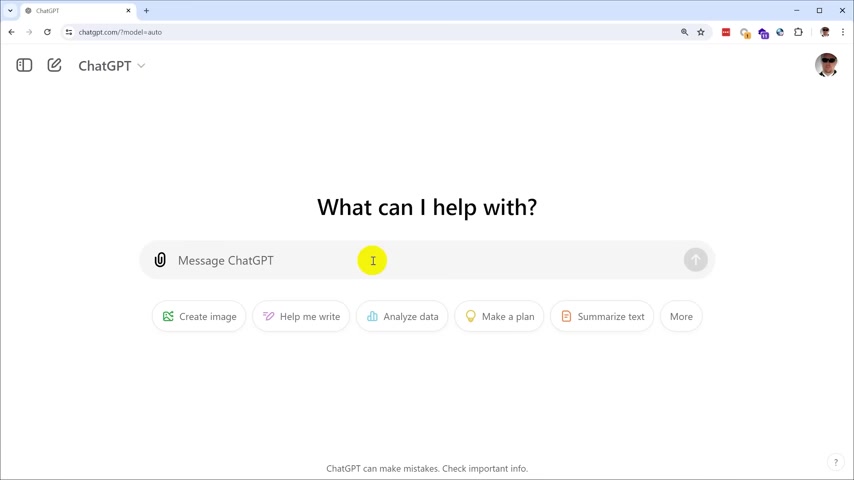
It can help:
- Architectural Design: Developers can use ChatGPT to brainstorm different architectural patterns, weigh their pros and cons, and generate high-level system diagrams.
- Code Explanations: ChatGPT can explain complex code snippets in plain English, making it easier to understand and maintain existing codebases.
- Documentation Generation: Need to document your code? ChatGPT can assist in creating clear and concise documentation based on code comments and function definitions.
However, it's crucial to remember ChatGPT's disclaimer: "ChatGPT can make mistakes." This isn't about the AI making logical errors, but rather that its responses are generated based on pattern matching and prediction, rather than a true understanding of the code's purpose. Always verify the information ChatGPT provides, especially when dealing with critical architectural decisions.
For example, the video creator used ChatGPT to determine if using integer calculations would be best instead of floating point. He also asked about the Model-View-Controller (MVC) for User Interface (UI) to make sure if it was the correct choice. It returned accurate and correct answers, and helped the video creator move forward with his project.
GitHub Copilot: The Inline Code Assistant
GitHub Copilot is a more direct coding assistant, integrating directly into your code editor. It functions as a pair programmer, suggesting code snippets and even complete functions as you type.

Copilot learns from your coding style and project context, making its suggestions increasingly relevant and accurate over time.
Copilot's key benefits include:
- Code Completion: Autocompletes entire lines or blocks of code based on your comments and existing functions.
- Boilerplate Generation: Generates boilerplate code for common tasks, saving you time and effort.
- Unit Test Generation: Assists in creating unit tests to ensure the quality and reliability of your code.
As good as it is, it’s still essential to treat Copilot's suggestions with caution. The AI can make errors or suggest code that is not the most efficient. Always understand the code Copilot provides, test it, and adapt it to fit your project’s needs.
Use Cases of AI Coding Tools
Where Do AI Tools Fit Best?
Here's a look at some use cases:
- Accelerating Prototyping: Quickly generate working prototypes to test ideas and validate concepts.
- Automating Repetitive Tasks: Automate the generation of boilerplate code and other repetitive tasks, freeing up developers for more creative work.
- Improving Code Quality: Use AI to detect potential bugs and vulnerabilities in your code.

AI is a useful tool for code, since it offers insight and ideas when planning.








Most people like
































Report
Please select a reason for reporting
- 13 Reasons to Switch from Snapchat to Text Messaging
- 7 Powerful Speech to Text Apps to Boost Productivity
- 10 Best Speech to Text Tools for Effortless Transcription
- 13 Free Tools to Easily Transcribe Audio to Text
- 15 Surprising Ways Google's Speech-to-Text Boosts Productivity
- 7 Best Free Online Audio to Text Transcription Tools
- 9 Tips to Transcribe Speech to Text Faster and Better
- 13 Best Speech to Text Software for Windows 10 in 2023
- 7 Tips for Choosing the Best Transcriber for Audio to Text
- 11 Reasons Why Dragon Speech-to-Text Apps are Game-Changers
- 6 Secrets to Enhance Your Speech to Text Transcription
- 6 Brilliant Ways to Boost Productivity with Talk-to-Text on Your MacBook
- 6 Ways Transcription Software Converts Audio to Text
- 8 Tips to Transcribe Speech to Text Like a Pro
- 6 Reasons IBM Watson Speech to Text is a Game-Changer
- 14 Powerful Ways Talk-to-Text Improves Your Workflow
- 12 Top Windows Speech-to-Text Software for Efficient Transcription
- 12 Game-Changing Benefits of Apple's Speech to Text Technology
- 9 Powerful Use Cases for AWS Speech to Text Technology
- 10 Easy Steps to Transcribe YouTube Videos to Text
- transcription audio en texte
- online audio transcription
- free audio file transcription
- free ai audio transcription
- audio transcription service
- audio transcription online free
- audio transcription free online
- audio to transcription software
- audio and transcript
- ai audio transcription free
- voice recording to text converter
- translate voice recording to text
- record voice to text
- audio recording to text converter
- voice recording and transcription
- chatgpt voice to text
- gmail voice to text
- speech to text reader
- speech to text ai free
- speech to talk
- How SEO and Marketing Dashboards Empower Agencies to Drive Results
- How to Use AI Tools to Find Internal Linking Opportunities Across a Business Website
- Discover Your Perfect Haircut with AI Hairstyle Apps
- Free Reputation Calculator Tools: How They're Adapting to Score AI Visibility, Not Just Rankings
- Design Professional Flyers for Free on Your Phone
- Best Free Flyer Maker Apps for Android: Design Like a Pro
- How to Know If Your Business Is Ready for an AI Customer Service Agent
- Revolutionizing Storytelling: From Novels to Screenplays with AI
- Create Engaging Animated Explainer Videos with a Free AI Tool
- Stop Multi-Subscribing: Benchmark Top AI Visual Models in One Canvas
- 5 Data Problems That Stall AI Projects in Financial Compliance
- Master Storyboard Drawing: Expert Tips for Non-artists
- The Future of Smart Glasses: Explained & Assembling Guide
- DeepL Translator: The AI-Powered Translation Tool
- AI Video Upscaling: Top Tools Compared for Enhanced Quality
- Bridging the Gap: How One Indie Developer Solved the "Art Asset Nightmare" Using AI Style Transfer
- How I Direct Consistent AI Clips: A Hands-On Guide to Multi-Model Generation
- My Honest Review of VideoAI: The Ultimate Character Voice Generator I've Been Using Lately
- Why do so many AI tools underdeliver for online stores?
- My Brand New Logo: AI-Powered Logo Design for Startups

Copyright ©2026 toolify